
 (1).svg)
 (1).png)


 (1).svg)
.svg)
Often metaphorically explained as the internet's phonebook, the Domain Name System (DNS) is a crucial component of how the internet functions. More specifically, your domain's DNS zone can be likened to the saved contacts list on your cell phone. Just as you save a name with a corresponding phone number and then simply search by name, a DNS zone works similarly. Here, the 'name' represents your domain name, a subdomain, or a specific service such as email or FTP, while the 'phone number' is an IP address. The core concept remains consistent: once the correct information is entered, a DNS zone operates on a "set it and forget it" principle, efficiently directing traffic without constant oversight. Let's delve deeper into understanding this essential system.
Understanding the DNS Zone
Despite often being viewed with apprehension and misunderstanding, the Domain Name System (DNS) zone is fundamentally a straightforward method for directing your domain's visitors to the appropriate webpage or service. With a foundational grasp of a few key elements, you can proficiently manage your own DNS zone.
While a comprehensive explanation of the internet's entire infrastructure extends beyond the scope of this discussion, we will begin with nameservers. If you have ever registered a domain and linked it to your hosting server, you have already interacted with nameservers. Their primary role is to channel internet traffic from users who type your domain into their web browser (or click a link to your website) directly to your site.
Nameservers typically resemble standard URLs – and indeed, they are essentially domain names created via A Records (which we will explore shortly). You provide these nameservers at the domain registrar level. This setup ensures that any request for your domain is first routed from the broader internet to your hosting server. At this point, your actual domain's DNS zone takes over the granular direction of traffic. Consider the nameservers for cpanel.net as an example:
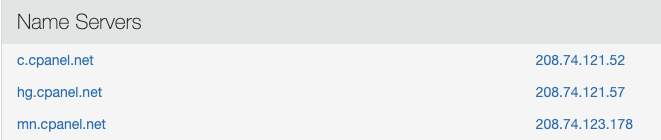
These nameservers ensure that all traffic associated with the cPanel.net domain is directed to the specific location where the domain's DNS zone can then further route it. This routing depends on the visitor's intended destination, whether it's the main website, a specific subdomain like https://store.cpanel.net/, or a blog section like https://www.cpanel.net/blog/. Each subdomain, and indeed various services, will have its unique entry within the DNS zone to ensure traffic is directed appropriately. But how exactly does this intricate direction occur? The answer lies within the specific entries configured in the DNS zone itself.
Common DNS Entry Types
To effectively manage your domain's traffic, it's essential to understand the fundamental types of DNS entries. We will focus on four primary records that are crucial for directing visitors and services:
- A RECORD – The "A" in A Record stands for "Address," directly correlating to an IP Address. An A Record's function is to point a domain or subdomain directly to a specific IP address. This record typically serves as the primary entry point for your website, translating your human-readable domain name into the machine-readable IP address of your hosting server. Furthermore, A Records offer flexibility, allowing you to direct traffic for distinct subdomains to entirely different servers if required, providing robust control over your website's architecture.
- CNAME – The "C" in CNAME signifies "canonical," indicating that this record points a domain or subdomain to another domain or subdomain. For instance, if you wished to create a subdomain, say "google.yourdomain.com," and have it direct users to google.com, a CNAME entry in your DNS zone would facilitate this. By pointing "google" to "google.com," anyone entering google.yourdomain.com into their browser would automatically be redirected to Google's website. While this is a illustrative example, CNAME entries have numerous practical applications, such as linking
www.yourdomain.comtoyourdomain.com, or pointing blog.yourdomain.com to a blogging platform like WordPress. - MX – Standing for "Mail eXchange," MX records are specifically designed to direct email traffic. These entries act as the literal mail carriers of the internet, informing other mail servers where to send emails addressed to your domain. Correctly configured MX records are vital for ensuring reliable email delivery and reception for your domain.
- TXT – A TXT record allows you to insert plain text into your DNS zone. Its most common application is to verify domain ownership. This verification is often necessary when integrating with third-party services, such as Google Analytics or other webmaster tools. The third party provides a specific string of text, which you then enter into a TXT record. They subsequently scan your DNS zone to confirm the presence of this text, thereby verifying your domain ownership without requiring file uploads or other complex methods.
Through the strategic use of these DNS entries, virtually all internet traffic is routed appropriately, ensuring that the correct websites and services load in your browser. This intricate system primarily serves to translate information between human-readable formats (like domain names) and computer-readable formats (like IP addresses), much like your cell phone manages contact names while silently using the associated phone numbers for its internal operations.
Exploring Additional DNS Records
Beyond the core DNS entries, several other types of records exist that serve specific functions and enhance the overall management of your domain:
- NS – These are nameserver records. While distinct from A Records, they share a similar function in that they also point to an IP Address. NS records primarily designate the authoritative nameservers for a domain, indicating which servers are responsible for providing DNS information for that domain. This is how the internet knows which nameservers to query when looking up your domain.
- SPF – A Sender Policy Framework (SPF) entry is designed to help prevent email spoofing and improve email deliverability. Essentially, an SPF record is a specialized type of TXT entry that lists the mail servers authorized to send email on behalf of your domain. When a recipient's mail server receives an email from your domain, it can check the SPF record to verify that the sending server is legitimate, thereby reducing the likelihood of your emails being marked as spam or rejected.
While the most effective way to master DNS management is through practical application, the information above provides a solid foundation for understanding the various record types you will commonly encounter. It is always prudent, and highly recommended, to consult with your hosting provider or domain registrar before implementing any changes to your DNS zone. Incorrect entries can lead to your website becoming inaccessible or cause other service disruptions. Therefore, exercising caution and seeking expert advice can prevent potential issues and ensure the smooth operation of your online presence.
We value your feedback and comments. Please feel free to reach out to us; we are always ready to assist in any way we can. You can connect with us on Discord, the cPanel forums, and Reddit. Additionally, be sure to follow our updates on Facebook, Instagram, and Twitter for the latest news and information.
