
 (1).svg)
 (1).png)


 (1).svg)
.svg)
Upon successful login to cPanel, you will be presented with its comprehensive interface. For new users, this initial view can sometimes feel overwhelming, but this guide aims to demystify its layout by highlighting its most important features and primary sections.
Below is a screenshot illustrating the two primary sections of the cPanel interface, clearly outlined in red and blue, to help you navigate its various functionalities.
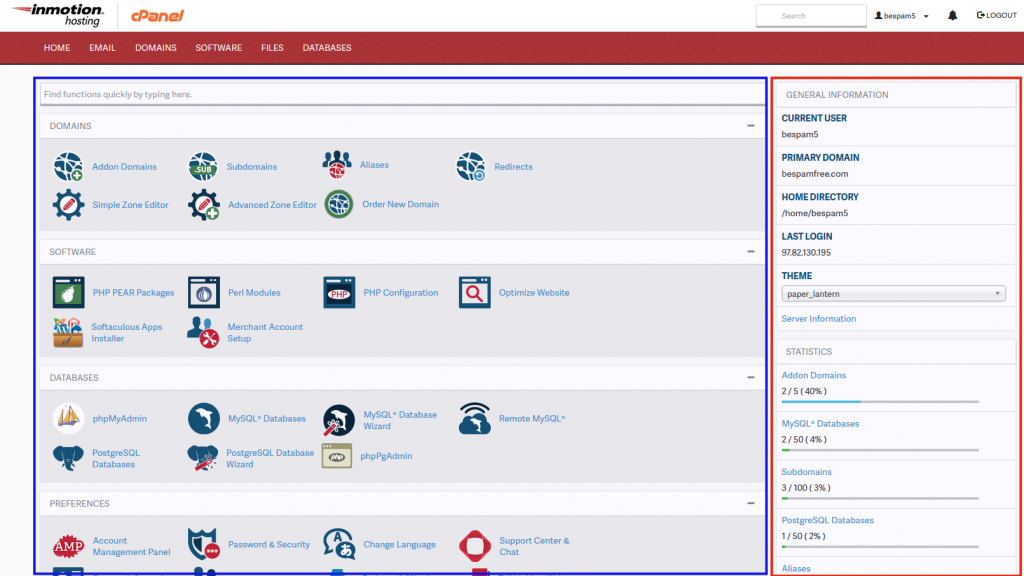
Understanding the cPanel Interface
Website Statistics (Red Section)
The section prominently highlighted in RED is dedicated to your website statistics and general account information. This area provides crucial details such as your Shared IP address, current Disk Space usage, the server your account is hosted on, the number of email accounts, the count of databases, and many other relevant metrics. This information is dynamic and automatically updates to reflect any modifications or changes made to your hosting account, offering an up-to-date overview of your resources.
cPanel Features (Blue Section)
The section highlighted in BLUE contains the extensive array of features and powerful tools within cPanel that you have direct control over. These functionalities are logically organized and grouped under distinct headers, making navigation and management intuitive. Each header categorizes related options, allowing for easier access to specific tools. Among the most frequently utilized sections by users are Mail management, File management, and Database administration, which are essential for maintaining and developing your web presence.
For those interested in offering hosting services, it's worth noting that cPanel accounts can be fully branded to align with your business identity. This allows resellers to offer a seamless and professional experience to their own clients. Discover more about reseller hosting with cPanel and its capabilities.
