
 (1).svg)
 (1).png)


 (1).svg)
.svg)
Odoo's architecture allows for significant customization through its extensive library of applications and modules. From your Odoo dashboard, you have the capability to seamlessly install, upgrade, and uninstall all available apps and modules, tailoring your system to meet your specific business requirements.
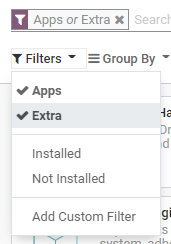
By default, the dashboard view applies an Apps filter, showcasing primary applications. To explore or search for specific modules, simply click on Filters and select the Extra option, which will display a broader range of available functionalities.
Important Considerations for App Management
It is crucial to understand that Odoo operates differently from a typical smartphone; its applications should not be installed or uninstalled without careful consideration. Exercise caution when adding or removing apps and modules from your database, as these actions can have significant implications, including potential impacts on your subscription costs and data integrity.
- Administrator Responsibility: As the administrator of your Odoo database, you bear the primary responsibility for its usage and configuration. Your understanding of your organization's workflow and needs is paramount in making informed decisions regarding app installations and user management.
- Understanding App Dependencies: Many Odoo apps are designed with dependencies, meaning they require other specific applications or modules to function correctly. Consequently, installing a particular app or feature might automatically install additional modules that are technically necessary, even if you do not intend to use them directly.
- Testing on Duplicate Databases: To mitigate risks and understand potential impacts, it is highly recommended to test the installation or removal of apps on a duplicate of your production database. This practice allows you to identify any required app dependencies or foresee any data erasure that might occur before implementing changes in your live environment.
Install Apps and Modules
To enhance your Odoo system with new functionalities, navigate to the Apps dashboard. Locate the desired application and click on the Install button associated with it. This action will initiate the installation process, integrating the new features into your Odoo environment.
Note: Updating the App List
If you cannot find a specific module in the listed applications, it may be necessary to update your app list. To do this, first activate the developer mode. Once activated, return to the Apps dashboard and click on the Update button to refresh the list of available applications and modules.
Upgrade Apps and Modules
Odoo continuously evolves, with new improvements and features frequently introduced for supported versions. To leverage these enhancements, you must upgrade your existing applications. From the Apps dashboard, locate the app you wish to upgrade, click on its dropdown menu, and then select Upgrade. This process ensures your applications are running the latest versions with improved functionalities and bug fixes.
Uninstall Apps and Modules
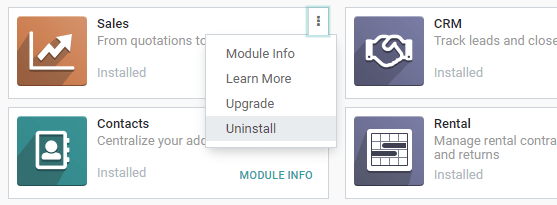
Should you need to remove an application from your Odoo instance, navigate to the Apps dashboard. Find the app you intend to uninstall, click on its dropdown menu, and then select Uninstall. This action begins the removal process for the selected application.
It is important to remember that many applications have interdependencies. This means that one application might rely on another to function correctly. Consequently, uninstalling a single app may trigger the uninstallation of several dependent applications and modules. Odoo provides clear warnings, indicating precisely which dependent apps and modules will be affected by your uninstallation choice.
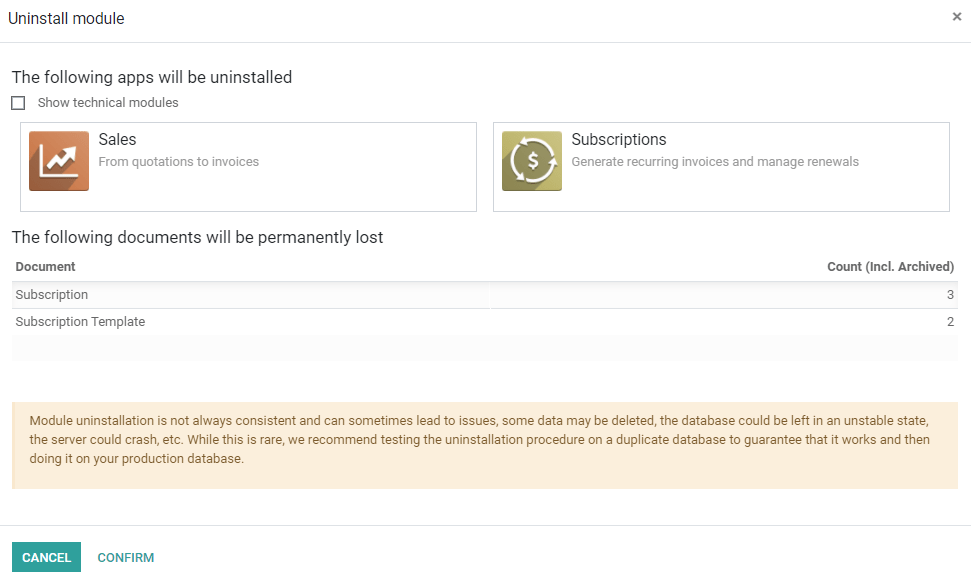
After reviewing the impact, to finalize the removal process, click on the Confirm button.
Danger: Permanent Data Loss
Be aware that uninstalling an application in Odoo is a significant action. This process not only removes the chosen app but also all its associated dependencies. Crucially, uninstalling an app permanently erases all data linked to it and its dependencies. Always ensure you have backups or have thoroughly considered the implications before proceeding with an uninstallation.
