
 (1).svg)
 (1).png)


 (1).svg)
.svg)
The MySQL database server is a fundamental component powering millions of content management systems and e-commerce applications globally. It provides the secure and reliable data storage and retrieval capabilities essential for dynamic, personalized websites. cPanel & WHM offers a comprehensive MySQL management solution that streamlines numerous common web hosting database tasks while providing detailed control for web hosts who require it.
Typically, websites and cPanel’s MySQL instance are co-located on the same server. However, there are significant advantages to separating these components, allowing websites to utilize a remote MySQL database hosted on a distinct server.
You might consider using a remote MySQL server for several compelling reasons:
- Performance Enhancement: By offloading database workloads to a separate server, you can significantly improve the performance of busy websites and the database itself, ensuring quicker response times and a smoother user experience.
- Specialized Hosting: Utilize a server specifically optimized and configured for database hosting, which can provide better resource allocation and stability compared to a general-purpose web server.
- Centralized Management: Consolidate database management for multiple web servers, simplifying administration, backups, and maintenance across your infrastructure.
- Enhanced Security: Isolate your database from servers directly exposed to public IP addresses, adding an extra layer of security and reducing the attack surface.
It is crucial to understand that directly exposing a MySQL server to the internet and allowing connections from untrusted IP addresses is an insecure practice. This method creates a critical security vulnerability that is frequently exploited to compromise data. This article will guide you through the correct and secure way to configure MySQL using cPanel to accept connections from web applications hosted on different servers.
The Importance of Remote MySQL Database Hosting
Implementing a remote MySQL database setup offers distinct advantages for scalability, performance, and security. By carefully configuring your environment, you can achieve a robust and efficient architecture.
Essential Prerequisites
To successfully follow this tutorial, you will need the following:
- A server with cPanel & WHM installed, which will serve as your dedicated remote database server.
- The IP address or domain name of your database server, along with cPanel authentication credentials, and the necessary MySQL username and password.
- A separate server where your web applications will be installed. While you can manually configure sites, using cPanel on this server can greatly expedite the process.
We will first detail how cPanel users can configure a remote MySQL database, followed by an exploration of WHM’s powerful MySQL Profile management tools.
Configuring Remote MySQL with cPanel
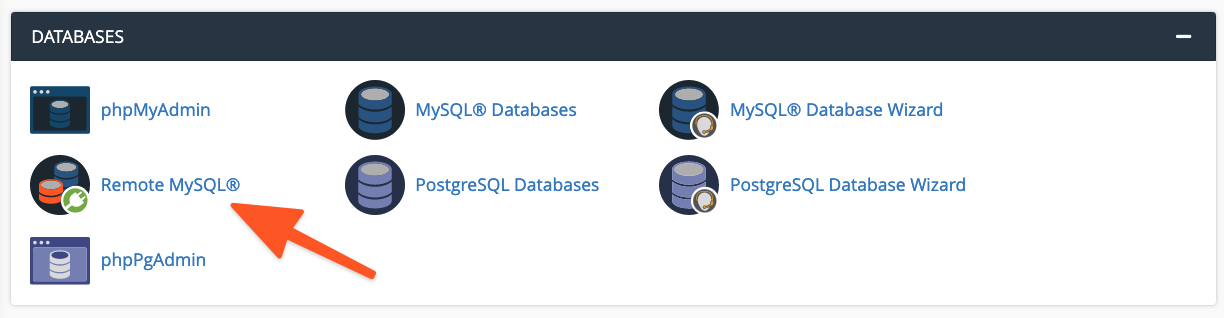
To begin, log in to cPanel on the server hosting the MySQL instance you wish to grant remote access to. From the main page menu, locate and select the Remote MySQL® tool.
Within the Add Access Host form, input the domain name or IP address of the server hosting your web application. For increased flexibility, you can employ a wildcard character (%) to permit multiple IP addresses to access the database. For example, using 192.68.0.% would allow any IP address within that subnet to connect. When utilizing wildcards, ensure you limit their scope to addresses under your direct control or those you are absolutely confident pose no security risk.
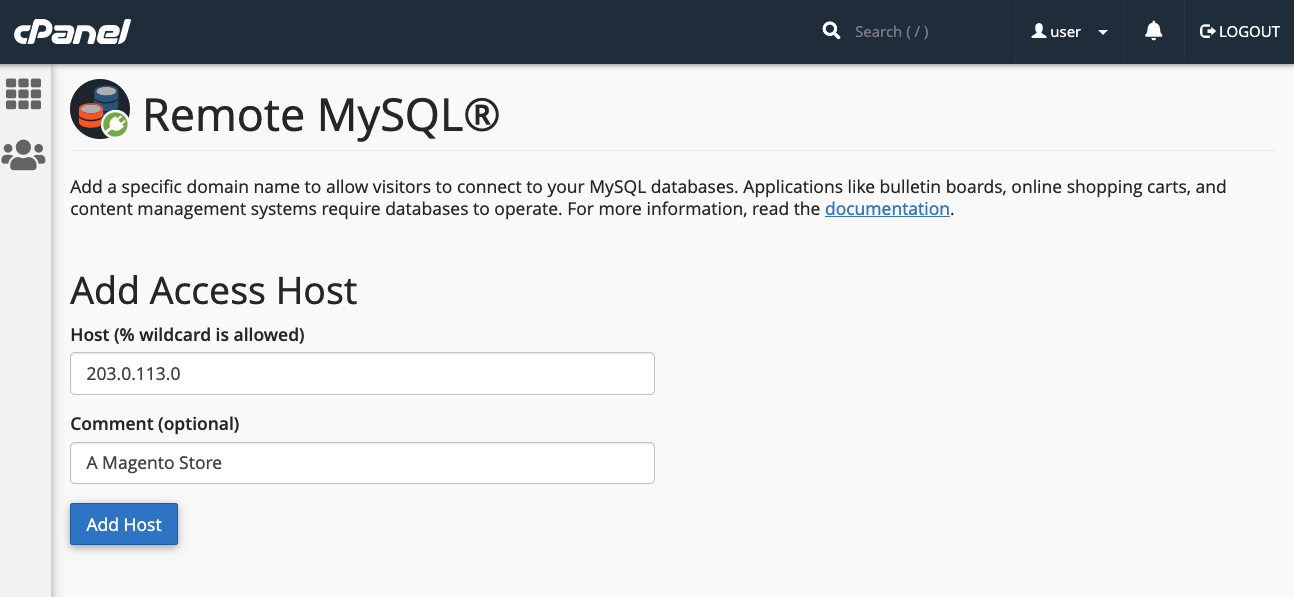
After entering the host information, click the Add Host button. cPanel will then automatically configure the MySQL database to accept connection requests originating from the specified remote site.
The subsequent step involves configuring your web application to utilize this remote database. The exact procedure varies depending on the specific application. For instance, with a new WordPress installation, you would first create the database using cPanel’s MySQL® Database Wizard.
Following database creation, you would then edit your WordPress site’s wp-config.php file to include the database name, authentication credentials, and the remote server’s domain name or IP address. An example configuration snippet is provided below:
define( 'DB_NAME', 'wp_database' );
define( 'DB_USER', 'user' );
define( 'DB_PASSWORD', 'a-secure-password' );
define( 'DB_HOST', '203.0.113.0' );
Administering MySQL Access Hosts via WHM
System administrators possess the capability to configure MySQL to accept incoming connections from sites hosted elsewhere, providing centralized control. There are key distinctions between cPanel and WHM concerning remote database access:
- Hosts added through WHM are universally applied to all cPanel user accounts and their associated MySQL users on that server.
- cPanel users are unable to permanently remove hosts that have been added by system administrators in WHM, ensuring consistent policy enforcement.
To enable remote hosts to access your MySQL databases, navigate to Additional MySQL Access Hosts within the SQL Services section of the WHM sidebar menu.
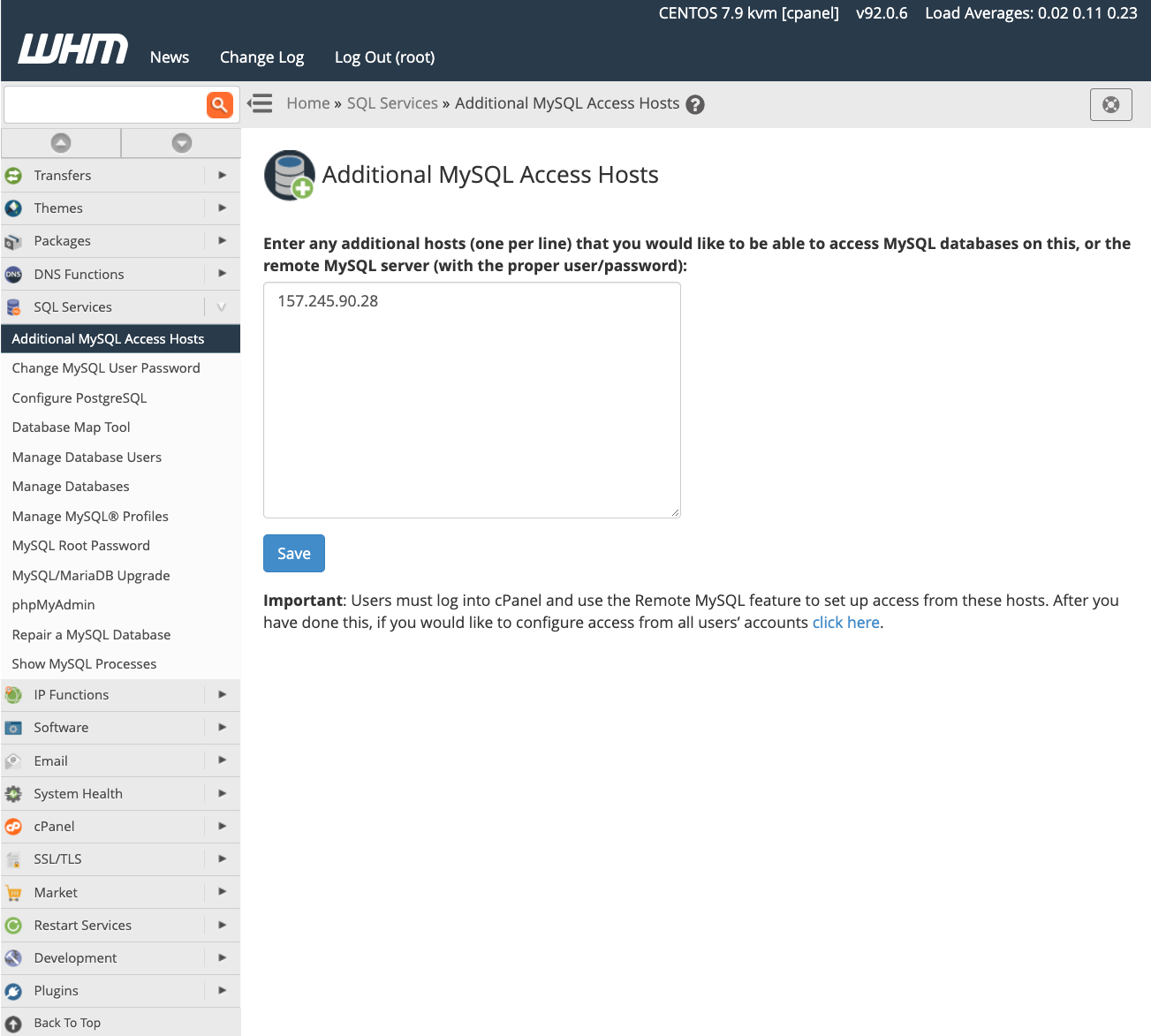
Enter the domain names or IP addresses of the remote hosts that should be granted permission to connect to the server’s databases, then click Save. To begin using databases on this server, remember to configure your sites with the appropriate remote IP address and authentication credentials, as previously detailed in the cPanel configuration section.
For more in-depth information regarding database access hosts, we recommend consulting the feature’s official documentation page.
Advanced MySQL Profile Management in WHM
Beyond individual remote database configurations, server administrators can leverage WHM to create and manage MySQL profiles, allowing for connections to external database servers. A MySQL Profile in WHM enables administrators to define the remote database server that cPanel & WHM will use system-wide. In fact, even the local machine’s default database is managed through such a profile.
Profiles offer flexibility for configuring various types of remote databases, including those running on other cPanel & WHM servers, dedicated MySQL servers, and even cloud-based database services like Amazon’s Relational Database™ Service.
Before creating and activating a new profile, be aware that only one MySQL profile can be active at any given time. To add a new profile, log in to WHM and navigate to Manage MySQL® Profiles located under SQL Services in the sidebar menu.
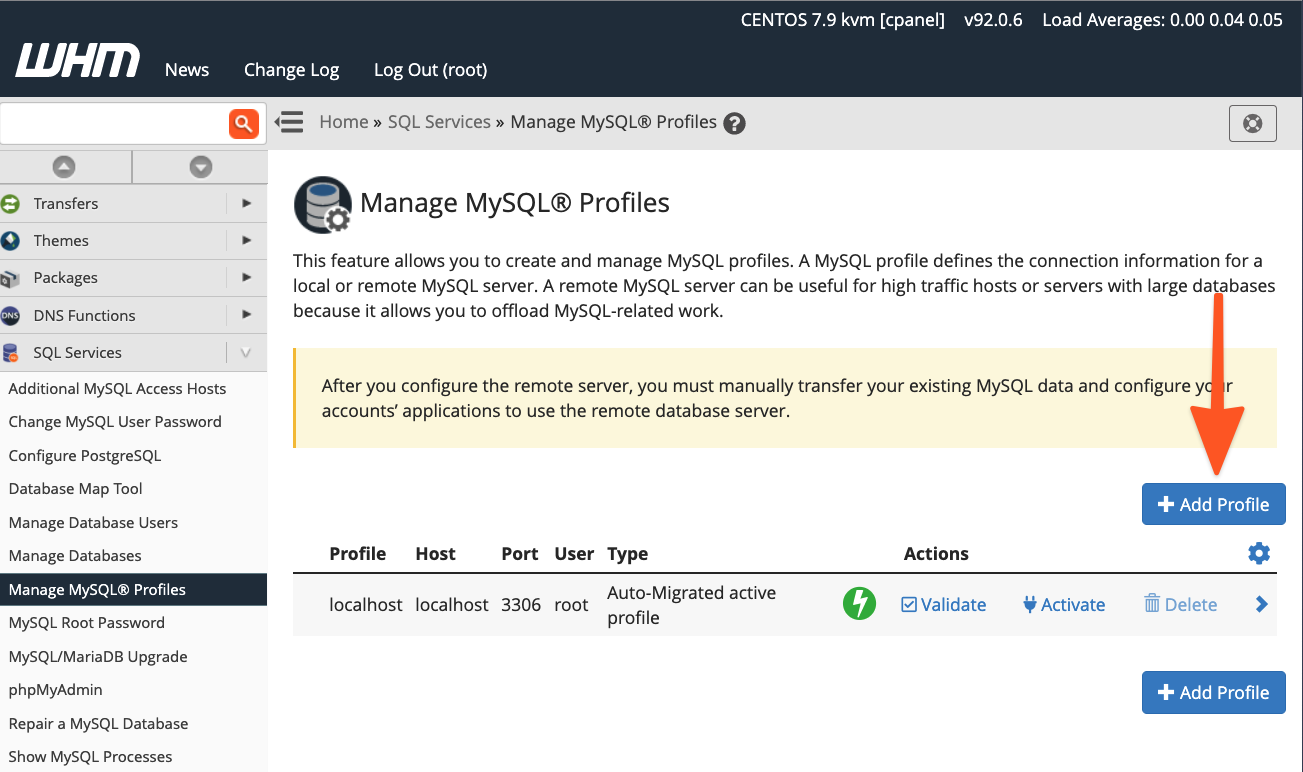
WHM can automate the process of logging into the remote server, creating a new MySQL superuser for database management, and configuring MySQL settings. Alternatively, if you have already set up a MySQL installation with a superuser, you can simply provide those existing details.
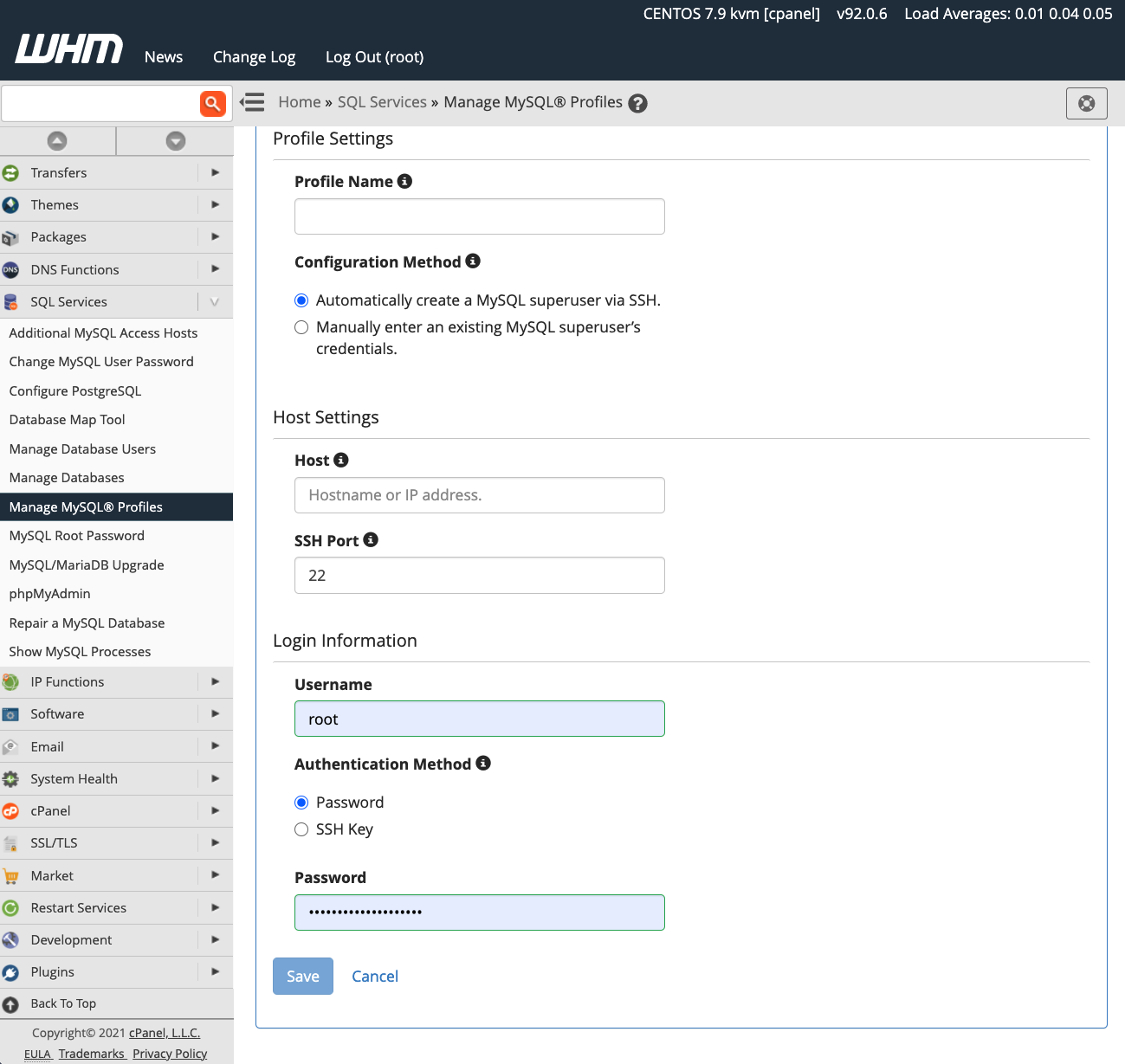
Once you activate a new profile, all subsequent new databases will be created on the designated remote server. It’s important to note that existing databases are not automatically migrated; you will need to manually transfer any existing data to the new remote server.
Conclusion: Maximizing Flexibility with cPanel & WHM
cPanel & WHM empowers web hosts and their clients with exceptional flexibility in configuring and managing MySQL databases. This robust platform provides:
- Optimized Defaults: Excellent out-of-the-box configurations for hosting MySQL databases directly on the local server.
- Seamless Remote Integration: Straightforward database configuration for websites and online stores hosted on remote servers, simplifying complex setups.
- Comprehensive Administrator Tools: Powerful system administrator tools that grant complete control over MySQL and the location where databases are hosted, ensuring maximum operational efficiency.
We value your feedback and comments. Please feel free to reach out to us with any questions or suggestions. You can find us on Discord, the cPanel forums, and Reddit. Additionally, stay connected by following us on Facebook, Instagram, and Twitter for the latest updates and news.
