
 (1).svg)
 (1).png)


 (1).svg)
.svg)
Odoo offers a robust framework for managing business operations, and a key aspect of its flexibility lies in its extensive collection of applications (apps) and modules. These components allow users to tailor their Odoo instance to specific business needs. This guide explains how to effectively manage these apps and modules directly from your Odoo dashboard, covering installation, upgrading, and uninstallation processes.
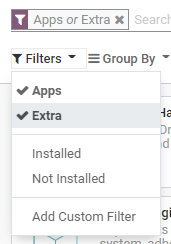
To begin, you can manage all available apps and modules directly from your Odoo dashboard. By default, the interface applies an 'Apps' filter to streamline your view. If you need to search for specific modules that are not categorized as primary applications, simply click on 'Filters' and select 'Extra' to expand your search parameters.
Important Considerations for App Management
It's crucial to understand that Odoo operates differently from a typical smartphone application environment. Therefore, installing or uninstalling apps and modules should be done with careful consideration. These actions can significantly impact your database configuration and potentially your subscription costs. Please keep the following points in mind:
- Your Responsibility as Administrator: As the administrator of your Odoo database, you hold the responsibility for its configuration and usage. Your decisions regarding app installation and user management should align with your organization's specific operational requirements.
- Understanding App Dependencies: Odoo applications often have underlying dependencies. Installing certain apps or features may automatically install additional modules that are technically required for their functionality, even if you do not intend to use them directly.
- Testing on a Duplicate Database: Before making significant changes to your live environment, it is highly recommended to test app installations or removals on a duplicate of your database. This practice allows you to identify any required app dependencies or potential data loss before affecting your production system.
Installing Apps and Modules
The installation process for new applications and modules in Odoo is straightforward. Navigate to the Apps section within your Odoo interface. Browse through the available applications or use the search functionality. Once you've identified the desired app, simply click on its Install button to add it to your Odoo instance.
Note on Missing Modules: If a specific module you are looking for is not visible in the list, it may be necessary to update your app list. To do this, first activate the developer mode. Then, return to the Apps section and click on the Update button to refresh the module catalog.
Upgrading Apps and Modules
Odoo consistently introduces new improvements and features in its supported versions. To take advantage of these enhancements and ensure your applications are running with the latest capabilities, it is essential to upgrade your apps periodically. To upgrade an application, go to the Apps section, locate the app you wish to upgrade, click on its dropdown menu, and then select the Upgrade option.
Uninstalling Apps and Modules
If an application or module is no longer required, you can easily uninstall it from your Odoo environment. To do so, navigate to the Apps section. Find the application you intend to remove, click on its dropdown menu, and then select Uninstall.
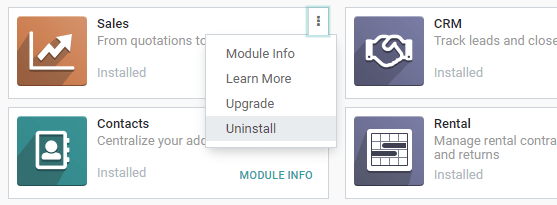
It is important to remember that many Odoo apps are interconnected through dependencies. This means that uninstalling one primary app may trigger the uninstallation of several other dependent apps and modules. Odoo provides a clear warning, detailing all affected dependent apps and modules, before proceeding with the uninstallation.
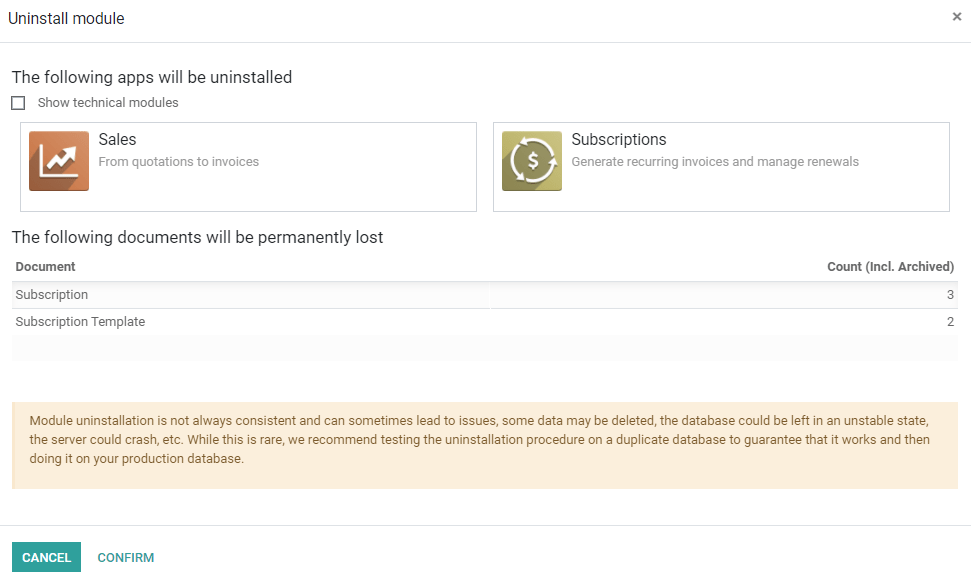
To finalize the uninstallation process and confirm the removal of the selected app(s) and their dependencies, click on the Confirm button.
Critical Warning: Be aware that uninstalling an app will also remove all its associated dependencies and will permanently erase any data linked to these modules. Exercise extreme caution when performing this action.
