
 (1).svg)
 (1).png)


 (1).svg)
.svg)
Deploying Odoo 16 using Docker containers on a Plesk environment presents specific challenges that many users encounter. This guide addresses common hurdles, particularly concerning volume allocation and database connectivity, drawing from shared experiences to provide a clearer path to successful deployment.
Understanding Initial Deployment Issues
When initiating an Odoo Docker container, users often observe the process halting or failing to advance, even without immediate manual intervention after the initial setup phase. A critical aspect of this deployment involves correctly configuring volume allocation, which is essential for persistent data storage and proper application functioning.
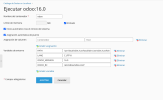
Many attempts involve leaving the volume allocation fields blank, expecting the system to automatically handle these configurations. While this might seem intuitive, it frequently leads to subsequent issues with data persistence and access within the containerized environment.
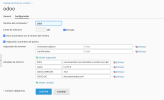
Addressing Volume Mounting Failures
A recurring problem is the failure of specified addresses or directories to mount correctly within the Docker container. This prevents Odoo from accessing necessary files, configurations, or custom modules, leading to operational failures and an inability to start the application properly. Ensuring that host paths are correctly mapped to container paths is vital for the application's filesystem integrity.
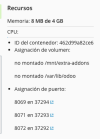
Troubleshooting Database Connectivity Errors
Beyond volume mounting, database errors are a prevalent obstacle. Users frequently report issues with Odoo establishing a connection to its PostgreSQL database, despite PostgreSQL itself running without apparent problems. This often manifests as connection refused errors on port 5432, indicating a communication breakdown between the Odoo application and its backend database.
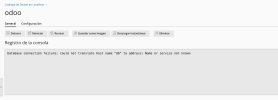
It's crucial to confirm that the PostgreSQL container is operational and correctly configured to communicate with the Odoo container. Verifying that PostgreSQL is indeed active and accessible on its designated port is a good first step in diagnosis.

Key Considerations for Odoo Docker Deployment on Plesk
Successful deployment often hinges on a few critical points:
- Separate Containers: Odoo typically requires a separate PostgreSQL database instance. Both Odoo and PostgreSQL should run in their respective Docker containers, with proper networking configured to allow them to communicate securely.
- Database Connection Parameters: Ensure that the Odoo container is configured with the correct database host (often the name of the PostgreSQL container in the Docker network), port (commonly 5432 for PostgreSQL), username, and password to establish a connection. Environment variables within the Odoo Docker container are commonly used for this configuration.
- Volume Mapping: Explicitly define and map volumes for both Odoo (for custom modules, configurations, and session data) and PostgreSQL (for its data directory) to ensure data persistence across container restarts and avoid issues with unmounted directories.
- Plesk Docker Extension Utilization: Familiarize yourself with the Plesk Docker extension's interface for managing images, containers, and network settings. This includes understanding how to expose ports and set environment variables.
- Port Configuration: Confirm that the necessary ports (e.g., Odoo's default web port 8069 and PostgreSQL's 5432) are exposed and accessible both between containers and, if required, from external networks, adhering to security best practices.
Seeking Further Assistance
Many users have faced similar challenges when attempting to deploy Odoo 16 or even Odoo 15 within Docker on a Plesk Obsidian environment. The complexity often lies in understanding the interplay between Docker networking, volume management, and specific Odoo requirements. Consulting official Odoo and Docker documentation, alongside community forums, can provide valuable insights and specific configuration examples to overcome these hurdles.
Successfully running Odoo on Docker within Plesk involves meticulous attention to detail in configuring container environments, ensuring robust database connectivity, and managing persistent data. By systematically addressing each potential point of failure, a reliable and functional Odoo instance can be achieved, streamlining business operations through a powerful ERP solution.
