
 (1).svg)
 (1).png)


 (1).svg)
.svg)
How to Use Odoo CRM: A Complete Guide
Have you recently integrated Odoo CRM into your business operations to manage your sales pipeline, but find yourself needing guidance on effectively prioritizing leads, meticulously tracking customer interactions, and ensuring timely follow-ups? Or perhaps you are looking to fully harness the extensive capabilities of Odoo CRM to significantly enhance and optimize your overall business operations? This comprehensive guide is specifically designed to provide you with expert assistance on how to use Odoo CRM to streamline your sales processes and master customer relationship management.
According to recent industry reports, the global market for CRM software is projected for substantial growth, indicating its increasing importance in modern business landscapes. Within this dynamic environment, Odoo CRM has distinguished itself as a remarkably popular and comprehensive solution, swiftly gaining traction as one of the fastest-growing CRM systems adopted by businesses globally. Its prominence in the open-source software category further underscores its widespread acceptance and robust capabilities across various international markets.
What is Odoo CRM?

Odoo CRM stands as an open-source, customer-centric solution engineered to address all facets of sales activity. This includes comprehensive customer and workflow management, efficient sales pipeline organization, definition of distinct stages, and seamless team collaboration. It furnishes businesses with a centralized, integrated platform where they can adeptly manage their diverse sales channels, nurture leads, convert opportunities, monitor performance metrics in real-time, and automate intricate business processes, thereby enhancing operational efficiency.
Independent analyses and industry publications frequently highlight Odoo CRM for its robust capabilities, often rating it highly as an all-in-one platform for cultivating and sustaining strong customer relationships. By leveraging this sophisticated CRM module, businesses are empowered to strategically focus their valuable resources on high-potential sales opportunities, thereby optimizing sales efforts and minimizing time spent on less promising, or "cold," sales deals.
The key features of Odoo CRM typically include:
- Streamlined Sales Pipeline Management
- Efficient Lead Management and Qualification
- Comprehensive Customer Information Storage and Reporting
- Automated Activities and Timely Follow-ups
- Seamless Integration Capabilities with Other Business Modules
- Advanced Customer Segmentation for Targeted Marketing and Sales
How to Use Odoo CRM: 8 Proven Steps
In today's intensely competitive marketplace, the Odoo CRM module presents itself as an exemplary solution for comprehensive customer relationship management. This powerful system consolidates all potential leads into a single, accessible location, enabling businesses to meticulously manage customer needs, track their journey, and make well-informed, strategic decisions that drive sales growth and foster long-term customer loyalty.
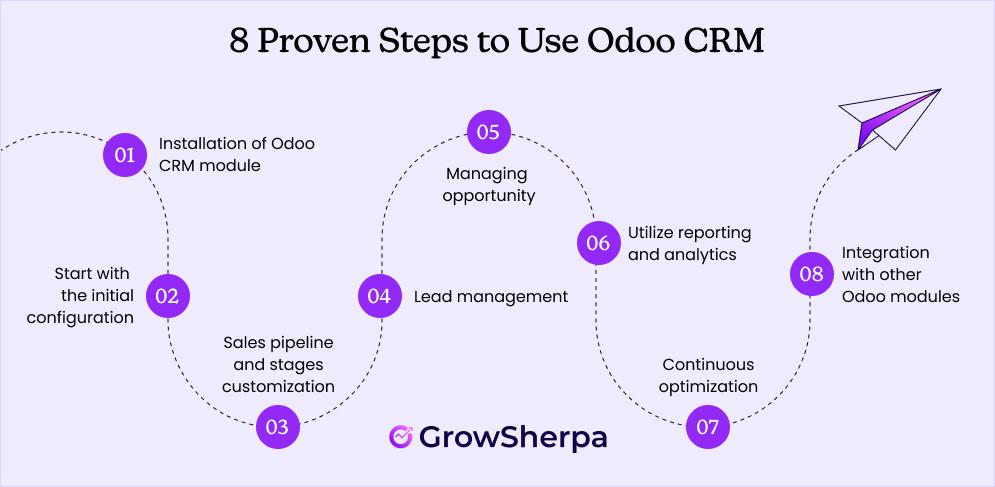
Follow these essential steps to effectively utilize Odoo CRM for your unique sales processes:
Step 1: Installation of the Odoo CRM Module
To begin leveraging the capabilities of Odoo CRM, the foundational first step involves the correct installation of its dedicated module within your Odoo environment.
- Log in to your Odoo ERP account using your credentials.
- Once successfully logged in, proceed to navigate to the **Apps** section, typically found on the main dashboard.
- Utilize the **Search bar** function to efficiently locate the Odoo CRM module among the available applications.
- Should the module not be pre-installed or active within your specific Odoo environment, select the **Install** option to initiate its setup.
- Upon completion of the installation, you will then be able to seamlessly access your newly installed Odoo CRM module directly from your main dashboard, ready for configuration.
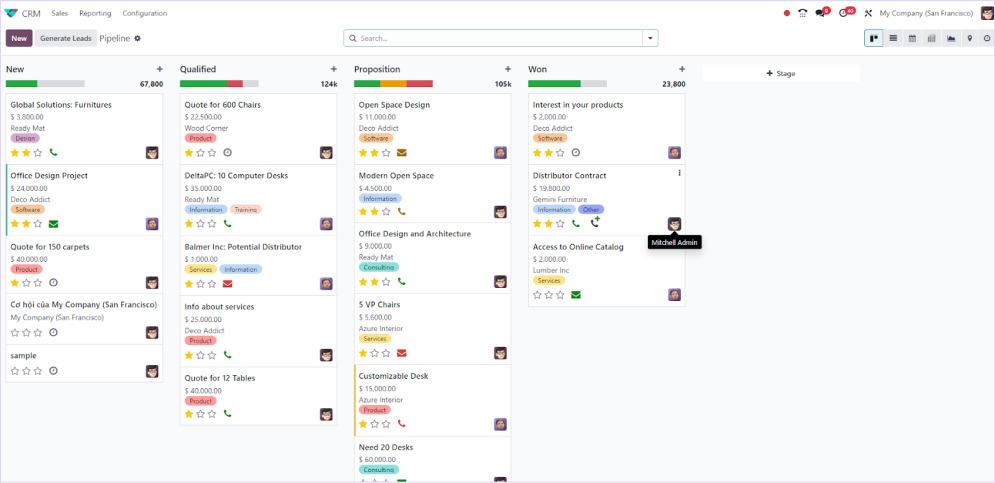
Step 2: Initial Configuration Setup
Initial configuration represents a pivotal phase, as it meticulously lays the groundwork for utilizing Odoo CRM with optimal effectiveness, ensuring it precisely aligns with your unique business requirements. Through careful configuration, organizations can significantly enhance user adoption rates, fortify data integrity, and ultimately propel superior sales performance, leading to exemplary customer relationship management outcomes.
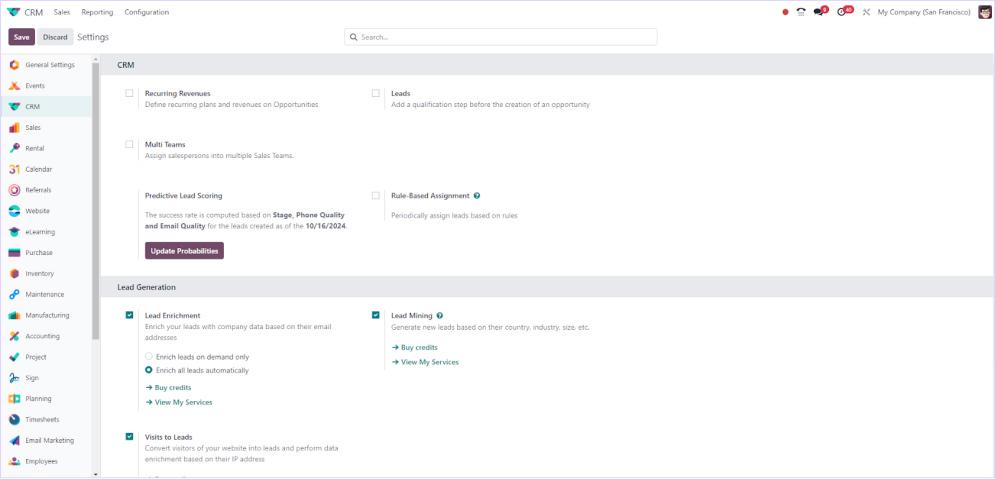
- Access your **Odoo CRM dashboard**, then proceed to navigate to **Configuration** and subsequently select **Settings**. Within this section, a comprehensive array of options will be available to meticulously customize your CRM experience.
- Activate essential functionalities such as **Lead/opportunity management** and **Opportunity tracking** to precisely streamline your sales stages in accordance with your distinct business operations. (It is highly recommended to selectively choose features that align precisely with your specific business needs).
- Upon enabling the desired features, ensure you click **Save** to apply all your modifications and settings.
- Furthermore, precisely define your sales teams by navigating through **Odoo CRM>Sales>Teams**. (Here, you can click on the **Create** button to establish a new team, meticulously enter a team name, and assign relevant members along with other pertinent details).
- Finally, it is imperative to **Save** this comprehensive configuration to guarantee that your sales teams are not only properly structured but also fully prepared and equipped for their operational tasks.
Step 3: Sales Pipeline and Stages Customization
Effective sales pipeline management and meticulous stage customization are absolutely paramount to the successful utilization of Odoo CRM software. These critical capabilities empower businesses to precisely tailor their sales processes to align with unique workflows and to define bespoke custom stages. Identifying specific areas for customization not only provides enhanced visibility into the entire sales process but also facilitates more accurate and granular tracking of progress towards conversion and ultimate deal closure.
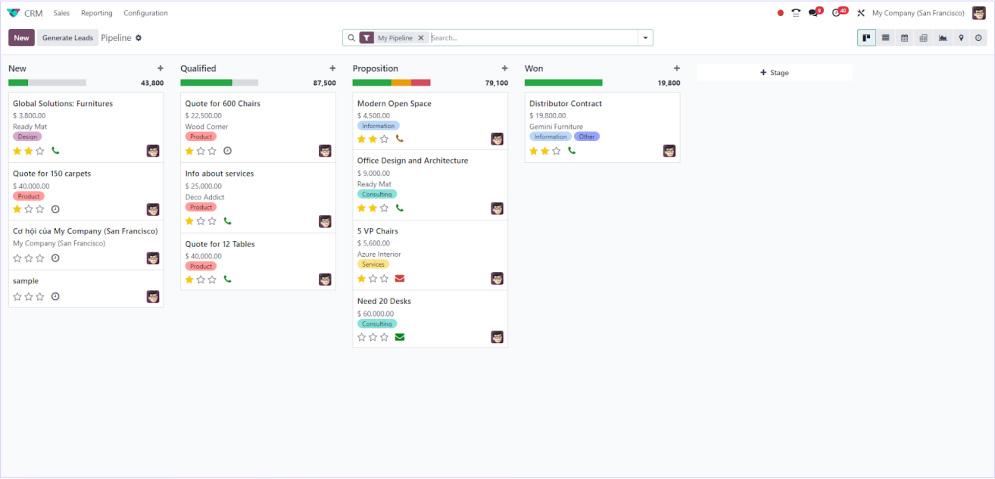
- Navigate to **Odoo CRM>Sales>My pipeline**. This view will distinctly present all the stages of your current sales process, offering an immediate overview.
- Click on the **+Stage** option conveniently located from the dashboard to introduce new, relevant stages that are specifically tailored to your business operations and sales cycle.
- Crucially, assign a **Sequence number** for each stage to ensure they appear in the correct, logical, and preferred order on the pipeline dashboard, maintaining clarity and consistency.
- Subsequently, leverage the intuitive **Drag-and-drop** functionality to effortlessly arrange these stages according to your optimized workflow, allowing for dynamic adjustments as needed.
Step 4: Lead Management
Within Odoo CRM, lead management is a meticulously structured process designed to streamline the identification, systematic tracking, and diligent nurturing of potential clients. Effective lead management is instrumental in significantly enhancing the overall efficiency of sales activities and concurrently fostering superior customer relationship management, ultimately guiding prospects towards conversion and becoming loyal customers.
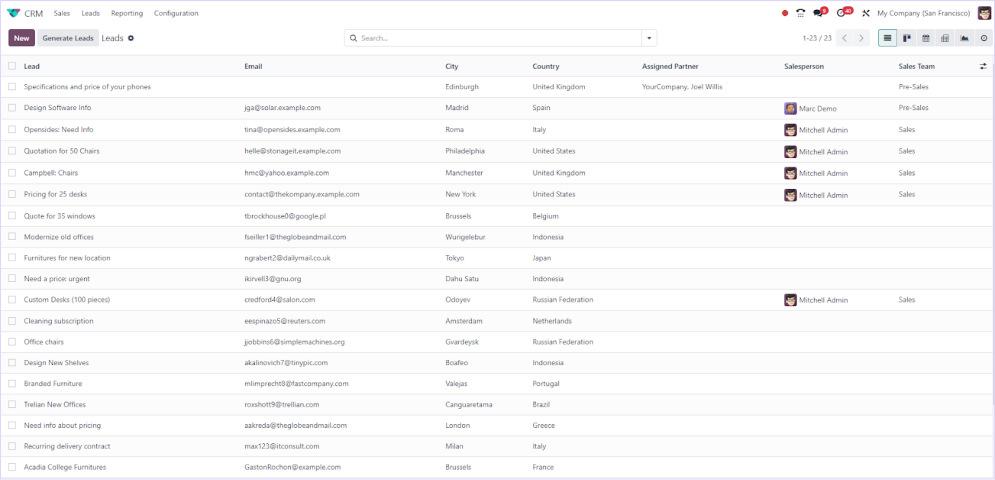
- Access the **Odoo CRM>Leads** section. (This dedicated area will comprehensively display all the leads that have been entered and are active within your dashboard).
- Click on the **Create** button to initiate the process of adding a brand new lead entry.
- Proceed to fill in all **Essential details**, which include assigning leads to specific representatives, providing comprehensive contact information, relevant addresses, designating salespersons, associating with a sales team, establishing a priority level, and estimating the probability of lead conversion.
- Successfully completing these inputs will generate a new lead record in your dashboard. If, at any point, you determine a lead is qualified and ready to be advanced, simply open its individual record and click on the **Convert to Opportunity** button to transition it for further tracking and development within the sales pipeline.
Step 5: Managing Opportunities
By diligently utilizing the opportunity management features within Odoo CRM, businesses can profoundly enhance their sales performance and make substantial contributions to sustainable revenue growth. This critical functionality facilitates the meticulous tracking and systematic organization of sales opportunities throughout a fully customizable pipeline, thereby ensuring that each potential deal is thoroughly monitored and nurtured at every stage, from initial qualification to successful closure.
- Once you have successfully created qualified opportunities directly from leads, the subsequent crucial step involves managing them with utmost effectiveness to drive them toward conversion.
- Navigate to **Odoo CRM>Sales>My pipeline.** This view provides a visual representation of all active opportunities within their respective stages.
- **Click** on each individual opportunity card to access and update its specific details. This includes crucial information such as expected revenue figures, the probability of success, and any other pertinent required details that influence the deal's progression.
- Furthermore, actively leverage the **Activities** section associated with each opportunity record. This ensures that all necessary follow-ups, tasks, and communications are scheduled and executed in a timely manner, keeping the sales process dynamic and proactive.
Step 6: Utilizing Reporting and Analytics
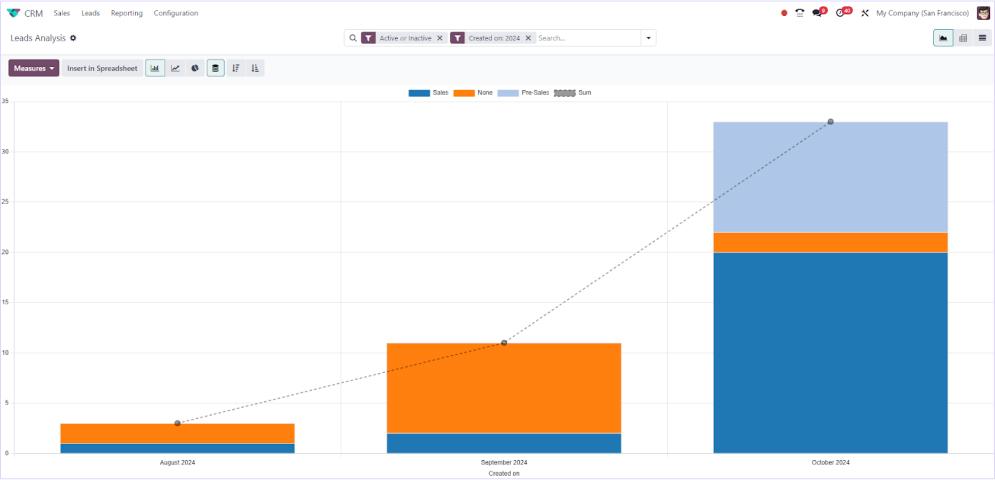
Odoo CRM is equipped with sophisticated, in-depth reporting and analytics capabilities, specifically designed to empower businesses in making truly data-driven decisions. These insights are vital for significantly improving sales management strategies and enhancing overall customer engagement. Users gain access to real-time perspectives on crucial metrics such as lead scoring effectiveness, sales conversion rates across various stages, detailed customer interactions, individual and team productivity levels, scheduled meetings, and comprehensive activity tracking, providing a holistic view of sales operations.
- Navigate to your **Odoo CRM dashboard** and then proceed to select the **Reporting** section. (Here, you will have the flexibility to select various types of reports, including those for forecasts, pipeline performance, lead generation, team activities, and strategic partnerships).
- **Customize** these reports extensively by applying diverse filters. These can be based on specific date ranges, designated sales teams, or by utilizing grouping options based on different stages within the pipeline or the original sources of leads.
- Upon setting your desired parameters for analysis, click on **Apply/Generate report** to produce an accurate, precise, and easily interpretable report that enables effective analysis of your key performance metrics.
Step 7: Continuous Optimization
Continuously and systematically reviewing the performance of your sales pipeline is an absolutely crucial practice for ensuring sustained growth and long-term success. This process involves meticulously examining how leads are progressing through each defined stage of the sales cycle and proactively identifying any potential issues or bottlenecks that could impede their forward movement. Diligently monitoring customer interactions at every stage provides invaluable insights into areas where improvements can be made or where processes might be slowing down. Based on this thorough analytical review, combined with constructive feedback gathered from your sales representatives, it becomes imperative to adjust sales stages or refine existing processes as required to continuously optimize overall performance and adapt effectively to evolving market dynamics.
Step 8: Integration with Other Odoo Modules
To maximize operational efficiency and ensure seamless data synergy, it is essential to guarantee that your Odoo CRM system is fully integrated with other pertinent Odoo modules. This includes crucial areas such as sales, inventory management, and marketing automation. Such comprehensive integration facilitates superior data sharing capabilities and fosters significantly enhanced collaboration across different teams within your organization, eliminating silos. Furthermore, it is highly beneficial to proactively leverage the robust automation features readily available within the system.
- Navigate to **Odoo CRM>Configuration>Automation rules**.
- Within this section, you can meticulously **Set up** predefined rules for automating various recurring tasks, such as systematic lead assignments or timely follow-up reminders, based on specific triggers or conditions. This intelligent automation significantly enhances overall business efficiency and optimizes the strategic management of customer relationships.
By diligently adhering to the comprehensive steps outlined above, businesses can effectively utilize Odoo CRM to robustly manage customer relationships, streamline intricate sales processes, and achieve their strategic objectives. Regular evaluation and continuous customization, intelligently informed by detailed performance analytics, will be instrumental in ensuring your operations remain perfectly aligned with evolving business goals and continually enhance overall productivity and success.
Frequently Asked Questions
How does Odoo CRM help identify areas for improvement in sales?
Odoo CRM significantly aids in identifying areas for sales improvement by providing access to detailed analytics and comprehensive reporting features. These tools meticulously track various aspects, including overall sales performance, specific customer interactions, and the progression of leads through different pipeline stages. This rich dataset empowers sales teams to precisely pinpoint bottlenecks, accurately assess lead conversion rates, and thoroughly analyze customer feedback. Consequently, businesses can make highly informed decisions and proactively optimize their sales strategies for superior results.
Is it possible to access Odoo CRM on Android devices?
Yes, Odoo CRM is designed with modern mobile accessibility in mind and can indeed be accessed on Android devices. Through dedicated mobile applications or highly responsive web interfaces, sales professionals gain the flexibility to efficiently manage their leads, opportunities, and all aspects of customer relationships while on the go, providing flexibility and continuous productivity.
How does email integration work in Odoo CRM?
Email integration within Odoo CRM functions by allowing users to seamlessly send and receive emails directly from within the CRM system's interface. This powerful feature ensures that all customer interaction and communication history is centralized, easily accessible, and systematically recorded within each lead or opportunity. The result is a complete and transparent view of every client engagement, enhancing communication efficiency and historical tracking.
How to create a new lead in Odoo CRM?
To create a new lead in Odoo CRM, navigate to the "CRM" module and then select the "Leads" option. Next, click on the "Create" button. You will then be prompted to fill in all the essential lead details, such as the potential client’s name, contact information, and any relevant notes or background. Once all information is entered, save the changes, and the new lead will be successfully added to your sales pipeline for further nurturing.
How to manage my sales funnel in Odoo CRM?
Odoo CRM offers robust capabilities to help you efficiently manage your sales funnel by providing tools to track leads, opportunities, and all customer interactions throughout their journey. The system's visual pipeline feature allows sales teams to intuitively move prospects through various predefined stages. This ensures timely follow-ups, targeted engagement strategies, and ultimately, a higher probability of successful lead conversions.
How to add new leads in Odoo CRM?
New leads can be effortlessly added to Odoo CRM through multiple convenient methods. Users can manually enter individual lead details, or the process can be automated via integrated web forms that capture prospect information directly. Alternatively, large lists of leads can be efficiently imported from external sources. Once entered into the system, these leads are then systematically tracked, nurtured, and progressed through the distinct stages of the sales cycle.
