
 (1).svg)
 (1).png)


 (1).svg)
.svg)
Introduction
This comprehensive guide explores the essential features and functionalities of the Odoo CRM application. Leveraging the insights from a modern environment with its updated user interface, we will cover core concepts applicable across recent versions. Our journey begins with an overview of the sales pipeline, particularly focusing on the intuitive Kanban view and the utility of the default "My Pipeline" filter. Subsequently, we will delve into the diverse range of configuration options accessible within the system's settings, providing a solid foundation for effective customer relationship management.
Configuring CRM Settings for Optimal Performance
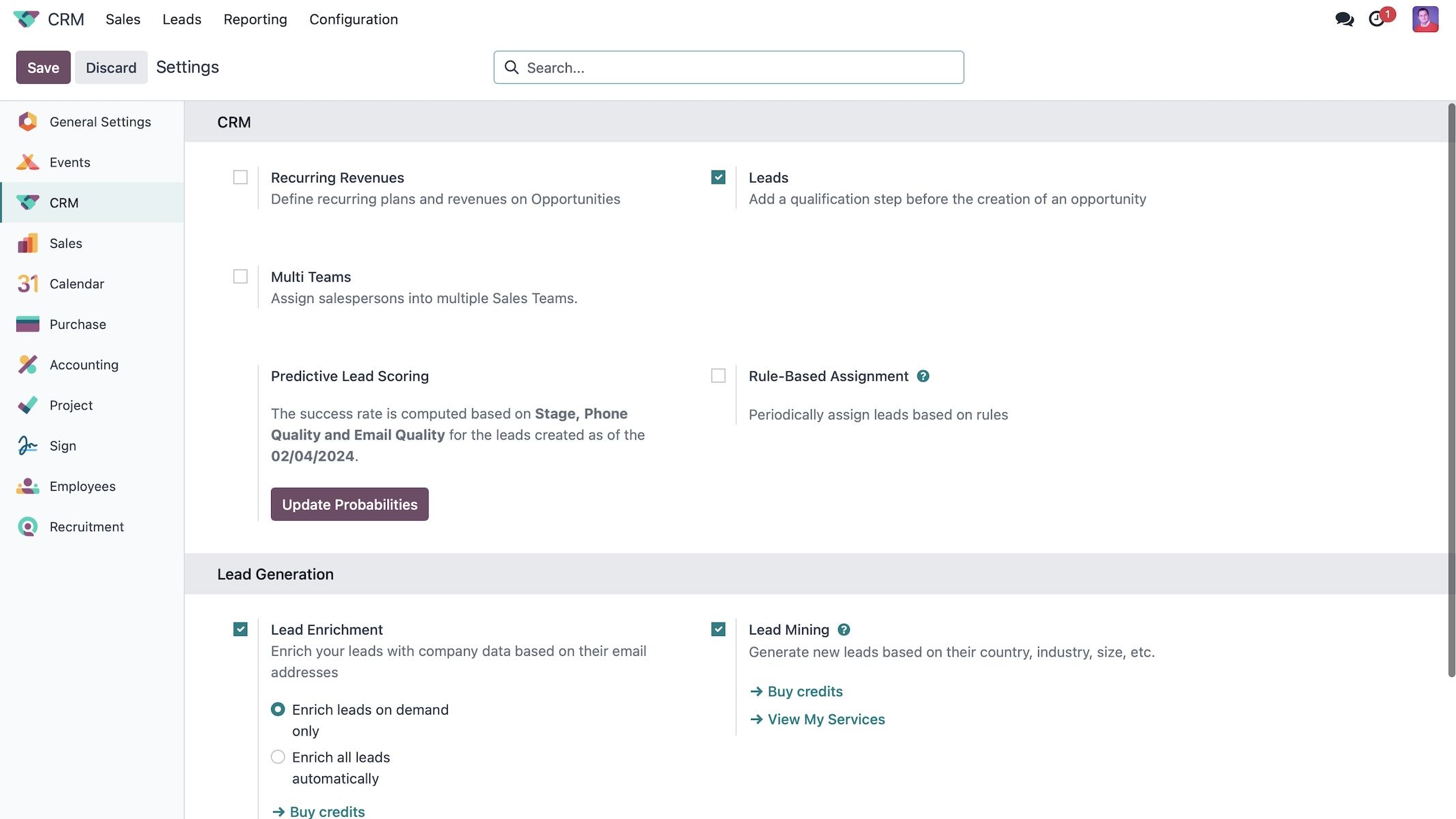
To optimize your CRM operations, let's start by exploring the General Settings section, accessible under the CRM menu. A crucial initial setting is Recurring Revenue. Activating this feature enables the system to distinctly categorize and track both recurring and non-recurring revenue streams. This differentiation is vital for generating precise financial forecasts and gaining a clearer understanding of your business's ongoing financial health.
Following this, the Leads Setting plays a pivotal role in lead management. By enabling this option, you introduce a distinct stage or a dedicated list view within your CRM. This allows for the systematic import or creation of potential customers, or 'leads', before they are qualified and converted into 'opportunities'. This clear separation helps in managing the early stages of the sales funnel, ensuring that unqualified contacts are nurtured appropriately before becoming active sales prospects.
The Multi-Teams feature enhances organizational efficiency by allowing you to establish and manage multiple sales teams, thereby segregating leads effectively. Furthermore, the system supports rule-based assignment, which automates the distribution of incoming leads to various sales representatives or designated sales teams. This intelligent distribution can be configured based on specific criteria such as predefined tags, geographic location, or other lead-specific attributes, ensuring that each lead reaches the most appropriate team member for optimal engagement.
Predictive Lead Scoring is a powerful analytical tool that leverages historical data from previously closed leads to accurately estimate the probability of a new lead converting into a sale. By continuously updating these probabilities, the system allows for dynamic adjustments based on past performance trends. This sophisticated feature analyzes a multitude of factors, including the quality of phone and email interactions, geographical location, language, lead source, and custom-defined tags. As more data is accumulated, the system's predictive accuracy for lead success continuously improves, enabling sales teams to prioritize their efforts more effectively.
Lead Enrichment significantly enhances your understanding of potential clients by integrating additional, valuable data about a lead directly into the system's communication log, or "chatter." This provides a more comprehensive and holistic view of each prospect. Complementing this, Lead Mining offers the capability to generate new leads proactively based on specific criteria such as industry, country, company size, and other relevant demographics. Moreover, for businesses utilizing the website module, the system facilitates the creation of scheduled visits to leads, further streamlining the sales outreach process.
Within the dedicated Sales Teams section, users have the ability to flexibly create and manage various distinct sales teams. For illustration, a typical setup might include teams designated for "Sales" and "Pre-sales," each with specific roles and responsibilities in the customer journey.
Setting up Sales Teams for Effective Lead Management
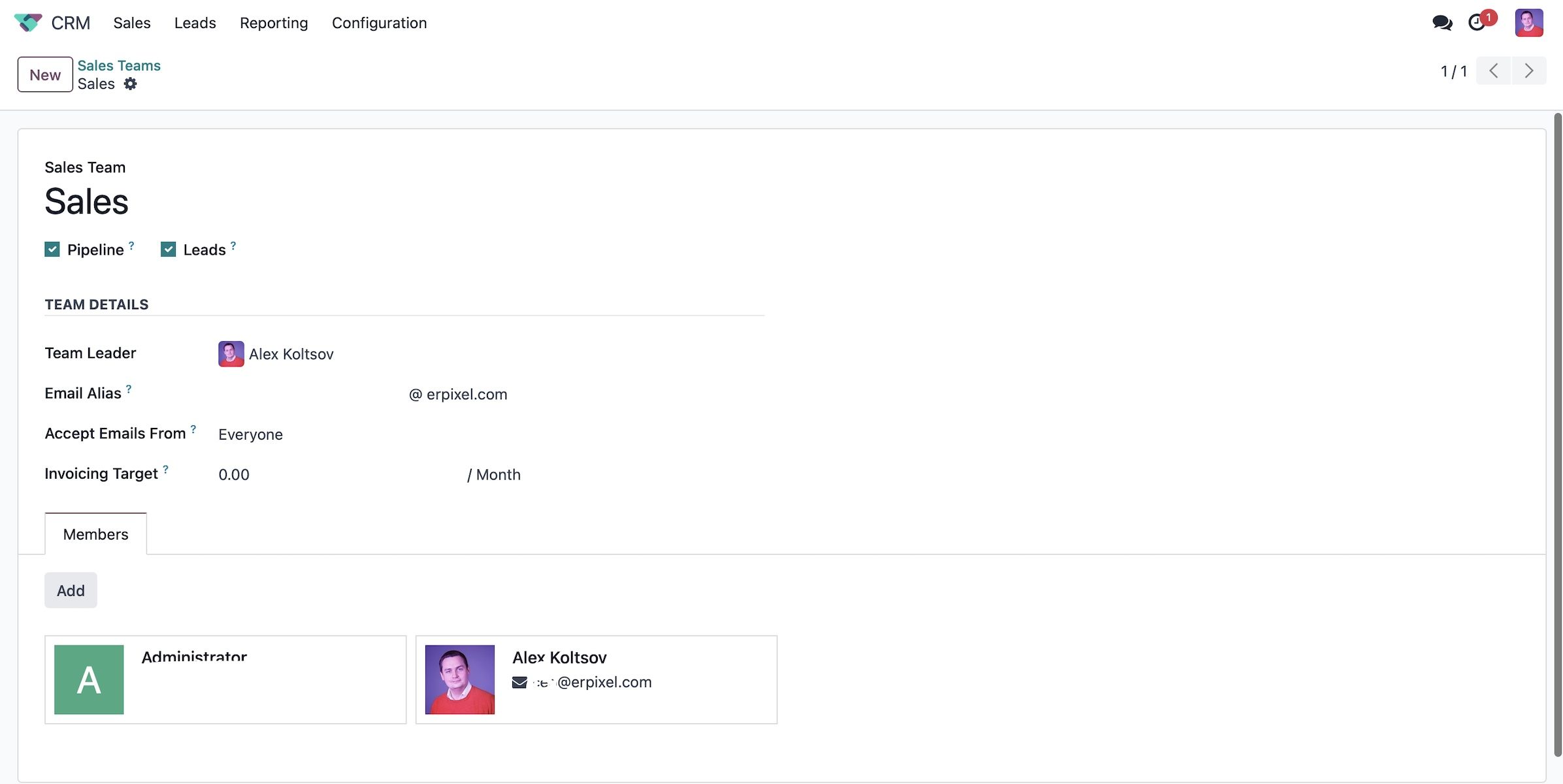
Within the detailed Sales Teams configuration, you will observe the names of each established team alongside indicators of their operational scope. By selecting the Pipeline checkbox, you empower a team to actively manage and oversee a structured pre-sales process, guiding potential opportunities through various stages. Conversely, enabling the Leads checkbox allows the team to filter and qualify initial incoming requests as raw leads. This crucial step precedes their conversion into full-fledged opportunities, which are then assigned to the appropriate sales professionals for further engagement.
Proceeding with the team setup, you can configure essential basic information. This includes designating a Team Leader, assigning either yourself or another suitable individual to this crucial role. Furthermore, an Email Alias can be established, which ingeniously automates the generation of new leads directly from incoming emails. This functionality is particularly useful for capturing inquiries originating from your website's contact form, general customer questions, or direct outreach. The alias can be finely tuned to accept emails universally or restricted to specific, authorized senders, ensuring control and relevance.
You can establish an Invoicing Target, for example, setting a monthly goal. The system diligently tracks all successfully paid invoices, allowing you to monitor progress and assess whether the set target has been achieved. On the right-hand side, robust lead assignment rules can be configured. You have the flexibility to either automate the distribution of leads based on predefined parameters or opt for manual allocation. By editing the assignment domains, you can specify precise criteria, such as geographic location or employee count, to direct leads to the most appropriate sales team. For instance, leads originating from a specific country could be routed to one specialized team, while those from larger organizations (e.g., with over 250 employees) might be directed to another.
Further down, the Sales Team Members section allows for granular management of individual team performance. Here, you can review the total number of leads each member has received and, if necessary, set a maximum limit to ensure equitable distribution and manageable workloads. For even greater precision, individual lead assignments can be refined using specific domains, such as targeting leads from particular countries or based on other relevant criteria. It is imperative to save these customized settings for each sales team to ensure all configurations are applied effectively.
Concluding the sales team setup, the next critical area to address is Activity Types. These predefined activities form the backbone of your task management system, proving indispensable for efficiently organizing and tracking all tasks associated with your ongoing sales opportunities.
Advanced Configuration and Operational Insights in CRM
Delving deeper into the CRM system's capabilities, understanding and utilizing the default activity types is paramount for efficient operational management. While the system provides a comprehensive suite of standard activities out-of-the-box, it also offers the significant flexibility to define and create entirely new activity types whenever specific business requirements or unique workflows necessitate it.
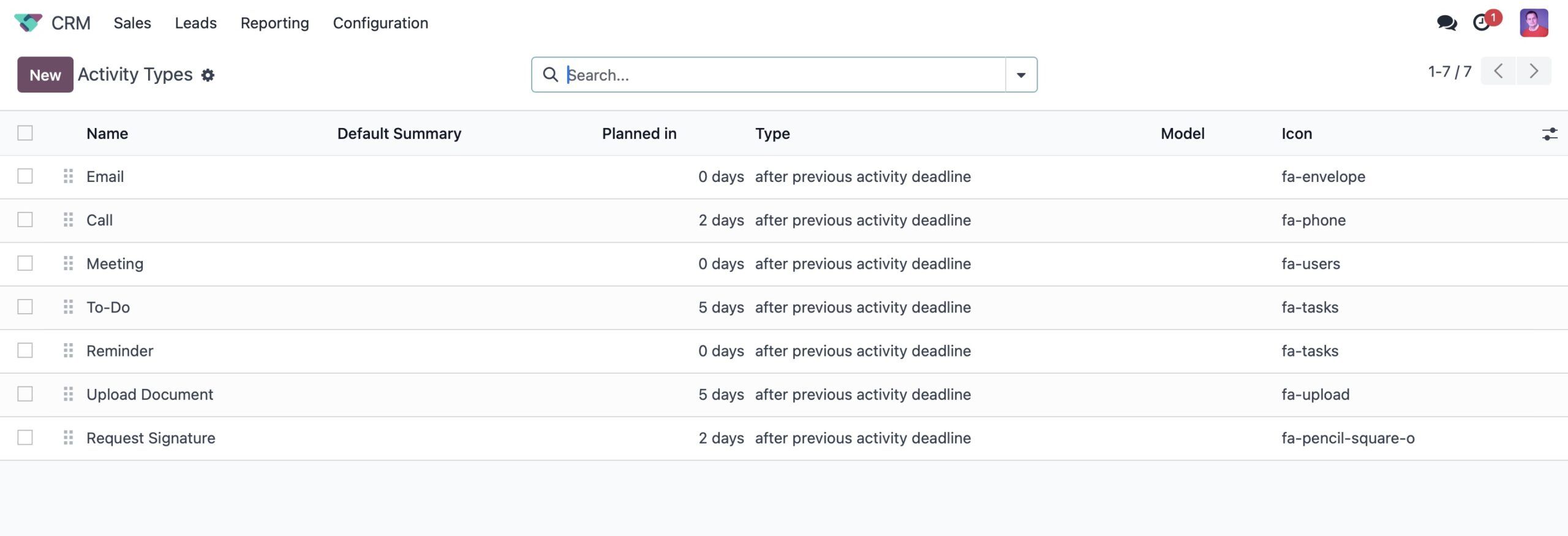
A thorough comprehension of each distinct Activity Type, encompassing actions like sending emails, conducting phone calls, or organizing meetings, is fundamental. Each activity type is designed to trigger specific, predefined actions within the system. For instance, initiating the scheduling of a meeting will seamlessly integrate with and directly access your calendar, minimizing extra steps and streamlining your workflow.
Effective management of dashboard visibility is a key factor in maintaining user focus and productivity. The system allows you to configure whether users see only their own assigned activities, all activities across the team, or choose to hide activities altogether, depending on specific organizational needs and roles. This granular control ensures that each user's dashboard displays only the most relevant activities, directly aligning with their individual responsibilities and minimizing distractions.
The ability to customize default activity settings significantly streamlines management processes. Users can pre-configure default user assignments, standardized summaries, and initial notes for various activity types. Furthermore, the system supports the automation of follow-up activities, which can be triggered automatically upon the completion of preceding tasks. This interconnectedness fosters a seamless and highly efficient workflow, reducing manual overhead and ensuring timely progression of tasks.
Robust pipeline and tag management are absolutely critical for effectively organizing and navigating your sales opportunities. By defining and applying specific tags, you can categorize opportunities with precision, making them easily searchable and retrievable in the future. This meticulous tagging not only improves daily operational efficiency but also significantly enhances your reporting capabilities, allowing for more detailed and insightful analysis.
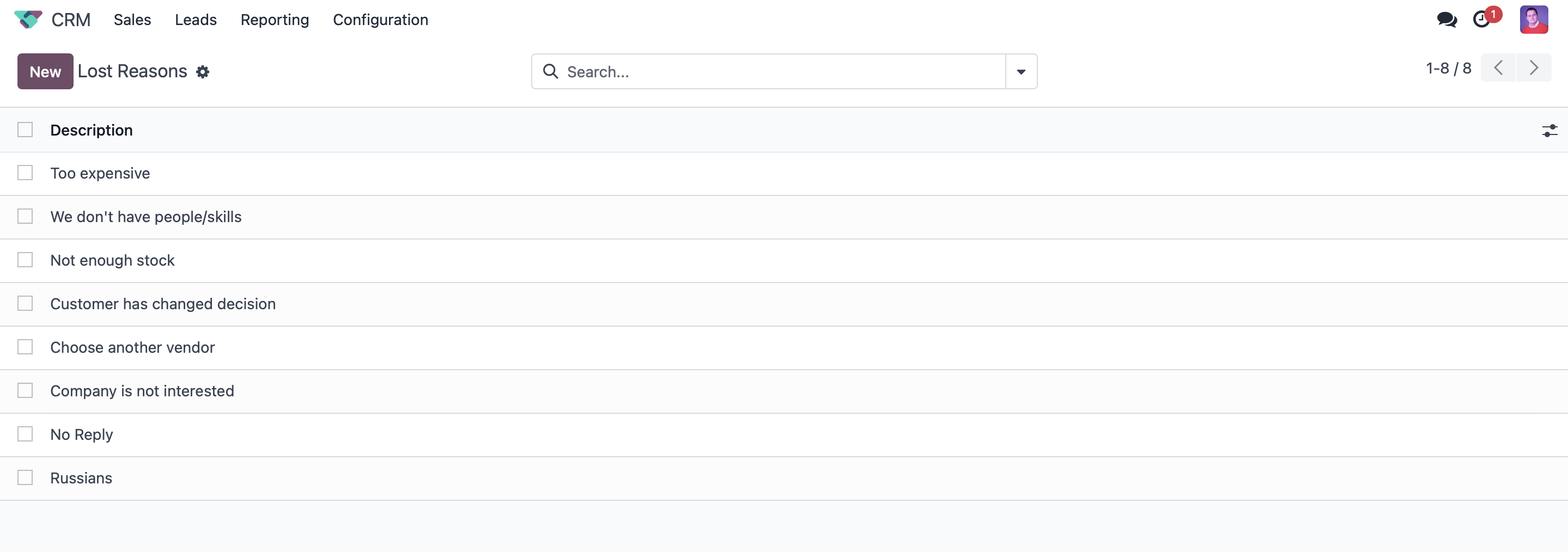
Precisely identifying and documenting the reasons behind lost opportunities—whether due to concerns about suitability or other factors—provides invaluable data. This information is crucial for generating comprehensive future reports and enabling strategic adjustments to your sales processes and offerings, ultimately aiming to significantly enhance overall sales effectiveness and win rates.
Proactive lead mining requests facilitate continuous lead generation. These requests are configured to identify and acquire new prospects based on highly specific criteria, directly supporting sustained business growth and strategic expansion initiatives.
Finally, the CRM system offers comprehensive reporting tools, indispensable for tracking key performance metrics and extracting actionable insights. These powerful reporting features equip users with the data needed for informed decision-making and continuous strategy refinement, playing a crucial role in effectively achieving established business objectives.
Managing Leads and Opportunities Efficiently
Effective lead management within a robust CRM system is foundational for successfully initiating and cultivating promising potential business relationships. Let's explore the typical unfolding of this critical process.
Upon accessing the dedicated Leads Pipeline, users are presented with a comprehensive list view showcasing all incoming potential customers. These leads can originate from a diverse array of sources, ranging from direct inquiries submitted through various channels to strategically acquired lists. For example, a Sales Development Representative (SDR) typically undertakes the initial qualification of these leads, often through preliminary calls, thereby marking them as prepared for engagement by a sales representative or account executive. Furthermore, the system intelligently allows for leads to be automatically converted into opportunities based on predefined criteria, significantly streamlining the overall workflow and improving efficiency.
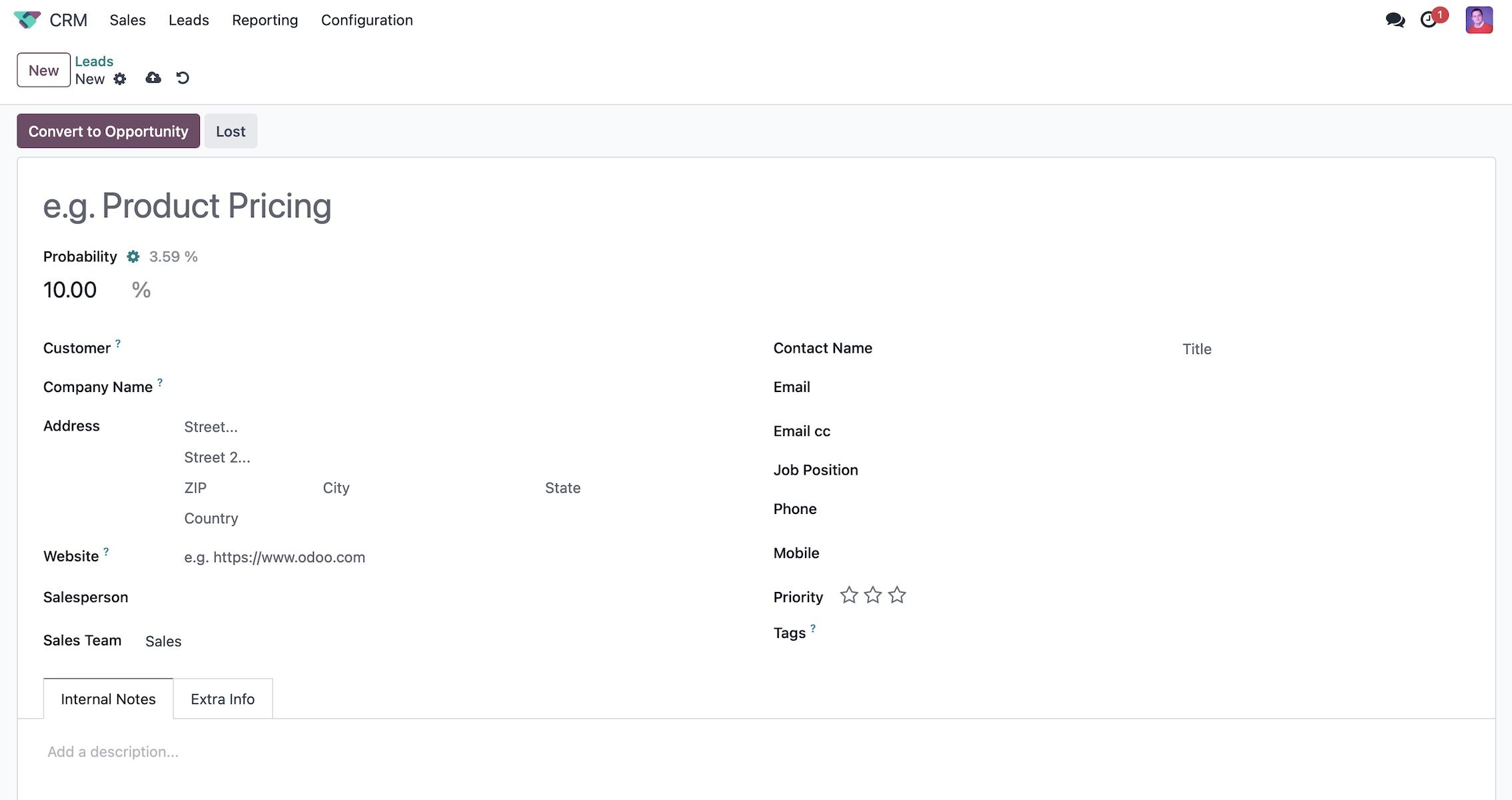
Each individual lead record is rich with essential information, including comprehensive contact details, relevant company information, and strategically assigned tags. These tags are particularly important as they play a significant role in intelligently routing leads to the most appropriate sales representative, thereby ensuring prompt follow-up and facilitating highly personalized engagement. Internal notes can be meticulously added to document all interactions and observations, while supplementary marketing information—such as specific campaign details and the original lead source—provides invaluable context for all subsequent interactions, aiding in more informed and targeted communication.
The strategic separation of lead management from opportunity management enables sales teams to apply focused attention and execute a more strategic conversion process. Leads can be manually transformed into opportunities, a step during which you can precisely assign them to specific salespersons and select the most suitable sales team. This conversion process is highly flexible, offering options to either link the newly formed opportunity with an existing customer record or to seamlessly create a brand-new customer contact directly within the CRM module, ensuring data consistency and completeness.
It is crucial to recognize the importance of configuring default access rights. These permissions are vital for upholding data security standards and further streamlining operational workflows. System administrators possess the capability to establish permissions ensuring that users can only access the leads or opportunities explicitly assigned to them. This robust access control mechanism is instrumental in maintaining strict confidentiality and fostering unparalleled operational clarity across the sales team.
By diligently optimizing lead management practices within sophisticated CRM systems, businesses are empowered to effectively nurture potential clients, significantly improve their conversion rates from prospect to customer, and ultimately enhance their overall sales performance and revenue generation.
Exploring the CRM Pipeline
Let us now navigate to the very core of effective customer relationship management: robust sales pipeline management. Upon entering the CRM module, you are immediately presented with a comprehensive and dynamic view of your sales pipeline, meticulously showcasing all ongoing opportunities. A key advantage of this system is the inherent flexibility to customize each stage within this pipeline, ensuring it perfectly aligns with your team's unique workflow requirements and strategic sales process.
Accessing the settings button unlocks the power to finely tailor each pipeline stage to your precise business needs. This customization extends to defining specific criteria for advancing an opportunity from one stage to the next, or even organizing stages distinctly for different sales teams. Such unparalleled flexibility guarantees that your sales pipeline accurately mirrors the intricate stages of your sales process, thereby significantly enhancing both clarity for team members and overall accountability.
Positioned conveniently at the top right of the page, a variety of powerful view options are available, including Kanban, list, calendar, pivot table, graph, and map views. These diverse perspectives on your pipeline data are instrumental in facilitating detailed reporting and enabling more informed strategic decision-making. For example, the intuitive Kanban view provides a highly visual representation of opportunities as they progress through different stages, offering an immediate snapshot of your sales funnel. Concurrently, the activities view offers a concise listing of all pending tasks directly associated with each opportunity, ensuring no crucial action is overlooked.
Within the dynamic Kanban view, a sophisticated system of color-coded bars provides immediate visual cues regarding the status of activities linked to each opportunity. A green bar indicates activities that are planned and on track, a yellow bar highlights tasks that are due for completion today, and a red bar unmistakably flags activities that are overdue. This intuitive visual language empowers sales teams to prioritize their tasks with precision, ensuring effective management and timely follow-ups to maintain momentum in the sales cycle.
Effectively managing your sales pipeline streamlines operations and equips teams with crucial tools to maximize efficiency and drive superior results. This robust system not only ensures a smooth progression of sales but also fosters a proactive approach to customer engagement. In subsequent sections, we will explore key activity management strategies in greater detail, highlighting their indispensable role in maintaining a dynamic, responsive, and ultimately successful sales process.
Understanding Opportunity Details
When examining individual opportunities within the CRM, several key elements are prominently displayed for quick and easy reference. On the right-hand side, a consolidated revenue figure is presented, meticulously aggregating values input by sales representatives from various components of the opportunity. Each opportunity card provides essential details including the opportunity's name, its estimated value, comprehensive customer information, relevant associated tags, and its assigned priority level. A notable feature is the system's ability to prioritize higher priority items by placing them at the top of the list, significantly enhancing visibility and focusing attention where it is most needed.
Upon selecting a specific opportunity, for instance, one titled “Project Proposal for 25 workstations,” you will immediately observe that all pertinent lead information is seamlessly carried over and integrated. This comprehensive transfer includes customer details, full contact information, and any additional notes meticulously captured under the “Extra Information” section. Furthermore, the system diligently tracks key metrics such as “Days to Assign” and “Days to Close,” which contribute crucial data essential for generating insightful reports and analyzing sales cycle efficiency.
Within each opportunity, you have the ability to set an expected revenue figure, providing a clear financial goal. Additionally, internal notes can be meticulously recorded using versatile formatting options, enabling detailed tracking and thorough documentation of all interactions and progress. The invaluable “Chatter” feature, located on the right-hand side, facilitates seamless communication and efficient activity scheduling. Through this feature, you can easily log messages, add important notes, and schedule tasks such as initial phone screenings or follow-up calls. A significant advantage is the ability to synchronize these activities with external calendar applications like Google Calendar or Outlook, ensuring comprehensive organization and timely follow-ups across all your platforms.
This fully integrated approach significantly streamlines workflow management, fostering enhanced collaboration and boosting overall efficiency across all sales operations. This holistic view ensures that every aspect of an opportunity is managed cohesively. In upcoming sections, we will delve into additional functionalities designed to further optimize your engagement with opportunities and maximize their potential.
Streamlined Communication and Activity Management
Within this powerful CRM system, users can seamlessly send messages via email directly to contacts, such as John Miller, with utmost ease. For example, a personalized message like “Hello, I’m looking forward to our discussion” can be easily customized and dispatched from your designated email address, maintaining a professional and personal touch.
The system provides extensive flexibility to manage email communications. Users can readily adjust email domains, configure outgoing email servers, and leverage a library of predefined templates, complete with dynamic placeholders, for highly efficient communication. Importantly, new templates can be swiftly created as needed and subsequently shared across the entire team, thereby ensuring consistent, branded, and professional messaging across all client interactions.
Upon successful dispatch, all your emails are automatically logged within the “Chatter” section, establishing a clear and comprehensive record of all communications. Planned activities, such as scheduled phone calls or follow-up tasks, are made visible and directly actionable from your primary pipeline view. Each activity provides detailed information, including its type, creation date, assigned team member, and critical due date, offering rapid insights into ongoing engagement efforts and progress.
The practice of logging internal notes directly within opportunities is crucial for maintaining comprehensive documentation and fostering robust team collaboration. These notes seamlessly integrate into the chatter feed, creating a transparent communication channel and reinforcing team accountability across all stages of the sales process.
The transition of contacts between various pipeline stages, for instance, moving an opportunity from an initial phone call stage to a "Qualified" status, is designed to be highly intuitive. This can be achieved effortlessly by utilizing the drag-and-drop functionality directly within the pipeline view, or by employing specific progress update buttons found within individual opportunities. All related activities are thoughtfully consolidated and readily accessible within your dedicated activities bar, facilitating efficient tracking and ensuring timely follow-up actions.
This integrated and user-friendly approach significantly enhances overall communication capabilities and substantially strengthens activity management processes within your CRM system. It ensures streamlined workflows and supports highly optimized engagement strategies. In the upcoming sections, we will delve into even more advanced functionalities designed to further elevate your workflow efficiency and maximize productivity.
Enhanced Activity and Opportunity Management
Within a sophisticated CRM system, the efficient management of activities is absolutely paramount for maintaining organization and consistently staying ahead of all tasks. The system provides a clear overview: for example, currently showing one overdue activity related to leads or opportunities, no activities due today, and eleven scheduled for future completion. By clicking on these indicators, users are presented with a comprehensive list view of all pending activities, which can be accessed either through specific, tailored filters or directly from the designated “Sales > My Activities” section. This meticulous setup ensures that every task is clearly outlined, categorized, and prioritized for each individual user, fostering clarity and accountability.
For managers and team leads, a valuable feature is the ability to remove individual filters, thereby expanding the view to encompass all team activities. This holistic perspective is incredibly beneficial for overseeing overall team productivity and workload, particularly during periods of absence. It effectively ensures that no critical tasks or opportunities are inadvertently overlooked, maintaining continuous operational flow.
Delving into additional fields for each activity provides deeper, granular insights, revealing crucial details such as the assigned salesperson, the relevant sales team, and specific deadlines. Actions like "snoozing" an activity (postponing it temporarily) or marking it as "completed" can be executed directly from this intuitive interface, offering significant flexibility and comprehensive control over personal and team task management.
Returning to the primary pipeline view, let's examine the seamless process of creating new opportunities. When initiating a new opportunity, users have the option to manually input contact details or, more efficiently, leverage the system’s powerful enrichment functionality. For example, by simply entering a company name, such as "Global Tech Solutions," and associating it with a relevant email domain, the system can be triggered to automatically enrich the lead with a wealth of pertinent company information. This valuable enrichment often includes details like the company’s background, estimated employee count, approximate revenue figures, and accessible social media profiles. Such comprehensive data significantly enhances our understanding of potential clients, enabling more informed and targeted engagement strategies.
Concurrently, the CRM system offers robust support for auto-populating contact details directly from various external sources, including popular platforms like Google. This intelligent feature significantly streamlines the process of entering new opportunities, dramatically reducing manual data entry. It is exceptionally valuable for rapidly gathering and accurately inputting contact information, thereby expediting overall workflow efficiency and freeing up valuable time for sales professionals to focus on engagement.
These multifaceted capabilities underscore the CRM's inherent power to substantially enhance productivity. This is achieved through meticulously streamlined task management processes and the provision of richly enriched data insights, collectively ensuring optimal client engagement and fostering highly informed decision-making across all sales operations. In subsequent discussions, we will further explore additional features designed to continuously enhance your comprehensive CRM experience.
Efficient Quotation Management
We will now explore the process of generating quotations directly from within our leads or opportunities. From the dedicated opportunity view, navigating to the “Quotations” section facilitates the seamless creation of new quotes. While this section does not provide an exhaustive deep-dive into the intricacies of quotation management, it is important to highlight that all associated contact information and critical tracking details are automatically transferred and integrated into the corresponding sales orders. This comprehensive data flow is essential for generating robust and accurate reports later on.
The process of creating a new quotation is straightforward: simply add a generic product or service and save. The newly generated quotation becomes visible and navigable via the system's breadcrumbs. When a quote is accepted by the client, it is automatically moved to the relevant column within the sales pipeline and tagged appropriately, reflecting its updated status. Conversely, if an opportunity is marked as "lost," the system prompts the user to select a predefined reason, such as "unsuitable for client's needs," and allows for optional closing notes to be added. This structured feedback is invaluable for future analysis.
Even lost leads are not permanently discarded; instead, they are thoughtfully archived. This ensures they remain fully accessible for subsequent review and analysis, proving invaluable for pinpointing precisely where opportunities may have stalled or encountered obstacles within the sales process, allowing for continuous improvement.
To briefly recap, we have thoroughly covered the principles of effective sales pipeline utilization, streamlined activity management, and precise data filtering. Moving forward, our focus will shift to exploring the powerful reporting features available, designed to extract actionable insights and continuously optimize sales strategies for sustained success.
Utilizing Forecasting and Reporting Tools
We begin by examining the comprehensive Forecast report, a tool designed to sort and present leads based on their projected closing dates. This report allows for easy identification of leads that currently lack a defined closing date, as well as those specifically scheduled for an upcoming period, for example, July. Clicking on any individual lead within this report provides immediate access to the expected closing date, as determined and set by the sales team.
Transitioning to the intuitive Graph view, we can visually represent the expected revenue on a monthly basis, thoughtfully grouped by individual sales teams. This visualization is incredibly useful for accurately gauging each team’s revenue projections, directly correlated with the deadlines of their respective opportunities. For a more granular and in-depth analysis, the powerful Pivot Table view allows for sophisticated filtering by various criteria, such as individual salesperson performance, projected revenue, and the anticipated closing month. All generated reports maintain flexibility, offering the option to be exported to standard Excel (XLSX) format or seamlessly integrated into specialized spreadsheet tools.
When conducting detailed pipeline analysis, various graphical representations, including clear bar charts or insightful pie charts, effectively illustrate the distribution of opportunities across different sales teams. This visual breakdown allows for a quick understanding of resource allocation and workload. Further refinement is possible by filtering data based on specific lead types and defined time frames, enabling a precise assessment of team performance and a granular breakdown of revenue contributions.
Within the dedicated Activities section, applying filters by specific opportunity types—for example, focusing on "initial contact" activities—enables meticulous tracking of completed tasks. This ensures strict adherence to established Key Performance Indicators (KPIs) and facilitates highly effective follow-up procedures, critical for maintaining momentum in the sales cycle.
Collectively, these robust tools provide unparalleled capabilities for sophisticated data manipulation, which is fundamental for informed decision-making and precise strategic planning within the comprehensive CRM module.
Summary
In summary, the CRM module stands out for its intuitive usability, providing support for multiple sales pipelines and facilitating seamless lead-to-opportunity conversions, all guided by predefined criteria. Users are empowered to efficiently filter data, precisely manage access rights for enhanced security, and enrich leads with extensive information for comprehensive insights into potential clients.
The process of moving leads across various pipeline stages is notably straightforward, and the ability to generate quotes directly within the CRM system significantly enhances workflow efficiency. A key highlight is the expanded functionality of scheduling activities, which now includes sophisticated options such as managing signature requests and facilitating document uploads. This streamlines critical processes like obtaining legally binding signatures for important documents, such as non-disclosure agreements, directly within the system.
For instance, initiating a signature request automatically prompts the designated recipients to digitally sign the document via email, leveraging the integrated electronic signature module. Users can conveniently monitor the status of all pending signatures within the dedicated documents section, ensuring the timely completion of crucial agreements. Furthermore, the electronic signature module provides customizable templates, which significantly simplify document preparation—an invaluable asset for streamlining initial negotiations and establishing confidentiality agreements efficiently.
In conclusion, the CRM module is a powerful tool that equips users with robust reporting capabilities, enabling precise monitoring of Key Performance Indicators (KPIs), in-depth data analysis, and accurate forecasting. It plays a pivotal role in facilitating effective resource allocation, ensuring the equitable distribution of sales opportunities among team members, and supporting fair commission management structures based on individual performance and achievements. This comprehensive suite of features positions the CRM as an indispensable asset for any sales-driven organization.
