
 (1).svg)
 (1).png)


 (1).svg)
.svg)
Expanding your website's reach to a global audience is a critical step for many businesses and content creators. Translating your WordPress website allows you to connect with visitors in their native languages, significantly enhancing user experience and opening new avenues for engagement. This comprehensive guide will walk you through the process of effectively translating your website into multiple languages using a powerful solution, outlining each step to ensure a smooth and successful localization.
1. Choose Target Languages
The initial and fundamental step in localizing your website is to select the specific languages into which you intend to translate your content. This robust translation solution supports a wide array of languages, empowering you to incorporate as many as necessary during its intuitive setup wizard. This flexibility ensures your website can cater to a diverse international audience from the outset.
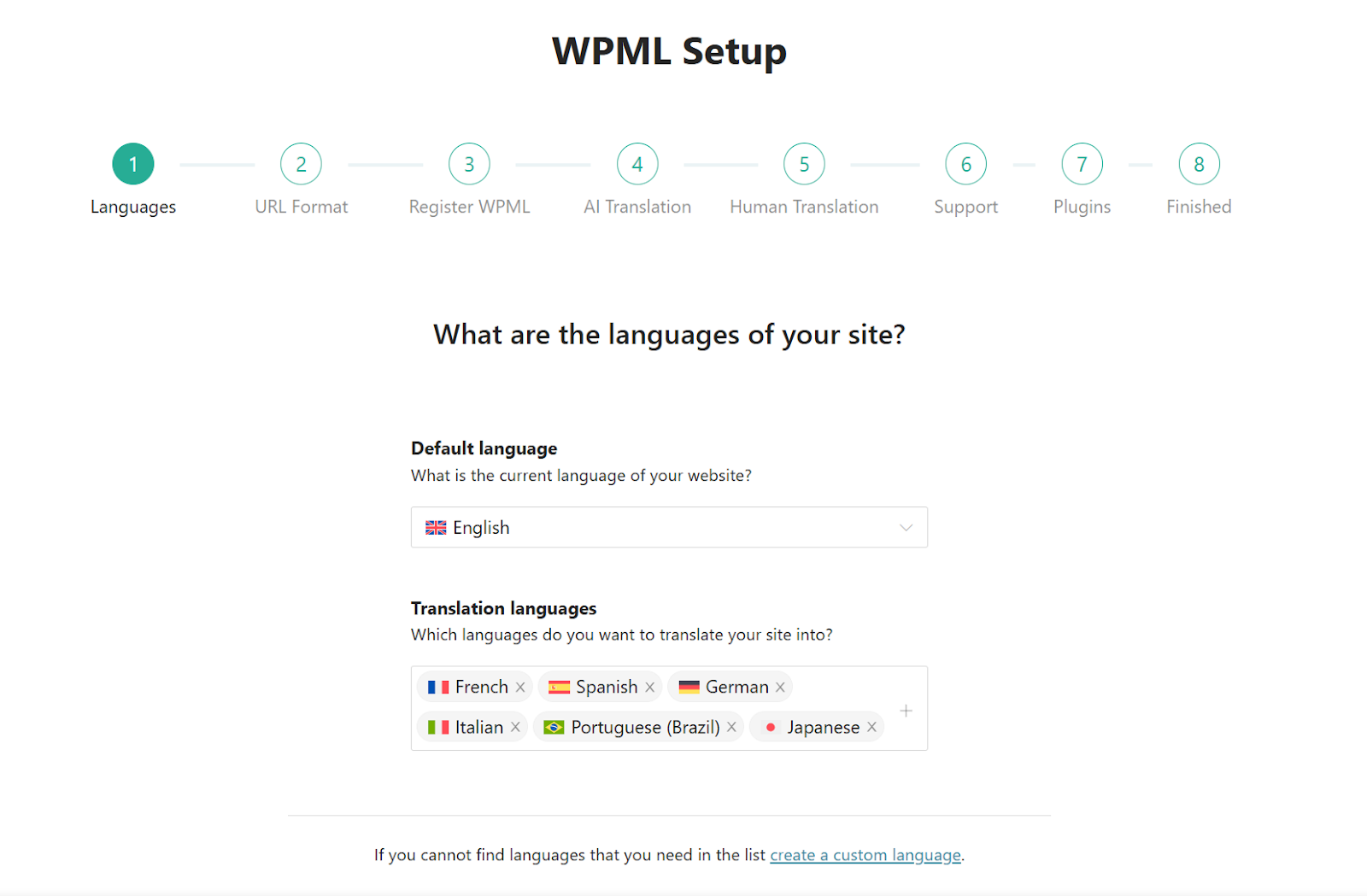 Selecting your desired languages during the initial setup process.
Should your definitive list of target languages not be fully determined at this stage, there is no need for concern. The system is designed with adaptability in mind, allowing you the convenience of adding more languages at any subsequent point, ensuring your translation strategy can evolve with your needs.
2. Configure Your AI Translator
Leveraging an AI translation engine represents the most efficient and effective method for localizing your website content. This advanced approach offers superior speed compared to manual human translation and generally yields more refined results than traditional, rule-based machine translation services. It provides a powerful combination of speed and accuracy, essential for global content delivery.
This sophisticated solution incorporates a custom-built AI translation engine designed to produce highly personalized translations. It is capable of adapting to your specific terminology, maintaining your distinct language style, and even matching desired levels of formality. To achieve this remarkable degree of personalization, the AI engine intelligently utilizes your entire website as contextual information, alongside any additional guidance you provide during its setup. This comprehensive approach ensures translations resonate with your brand voice.
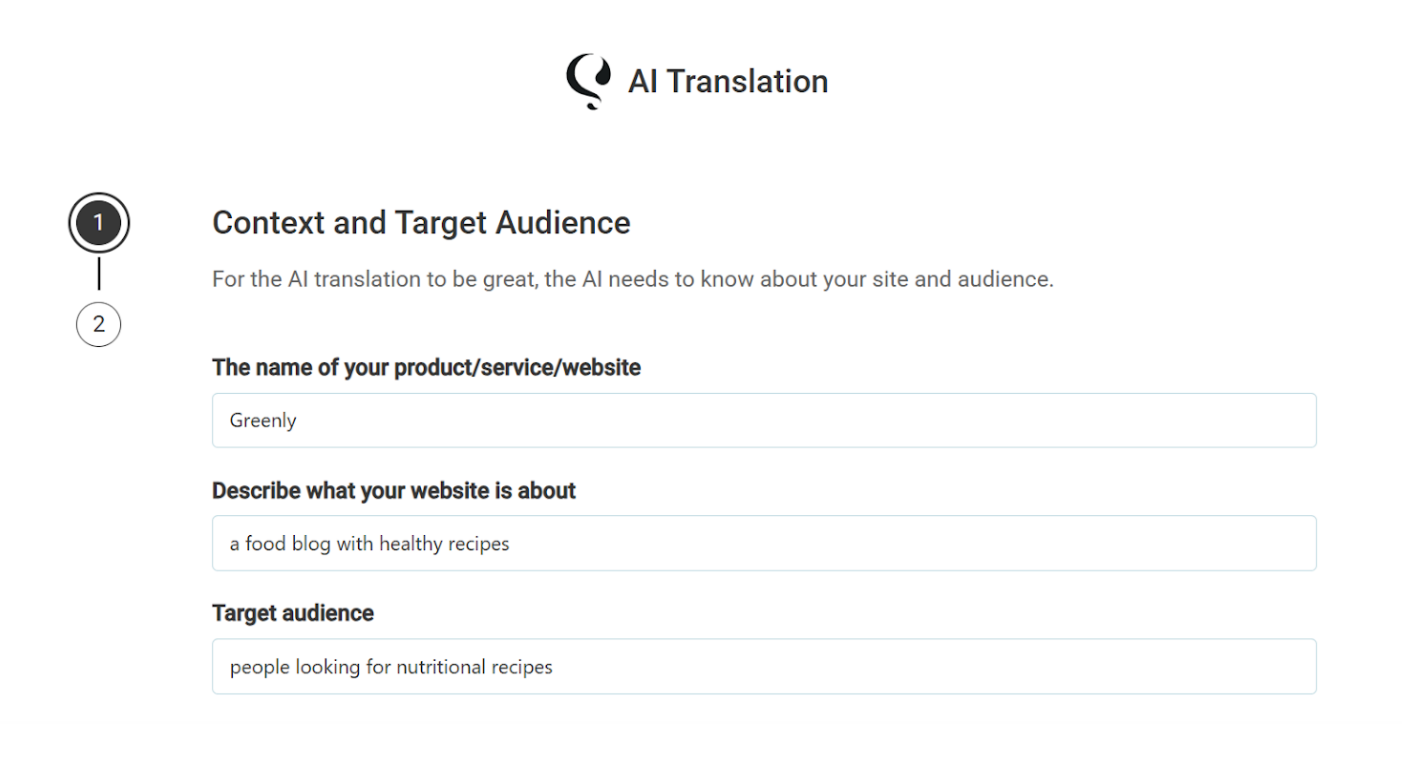 Sharing website context with the powerful AI translation engine for tailored results.
Beyond its exceptional accuracy, employing this AI translation engine for automatic translation offers several key advantages:
- Guaranteed Quality: Experience peace of mind with translations that meet high standards.
- Translations are Yours: All translated content is securely stored on your own website, ensuring you retain full ownership and control.
These benefits collectively make automatic AI translation a compelling choice for any website aiming for global reach.
3. Translate Your Content
This powerful plugin centralizes your entire website translation process within a single, intuitive interface, often referred to as the Translation Dashboard. This comprehensive area allows you to manage the translation of diverse content types, including individual pages, blog posts, custom post types, and content originating from other integrated plugins, such as contact forms, e-commerce product listings, and thematic templates. This unified approach simplifies content management across all languages.
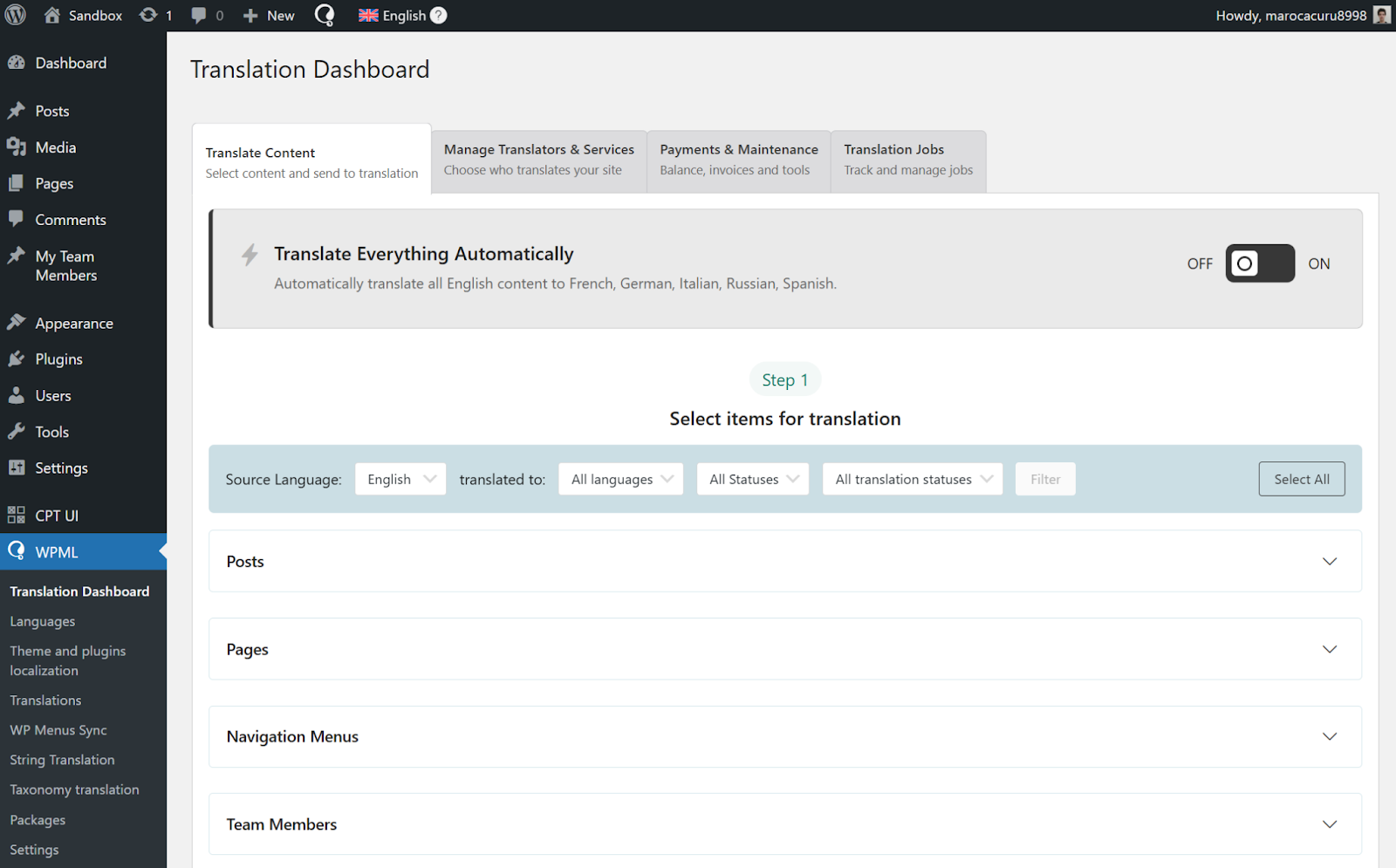 The centralized Translation Dashboard, providing a comprehensive overview of your content.
To initiate content translation, navigate to the plugin's main menu, specifically the Translation Dashboard, and proceed to select the precise items you wish to translate. This straightforward process ensures you have full control over which parts of your site are localized.
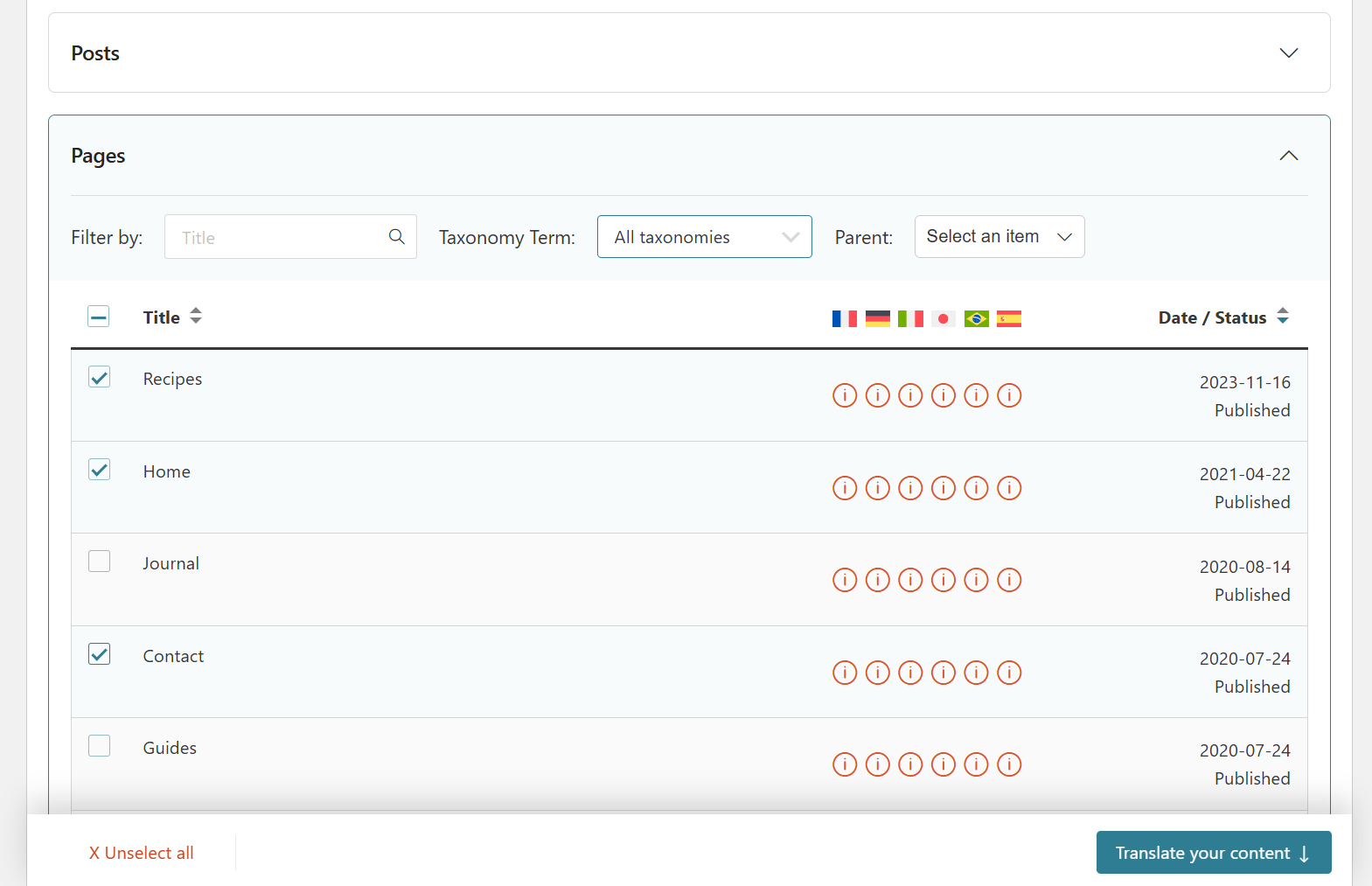 Easily select specific content items ready for translation.
Following your selection, you will choose your preferred translation method. To leverage the advanced capabilities of the primary AI translation engine, simply select Translate automatically and confirm that your chosen engine is set to this powerful option. This ensures the most efficient and high-quality automatic translation.
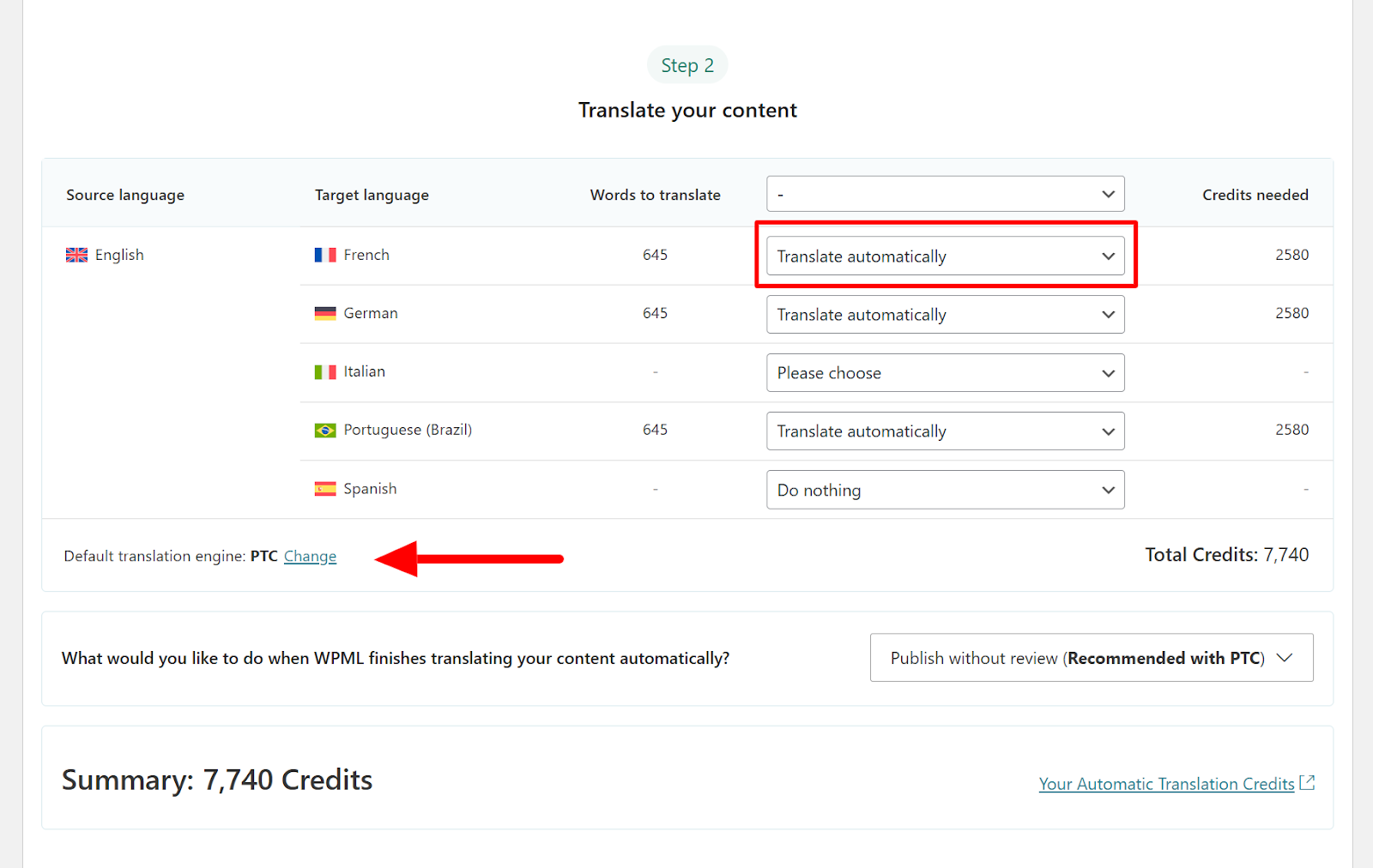 Define target languages and select the automatic translation method.
Finally, you'll have the option to decide whether you would like to review the completed translations. Given the primary AI translation engine's ability to produce exceptionally accurate and natural-sounding results, this review step is entirely optional. Once the AI engine has finished processing, your newly translated content will seamlessly appear on your website whenever visitors switch to the respective language, providing an immediate localized experience.
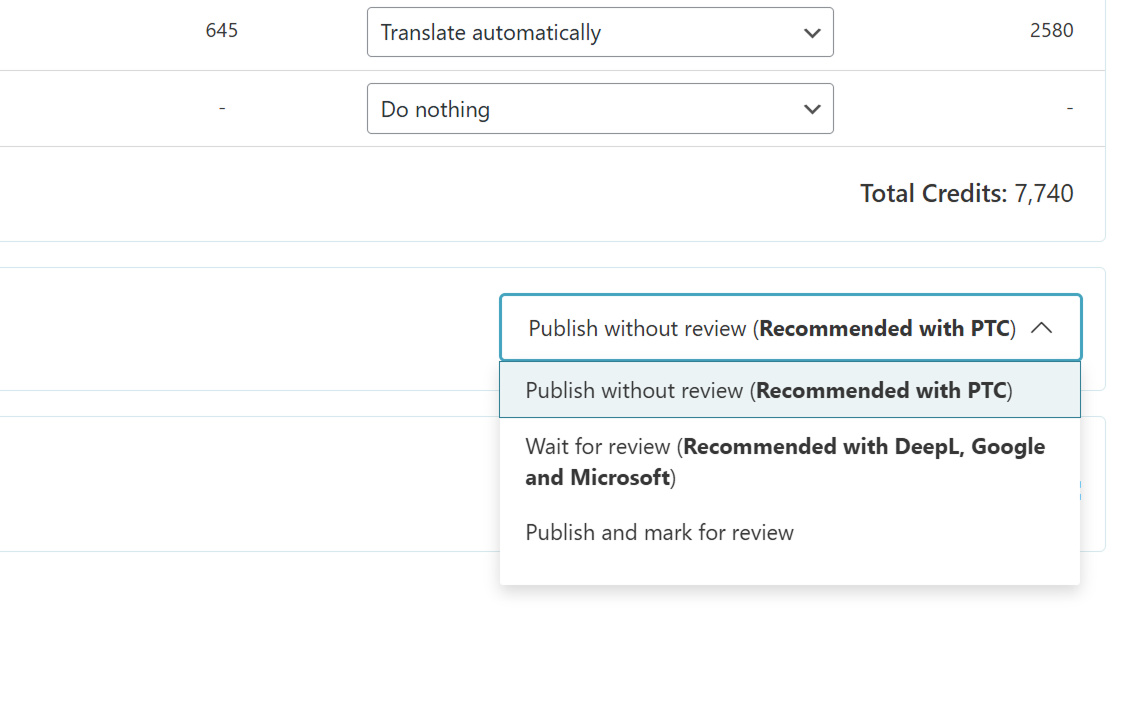 Decide whether to conduct a final review of the automatically generated translations.
4. Translate Everything Automatically
Manually translating an entire website can be a considerably time-intensive undertaking, particularly for sites with extensive content that requires frequent updates. To significantly streamline this process and minimize manual effort, the plugin offers a powerful and innovative feature known as Translate Everything Automatically. This advanced function provides two primary advantages that revolutionize multilingual content management:
- Translate All Existing Content: It intelligently identifies and automatically translates every single page, post, and other translatable elements across your entire website, ensuring comprehensive coverage without manual intervention.
- Automated Translation Updates: This feature ensures that whenever you make edits or additions to your original language content, the corresponding translations are automatically retranslated and updated. This maintains consistency and currency across all language versions effortlessly.
To activate the Translate Everything Automatically feature, navigate to the plugin's Translation Dashboard and simply click the prominent toggle switch located at the top of the screen. This action initiates the setup for continuous, automatic content localization.
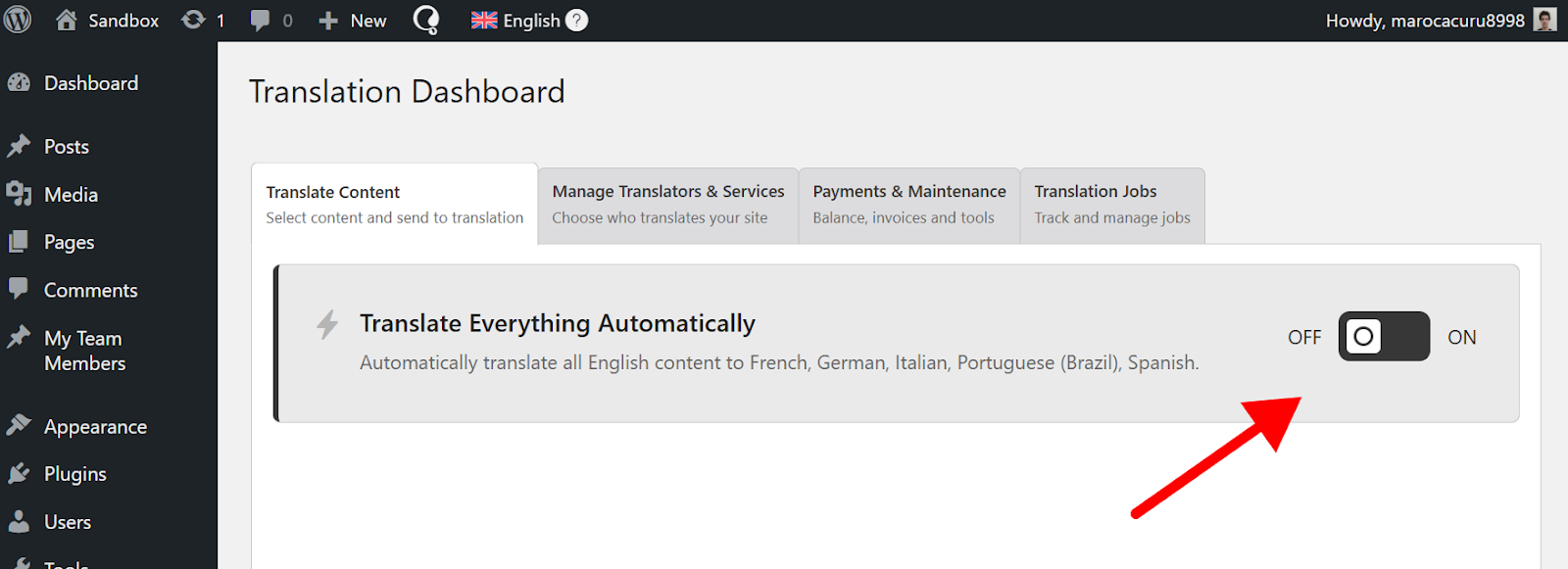 Activating the Translate Everything Automatically feature for seamless localization.
Upon activation, a convenient pop-up will appear, prompting you to specify your preferences regarding which content to automatically translate. You can choose to translate all existing untranslated content immediately, or opt to automatically translate only new content published after this mode is enabled. This flexibility allows for tailored implementation based on your current content strategy.
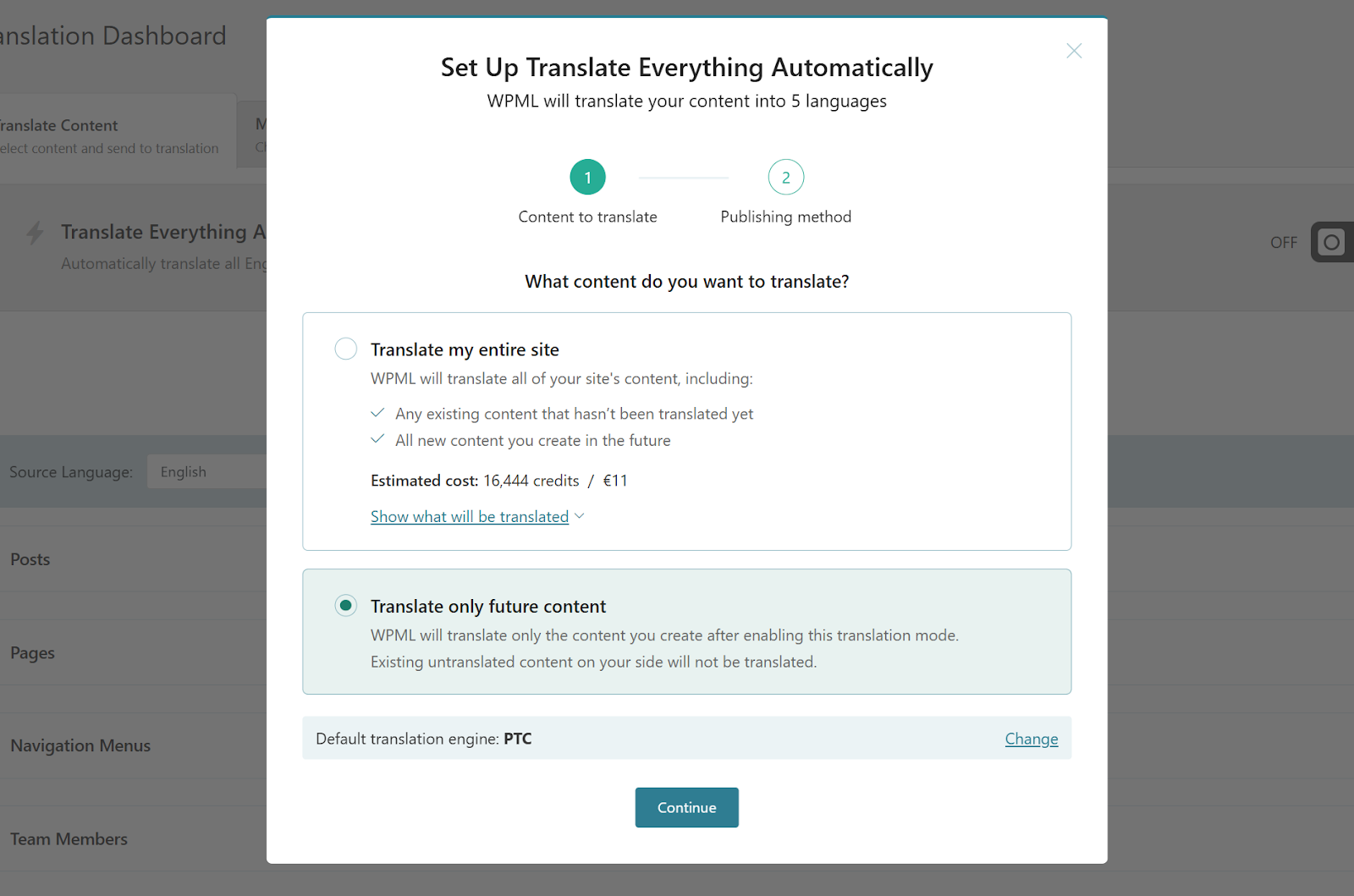 Configure settings for automatic translation of existing or new content.
Once your preferences are confirmed, the plugin will commence the translation of your content, with a clear progress indicator visible at the top of the dashboard. This provides real-time updates on the localization process, allowing you to monitor its completion.
5. Add a Language Switcher
Having successfully translated your website content, the next crucial step is to enable your visitors to easily select their preferred language. While many translation solutions offer browser-based automatic redirection, it is generally recommended to provide visitors with the explicit option to manually choose their language through a dedicated language switcher. This gives users control over their browsing experience.
By default, the plugin thoughtfully displays a language switcher in the footer of your website whenever a page has available translations, making it accessible to users who scroll to the bottom. This ensures a basic level of language selection functionality out of the box.
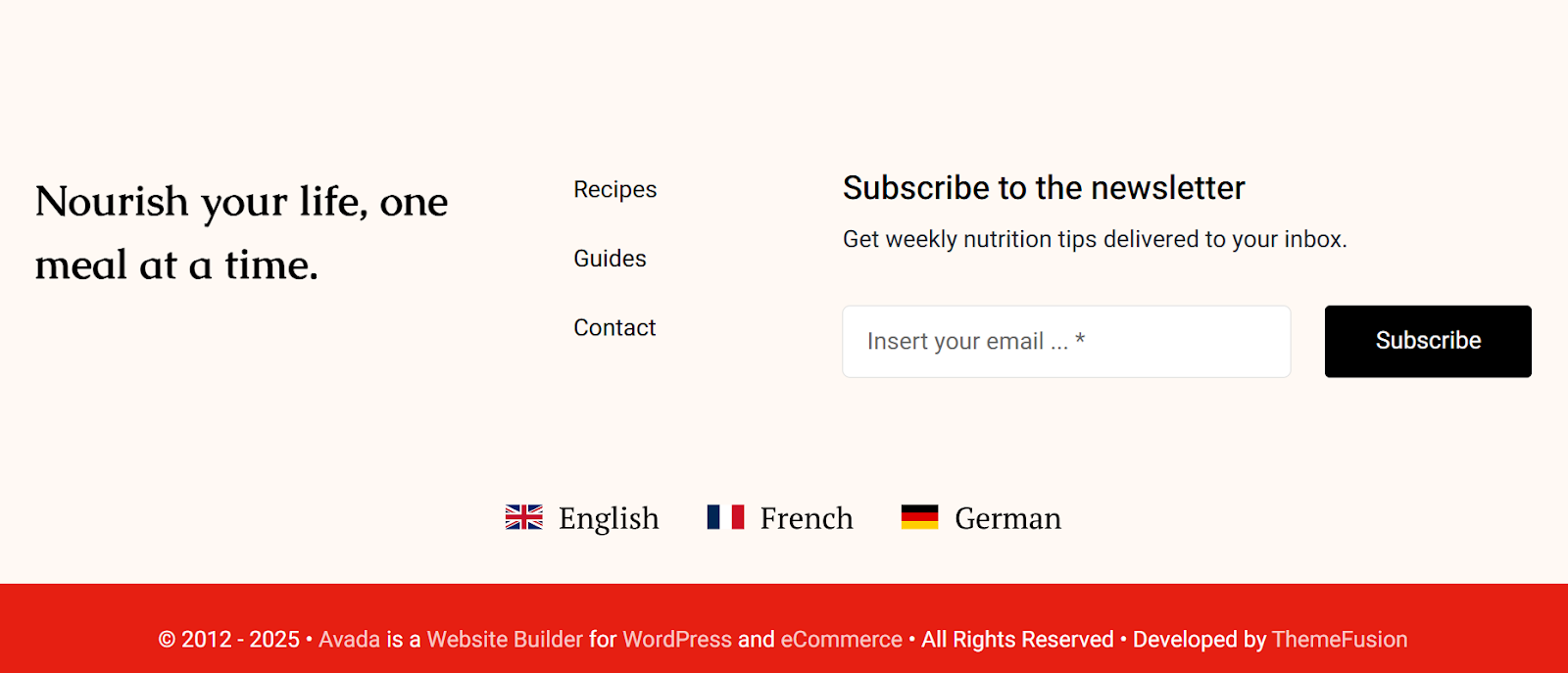 A default language switcher conveniently placed in the website's footer.
However, the flexibility of this solution extends far beyond the footer. You have the ability to strategically place a language switcher in various other prominent areas of your site, such as within your navigation menus, allowing for more immediate access and enhanced user interaction.
 Integrating the language switcher directly into your website's navigation menus.
To customize and add a language switcher, begin by navigating to the plugin's Languages settings and scroll down to the dedicated language switcher configuration options. From this centralized area, you can effortlessly integrate a switcher into your site's menus, various widget areas, and even directly embed it within a page’s body content using shortcodes or blocks. This ensures complete control over its placement.
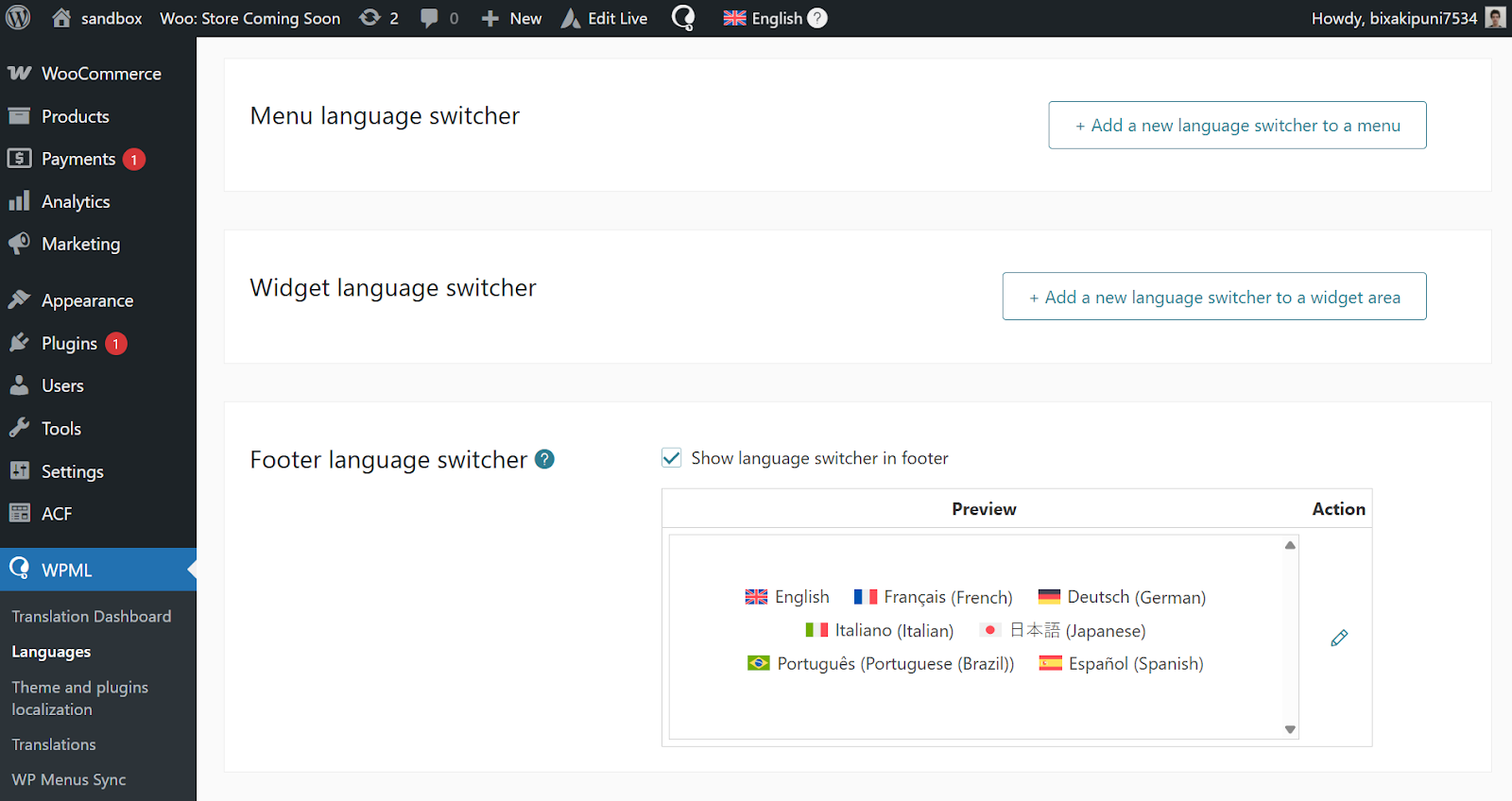 Comprehensive settings for configuring and placing language switchers.
Simply click on the desired placement option – whether it’s a menu, widget area, or a specific content block – and proceed to customize its appearance to perfectly align with your website's design aesthetic. The plugin provides a rich set of options for visual customization.
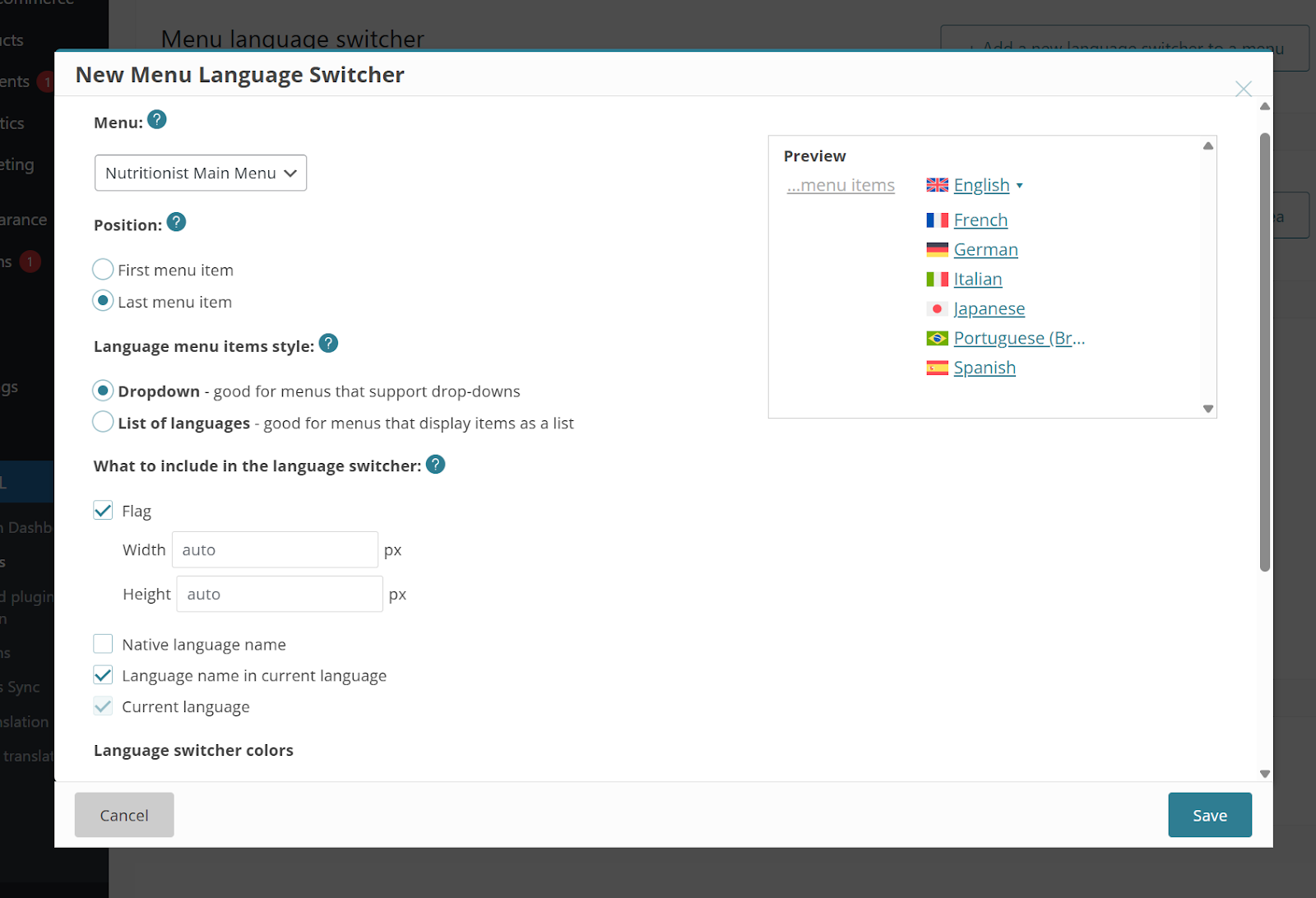 Detailed customization options to tailor the language switcher's appearance.
The solution includes multiple robust customization options to ensure your language switcher integrates seamlessly and functionally:
- Display Style: Choose between a compact dropdown menu or a more expansive horizontal list format.
- Background Color: Easily set a background color that complements your website's palette.
- Flag Visibility: Decide whether to show or hide country flags alongside language names.
- Native Language Name: Option to display each language using its native script and name, enhancing user recognition.
Beyond these default customization settings, advanced users can also implement their own custom CSS rules to design a truly unique and branded language switcher. This allows for unparalleled creative control and visual integration.
 An example of a streamlined language switcher displaying only language names.
For more comprehensive instructions and advanced configurations, refer to the detailed documentation on adding a language switcher to your website.
Alternative Translation Engines
While the primary AI translation engine is highly recommended for its advanced capabilities and personalized output, this solution also provides compatibility with several other reputable translation engines. These alternatives offer varying levels of quality and distinct features, allowing you to choose the best fit for your specific translation needs and budget requirements.
| Translation Engine | Quality | Key Feature |
|---|---|---|
| Primary AI Engine | Human-quality | Customizable AI-powered translations |
| DeepL | Very good | Offers control over language formality |
| Google Translate | Good | Supports the widest range of available languages |
| Microsoft Translator | Good | Known for its efficiency and broad language support |
To switch to a different translation engine, simply locate and click the Change link, typically found under the "Translation Method" or "Engine Configuration" section when preparing content for translation. This option provides flexibility in your translation workflow.
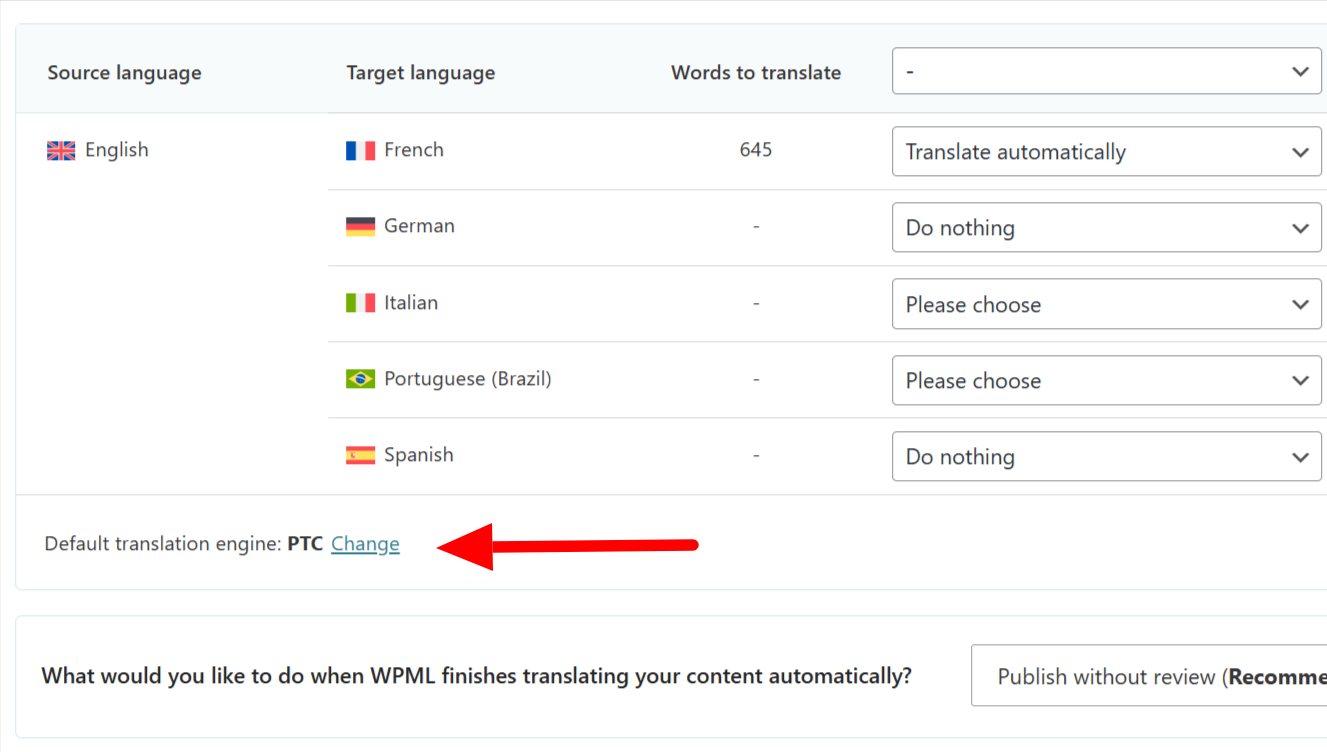 Option to switch between various available translation engines.
For those who prefer not to utilize automatic translation services exclusively, the plugin also offers the functionality to conduct manual translations. However, as this method can be significantly time-consuming, particularly for large websites, a hybrid approach is often recommended. This involves using automatic translation to generate an initial draft, followed by a thorough manual review and refinement to ensure perfect accuracy and stylistic consistency.
Bonus: Optimize for Multilingual SEO
Optimizing your website for multilingual SEO is a strategic approach that can significantly boost your rankings in various languages and attract a broader international audience. Implementing these best practices ensures that search engines effectively index and display your translated content to the right users, maximizing your global visibility. Consider the following key optimization tips to enhance your multilingual strategy.
Use Language Directories for URLs
Language directories offer a straightforward and highly effective method for structuring your website's URLs, making it effortlessly easy for search engines to understand the language of each specific page. This clear segmentation aids in proper indexing and targeting. For example, here’s how an “About” page might be structured with a Spanish language directory:
example.com/about/example.com/es/sobre/
When configuring your translation solution, you are provided with various flexible URL formats to choose from, including language directories, subdomains, or even entirely distinct domains for each language. This versatility allows you to select the structure that best suits your website's architecture and SEO goals.
Implement Hreflang Tags
Hreflang tags are a critical component for multilingual SEO, helping search engines to accurately discover your translated page versions and to comprehend the overall structure of your international website. It is essential that every page includes an hreflang tag that correctly links to its corresponding translated version. Conversely, each translated page should similarly link back to the original content, establishing a clear relationship between language variants.
The translation solution automates the implementation of hreflang tags, eliminating the need for manual configuration. This means you won't have to manually manage these complex tags yourself. Furthermore, as you add new translations or reorganize existing pages, the system intelligently and automatically updates your hreflang tags, ensuring ongoing accuracy and compliance with search engine guidelines.
Translate URL Slugs
Translating URL slugs offers dual benefits: it significantly aids search engines in understanding your content's context within each language and simultaneously makes your URLs more intuitive and user-friendly for international visitors. A well-translated slug can improve click-through rates and reinforce content relevance. Here’s a practical example illustrating this concept:
example.com/blog/best-summer-destinations/example.com/blog/es/mejores-destinos-de-verano/
By default, the translation solution automatically generates a translated URL slug whenever you localize content. This convenient feature saves time and ensures consistency. However, for complete control, you also have the option to manually specify your own custom translated URL slug if desired, allowing for precise optimization.
