
 (1).svg)
 (1).png)


 (1).svg)
.svg)
This article introduces a seamless, no-code integration between Gravity Forms and Odoo. This powerful module enables you to synchronize your Gravity Forms entries directly with your Odoo ecosystem, significantly streamlining workflows and fully leveraging your valuable web data.
For organizations utilizing WordPress to collect information, the challenge of integrating web-collected data directly into essential business tools like Odoo can be substantial. Traditionally, each form submission often necessitated manual data entry into a CRM or other business management system. This process is prone to delays, introduces risks of human error, and consumes valuable time for your operational teams.
This innovative integration is designed to transform these manual processes by delivering enhanced operational efficiency and unlocking powerful automation capabilities. Continue reading to discover practical applications and learn how to configure your initial Gravity Forms to Odoo connection, paving the way for a more integrated and efficient digital workflow.
It is important to note that Odoo is a third-party business management platform. While this article discusses its integration with Gravity Forms, it is not an official endorsement of Odoo, its developers, or its support quality. As with any third-party solution, we advise a thorough evaluation to ensure its suitability for your specific organizational requirements.
Why Integrate Gravity Forms with Odoo?
Gravity Forms stands out as a highly effective and versatile form builder for WordPress, renowned for its extensive capabilities. It excels in creating everything from basic contact forms and sophisticated lead capture forms to systems for customer feedback and online payment processing.
Conversely, Odoo functions as a comprehensive management platform, providing a vast array of business management applications and integrations designed to support diverse operational needs.
Despite their individual strengths, these two robust platforms do not inherently communicate with each other. This lack of natural integration can lead to several significant operational challenges:
- **Redundant Data Entry**: The necessity for manual double data entry or complex import/export procedures for Gravity Forms data into Odoo.
- **Data Inconsistencies**: Potential for discrepancies and inconsistencies in data across different tools, leading to unreliable information.
- **Delayed Processing**: Overlooked or delayed handling of critical customer requests submitted via Gravity Forms.
- **Operational Inefficiencies**: Significant time wastage and reduced efficiency within operational teams due to manual data handling.
- **Limited Data Visibility**: A lack of comprehensive insight into all web requests and collected data.
- **Information Silos**: The creation of isolated data pockets, leading to missed opportunities for cross-functional insights and actions.
- And numerous other complications that can impede business growth and responsiveness.
The definitive solution to these challenges is a cohesive integration between both platforms, establishing a seamless and automated connection between Gravity Forms and Odoo.
Through this integration, submissions from your WordPress forms are channeled directly into your specified Odoo modules, adhering to your predefined rules. For instance, a lead capture form developed in Gravity Forms can instantly sync new entries with Odoo, transforming them into actionable prospects for your sales and marketing campaigns. This integration empowers you to configure and automate various business processes directly from your Gravity Forms submissions, ensuring data is always where it needs to be.
Let's delve into concrete examples of the extensive capabilities and efficiencies you can achieve with this integration for the Odoo platform.
Key Automation Capabilities with Gravity Forms and Odoo Integration
The integration of Gravity Forms with Odoo unlocks a multitude of workflow enhancements and automation possibilities across various business functions. Here are several practical examples demonstrating the significant potential of this powerful integration:
Streamline Lead Transfer to Your Odoo CRM
When a prospective client completes a contact form or a quote request form on your website, their vital information is instantly transferred to Odoo, automatically generating a new CRM lead. This immediate data flow empowers your sales and outreach teams to follow up promptly with fresh leads, significantly accelerating the request processing timeline.
Rapid action, coupled with comprehensive and accurate information, demonstrably increases the likelihood of converting incoming leads into valuable customers. This integration eliminates the need for manual data entry, drastically reducing the risk of errors and oversight for your teams. Consequently, your personnel can devote their focus to engaging with inquiries and actively converting prospects, rather than administrative tasks.
Efficiently Manage Event Registrations within Odoo
For organizations that regularly host webinars, training sessions, conferences, or other events, this integration offers a substantial simplification of daily operational tasks. You can seamlessly synchronize Gravity Forms registrations directly with Odoo, allowing you to access and manage your entire participant list from a unified, central interface.
Furthermore, this integration allows you to leverage Odoo’s robust features for enhanced communication management, including automated emailing, precise attendance tracking, streamlined task management, and improved team collaboration surrounding your events.
Enhance Project Management Through Odoo and Gravity Forms
Establish a direct connection between your Gravity Forms entries and your Odoo projects. With every new form submission, project-related data is fed directly into Odoo, where it can seamlessly integrate with your existing project management workflows. Whether it involves change requests, bug reports, or valuable client feedback, critical information flows effortlessly into your project management system.
This Gravity Forms to Odoo integration effectively eliminates the inefficiencies of back-and-forth email communications and centralizes all project-related requests within a single, accessible tool. Your teams gain clear visibility into each project's status, enabling them to effectively prioritize interventions and allocate resources. Additionally, Odoo provides proactive management capabilities, such as automating immediate customer confirmations, potentially including a tracking number or reference.
Centralize and Categorize Contact Management with Gravity Forms and Odoo
Does your organization receive diverse types of contacts, such as partnership inquiries, spontaneous job applications, or communications from suppliers, through various web forms? This integration automates the creation and categorization of these contacts directly within Odoo.
You can establish and manage multiple distinct data flows to organize your contacts with unparalleled ease. For example, a “Become a Partner” form can feed directly into your supplier database, while an application form automatically generates new contacts within your recruitment module. This granular control extends to automatically segmenting contacts based on their specific responses, further refining your contact management strategy. The Gravity Forms Odoo integration module also supports conditional synchronization, allowing you to send only those responses that meet predefined criteria.
As evident from these examples, the potential for automation with this module is virtually limitless, offering profound flexibility to tailor your data workflows. And notably, configuring a Gravity Forms Odoo integration can be accomplished in just a few minutes.
Here’s a straightforward 5-step guide to get you started:
Five Steps to Configure Your Gravity Forms to Odoo Integration
Setting up your integration between Gravity Forms and Odoo is a straightforward process. Follow these five detailed steps to establish a robust and automated data flow:
Step 1: Install and Activate the Integration Module
Begin by obtaining the Odoo Add-On. Once acquired, log into your WordPress dashboard and proceed with the standard plugin installation process for your new module. After successful installation, ensure the add-on is activated. This step is crucial as it enables the foundational exchange of API keys between Gravity Forms and your Odoo instance.
Step 2: Generate Your Odoo API Key
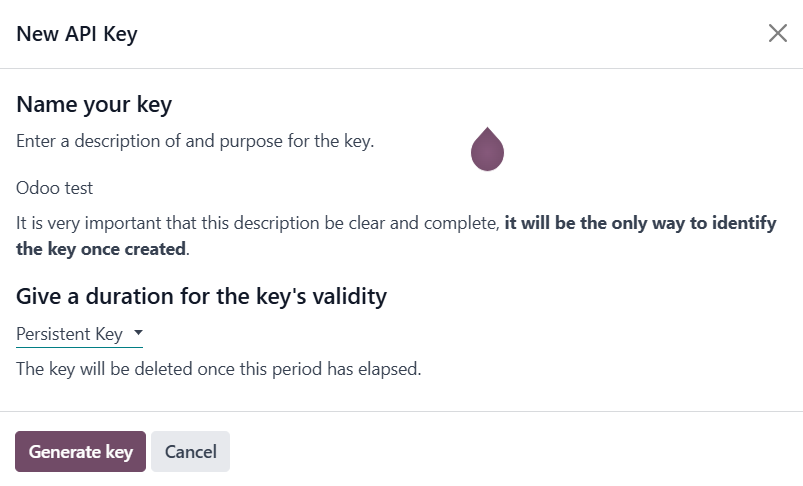
Within your Odoo interface, navigate to your user profile by clicking on your name, typically located in the top-right corner. Select **Preferences** from the dropdown menu. Proceed to **Account Security**, then click on **API Keys**, and finally, select **Add New API Key**. You will be prompted to enter your password, provide a descriptive name for your API key, and then generate it. It is paramount to keep this newly generated API key secure, as it grants access to your Odoo environment.
Step 3: Establish the Connection Between WordPress and Odoo
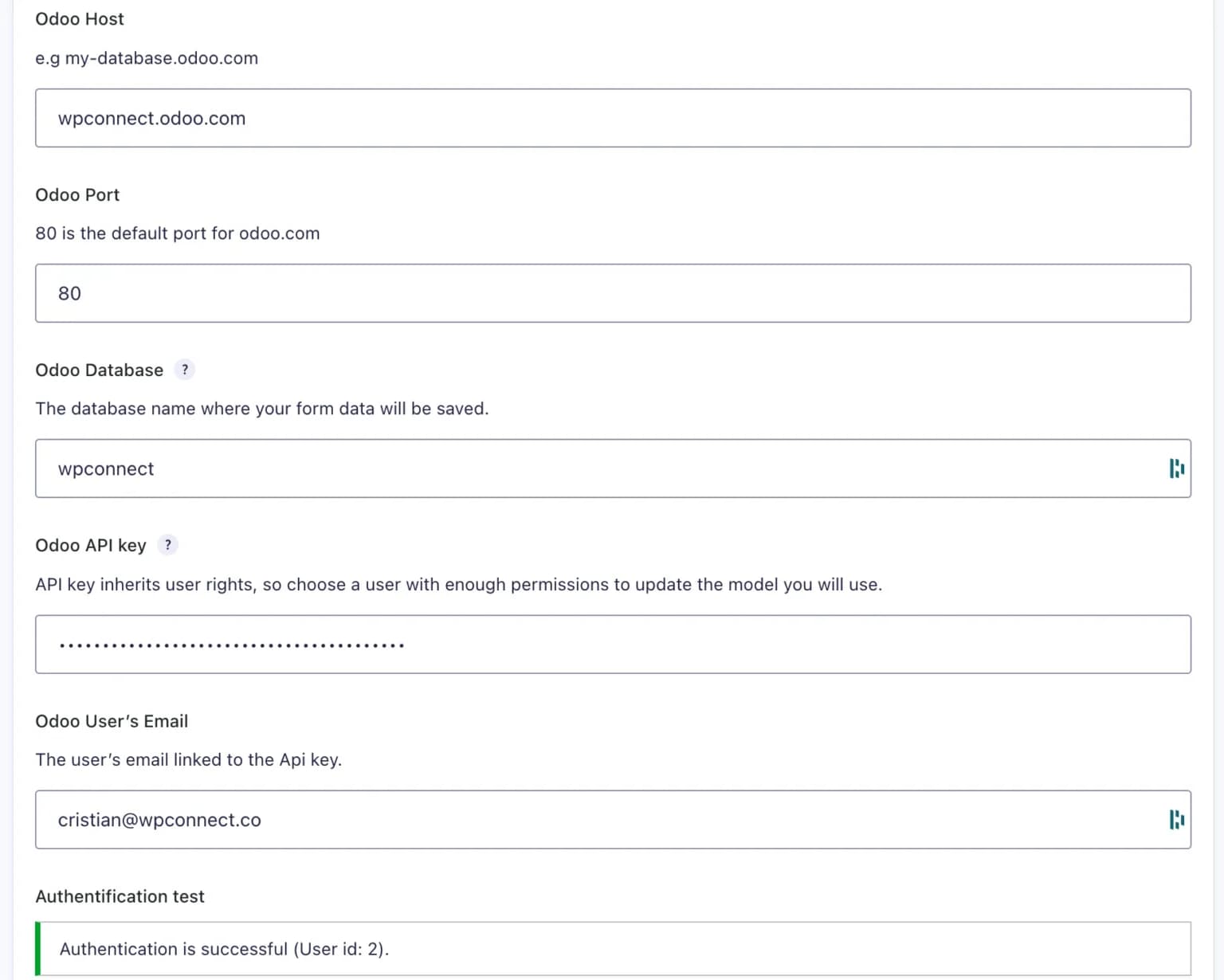
Return to your WordPress dashboard. Navigate to **Gravity Forms > Settings > Odoo**. In the designated fields, paste the API key you generated in the previous step, enter the email address associated with your Odoo account and your database information. After filling in all the required details, click **Save**. A confirmation message, "Authentication Successful," will appear, verifying that the connection between your WordPress site and Odoo has been successfully established.
Step 4: Configure Field Mapping for Data Synchronization
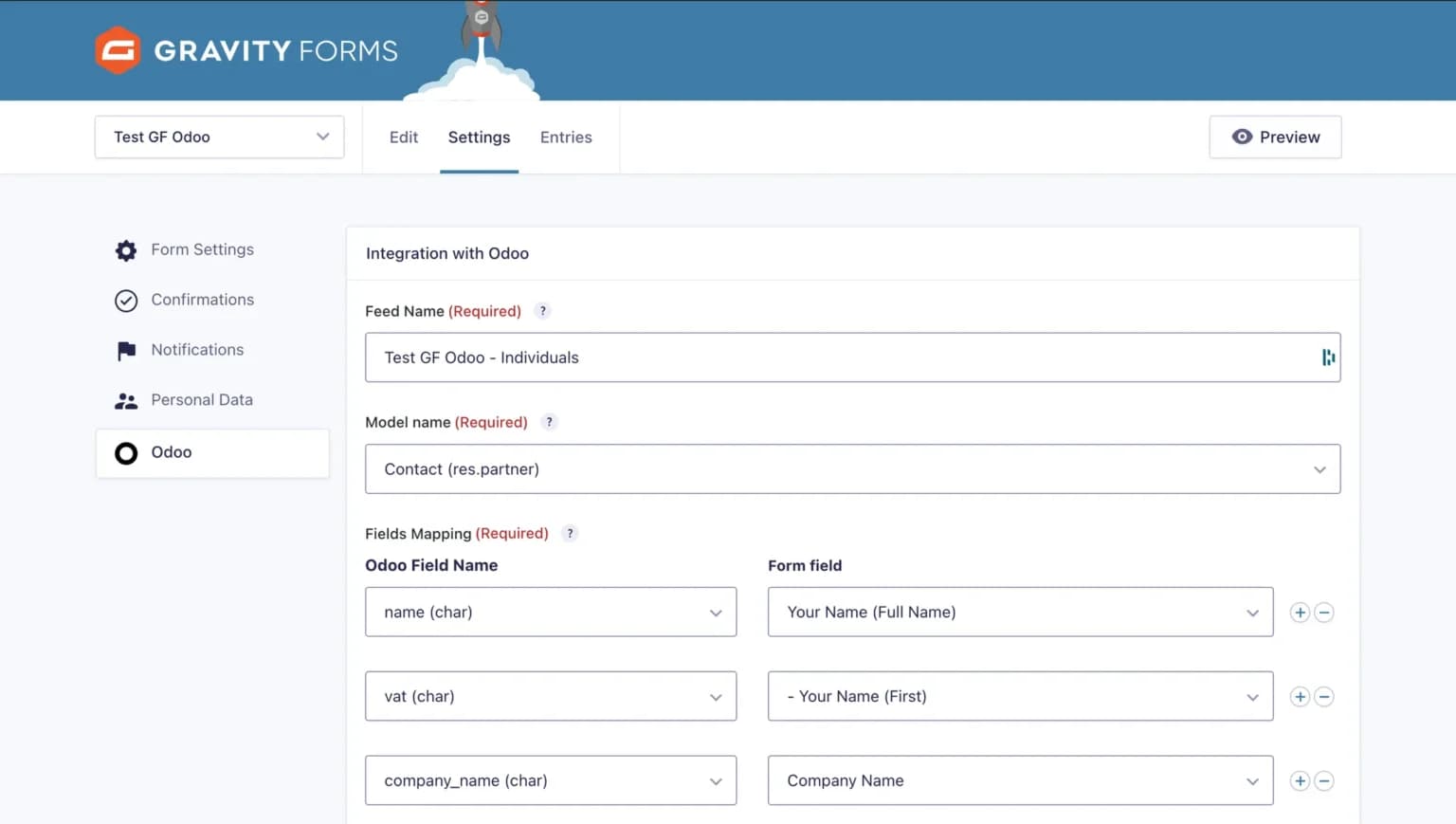
Open the specific Gravity Form you wish to integrate with Odoo. Access its settings by navigating to **Settings > Odoo**. Here, you will create a new feed. Select the appropriate destination Odoo model where the form data should be sent (e.g., Leads, Contacts, Projects). Subsequently, meticulously map each field from your Gravity Form to its corresponding field within Odoo. This ensures that data is accurately transferred to the correct locations.
Once you have completed the mapping process, save your settings to apply the configuration.
Step 5: Activate and Test Your Integration
With the field mapping configured, activate your newly created feed. To ensure everything is working correctly, perform a test by submitting dummy data through your Gravity Form. After submission, verify that this data appears accurately and as expected within your Odoo system. This step allows you to fine-tune any settings and confirm the seamless flow of information. Additionally, you have the option to incorporate conditional logic at this stage to filter which form submissions are synchronized, allowing only data meeting specific criteria to be sent to Odoo.
Congratulations! Your integration is now fully operational, ready to enhance your productivity. For more comprehensive, step-by-step guidance, please refer to the complete documentation available on our website.
Frequently Asked Questions About the Gravity Forms Odoo Integration
Can Form Submissions Be Filtered Before Being Sent to Odoo?
Yes, the integration is equipped with a robust conditional logic feature. This functionality allows you to establish precise rules, ensuring that only form submissions that meet specific criteria – such as a particular request type or a designated field value – are sent to Odoo. This provides granular control over the data synchronized between the platforms.
Are Programming Skills Required to Configure This Integration?
Absolutely not. This integration is designed to be entirely no-code, featuring an intuitive mapping interface that simplifies the setup process. All configuration steps are easily managed directly through the WordPress interface, eliminating the need for any coding knowledge. Our comprehensive documentation is available to guide users through every stage of the setup.
What is the Frequency of Data Synchronization Between Gravity Forms and Odoo?
Data synchronization between Gravity Forms and Odoo is instantaneous. As soon as a form is submitted on your website, the collected data is immediately transferred to Odoo in real-time, ensuring that your business systems are always updated with the latest information.
Conclusion: The Transformative Potential of Gravity Forms and Odoo Integration
The integration module for Gravity Forms and Odoo signifies a pivotal advancement for achieving substantial gains in productivity and operational efficiency. This no-code solution empowers organizations to automate complex workflows without encountering technical complexities.
By eliminating manual data transfer and processing, your teams are freed to concentrate on strategic objectives and core business missions, leading to enhanced responsiveness in managing customer inquiries and critical business processes.
In today's rapidly evolving digital landscape, characterized by advancements in no-code platforms and artificial intelligence, sophisticated automation is no longer an exclusive domain of large enterprises. This integration democratizes access to powerful automation, offering the potential to craft dynamic workflows that are precisely customized to your unique business processes, regardless of your organization's size.
We are dedicated to making such powerful no-code solutions accessible to businesses of all scales through our range of add-ons and plugins. We invite you to explore other integration opportunities available to enhance your WordPress ecosystem.
