
 (1).svg)
 (1).png)


 (1).svg)
.svg)
We are pleased to introduce a no-code integration designed to connect Gravity Forms with Odoo. This powerful module facilitates the direct synchronization of your Gravity Forms entries with your Odoo ecosystem, effectively streamlining your workflows and enabling you to harness the full potential of your web-collected data.
For organizations utilizing WordPress to gather information, the challenge of integrating web data directly into essential business tools like Odoo is often encountered. Without a proper connection, every form submission typically necessitates manual entry into your CRM, leading to potential delays, increased risks of errors, and inefficient use of your team’s valuable time.
This integration fundamentally transforms how businesses operate by delivering significant operational efficiencies and opening up powerful automation possibilities. Continue reading to explore practical use cases and gain insights into setting up your initial Gravity Forms to Odoo connection.
It is important to note that Odoo is a third-party solution. This article serves as an informative guide on integration capabilities and does not imply endorsement of the platform, its developers, or the quality of its support. As always, we recommend a thorough evaluation of any third-party solution to ensure its suitability for your specific business requirements.
Why Connect Gravity Forms to Odoo?
Gravity Forms is widely recognized as a robust and versatile form builder for WordPress. Its effectiveness is proven across various applications, from straightforward contact forms to sophisticated lead capture forms, customer feedback surveys, and secure online payment solutions.
Odoo, conversely, is a comprehensive management platform that offers a wide array of business management applications and integrations designed to support various organizational needs. From CRM to accounting, project management, and inventory, Odoo provides a unified suite of tools.
However, these two powerful platforms do not naturally communicate with each other, which can lead to several operational challenges:
- The necessity for manual double data entry or complex import/export processes for Gravity Forms data into Odoo.
- Potential data consistency issues arising from discrepancies between disparate tools.
- The risk of forgotten or delayed processing of critical customer requests submitted via Gravity Forms.
- Significant time wastage and reduced efficiency for operational teams due to manual data handling.
- Lack of unified visibility across all web requests and collected data, hindering informed decision-making.
- Creation of information silos that can lead to missed business opportunities.
- And numerous other inefficiencies that impede productivity.
The clear solution to these challenges is a seamless integration between both platforms: a direct connection that allows Gravity Forms and Odoo to work in harmony.
Through this integration, your WordPress forms can feed directly into your Odoo modules, configured precisely according to your established business rules. For instance, a lead capture form created with Gravity Forms can instantly sync new entries with Odoo, automatically classifying them as prospects for your marketing or sales campaigns. The integration empowers you to configure and trigger various business processes directly from your Gravity Forms submissions.
Let’s delve into concrete examples of what you can achieve with this integration between Gravity Forms and the Odoo platform.
What Can You Automate with the Gravity Forms Integration for Odoo?
Integrating Gravity Forms with Odoo unlocks a multitude of workflow and automation possibilities, significantly enhancing your operational capacity. Here are compelling examples that illustrate the vast potential of this integration.
Transfer Web Form Leads to Your Odoo CRM
When a prospective client completes your contact or quote request form, their information is immediately transferred to Odoo, automatically creating a new CRM lead. This instant transfer enables your sales teams to make timely contact with "hot" leads, significantly accelerating the request processing timeline. Swift action with comprehensive and accurate information is crucial for increasing the likelihood of converting incoming leads into loyal customers. This integration eliminates the need for manual data entry and mitigates the risk of oversight, allowing your teams to concentrate on their core activities: responding to inquiries and effectively converting prospects.
Manage Event Registrations in Odoo
For organizations that frequently host webinars, training sessions, or other events, this integration offers substantial simplification for daily operations. You can synchronize Gravity Forms registrations directly with Odoo, providing a unified interface to access and manage your participant lists. Furthermore, you can leverage Odoo’s extensive features for enhanced communication and event management, including automated emailing, efficient attendance tracking, streamlined task management, and improved team collaboration surrounding your events.
Enhance Project Management with Odoo and Gravity Forms
Connect your Gravity Forms entries seamlessly to your Odoo projects. With every new submission, the integration feeds project-related data directly into Odoo, where your existing workflows can automatically take over. Whether it’s change requests, detailed bug reports, or valuable client feedback, critical information flows effortlessly into your project management system. This integration eliminates the need for endless email exchanges and centralizes all project-related requests within a single, accessible tool. Your teams gain clear visibility into each project’s status and can prioritize their interventions more effectively. Additionally, Odoo provides various proactive management options, such as automating immediate customer confirmations complete with tracking numbers.
Centralize Contact Management with Gravity Forms and Odoo
If your business receives partnership inquiries, unsolicited applications, or supplier contacts through various online forms, this integration automates the creation and categorization of these contacts within Odoo. You can establish multiple distinct data flows to organize your contacts effortlessly. For example, a "Become a Partner" form can directly populate your supplier database, while an application form can create new contacts within the recruitment module. You can even automatically segment contacts based on their responses. The Gravity Forms Odoo integration module also supports conditional synchronization, allowing you to send only responses that meet specific predefined conditions. As demonstrated, the possibilities for automation with this module are virtually limitless. The most significant advantage is that configuring a Gravity Forms Odoo integration typically takes just a few minutes.
Here’s a concise five-step guide to setting up your integration:
5 Steps to Set Up Your First Gravity Forms Odoo Integration
Step 1: Add-On Installation and Activation
First, obtain the necessary Odoo Add-On. Then, log into your WordPress dashboard to install your module by following the standard plugin installation procedures. Once the add-on is successfully installed and activated, you will be able to establish the API key exchange between Gravity Forms and Odoo.
Step 2: Generate Your Odoo API Key
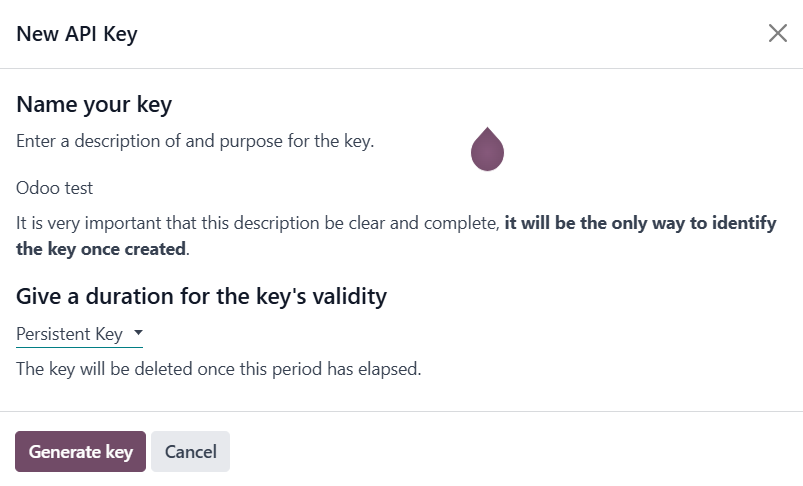
Within your Odoo interface, navigate to your profile by clicking your name in the top right corner, then select **Preferences**. Proceed to **Account Security > API Keys** and click on **Add New API Key**. You will be prompted to enter your password, provide a name for your key, and then generate it. It is crucial to keep this API key secure and confidential.
Step 3: Connect WordPress and Odoo
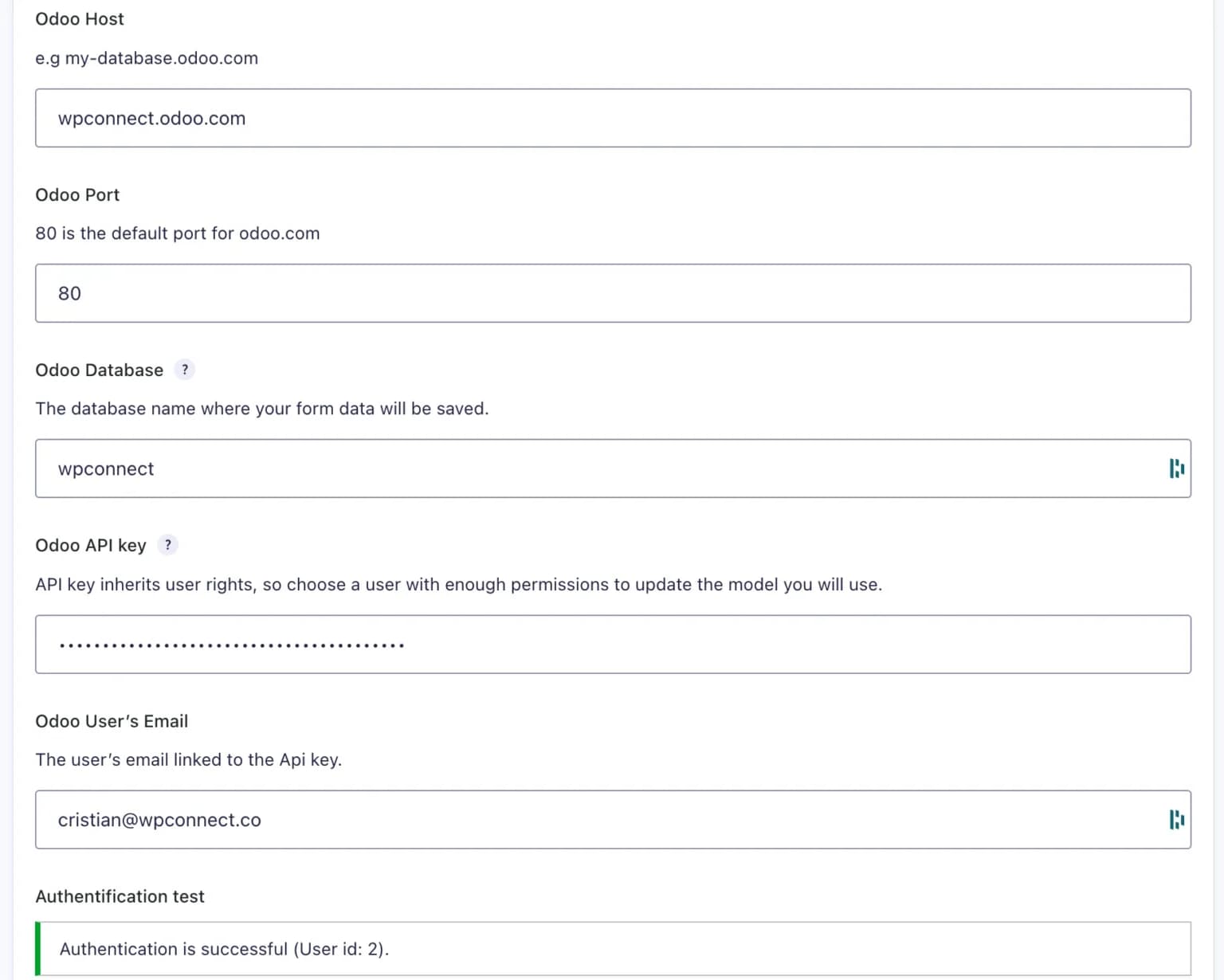
Return to your WordPress dashboard and access **Gravity Forms > Settings > Odoo**. Here, you will paste your generated API key into the designated field. Additionally, enter the email address associated with your Odoo account and your Odoo database information. Click **Save** to finalize the connection. A confirmation message, "Authentication Successful," will confirm that the connection has been established correctly.
Step 4: Configure Field Mapping
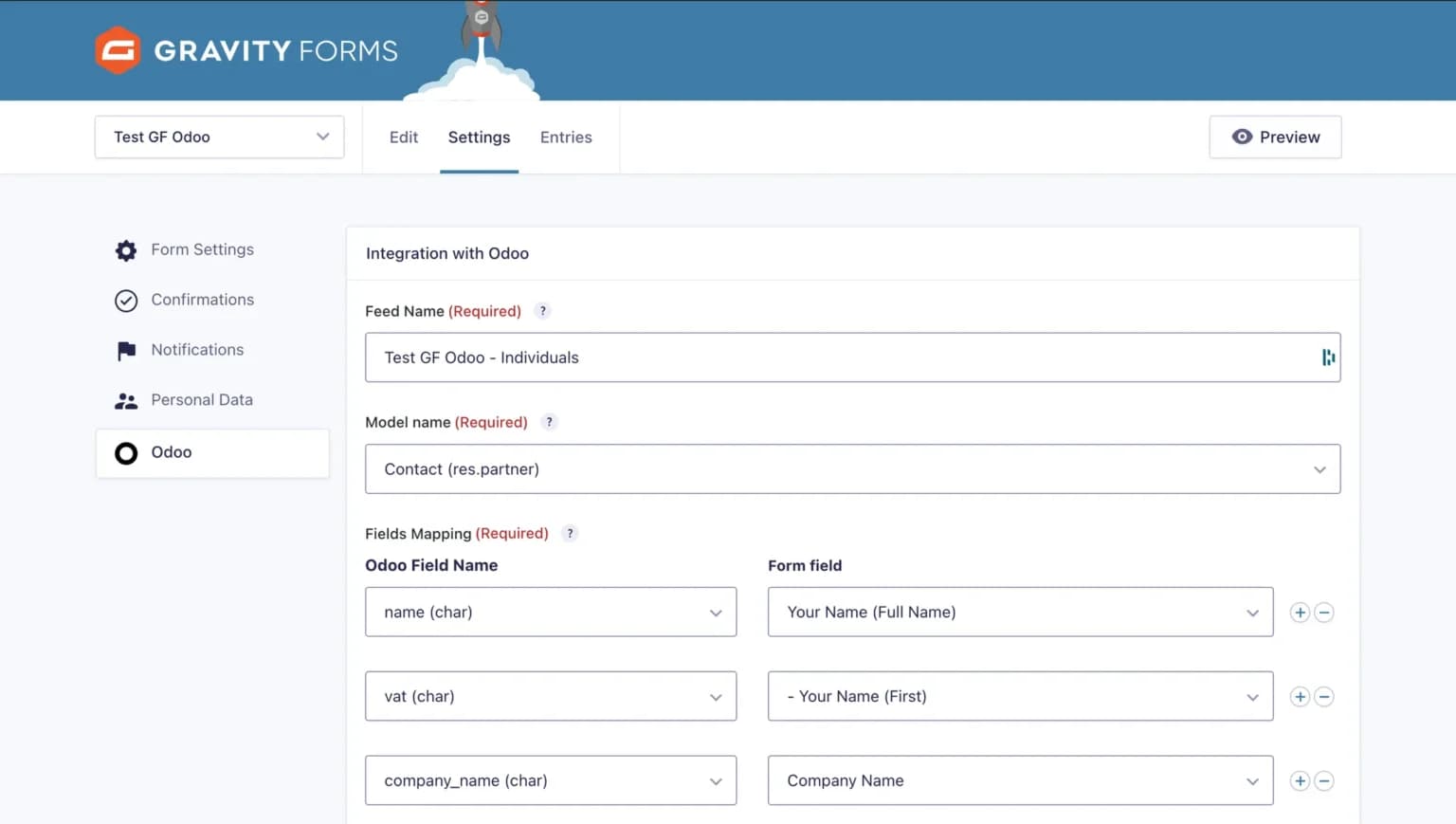
Open the specific Gravity Form you wish to connect and navigate to **Settings > Odoo**. Create a new feed, select the appropriate destination Odoo model (e.g., Leads, Contacts, Projects), and then meticulously map each field from your Gravity Form to its corresponding field in Odoo. Once satisfied with the mapping, save your settings.
Step 5: Activation and Testing
Activate your newly configured feed. It is highly recommended to thoroughly test the integration by submitting dummy data through your Gravity Form. Verify that the data appears correctly and as expected within your Odoo environment. For advanced control, you can also add conditional logic to filter which submissions are synchronized, ensuring only relevant data is transferred. Your integration should now be fully operational!
FAQs About the Gravity Forms Odoo Integration
Can I filter which form submissions are sent to Odoo?
Yes, the integration includes a robust conditional logic feature. This allows you to set precise rules and criteria to ensure that only form submissions meeting your specific requirements (such as request type, specific field values, or other conditions) are sent to Odoo.
Do I need programming skills to configure the integration?
Absolutely not. This integration is designed to be entirely no-code, featuring an intuitive mapping interface. The configuration process is straightforward and easily managed through the WordPress interface, requiring no prior coding knowledge. Comprehensive documentation is typically available to guide you through every step.
How often is data synchronized between Gravity Forms and Odoo?
Synchronization occurs in real-time. As soon as a form is submitted on your website, the collected data is immediately transferred to Odoo, ensuring that your information is always up-to-date.
Final Thoughts
The Odoo Add-On for Gravity Forms represents a significant advancement for enhancing productivity and achieving substantial operational efficiency gains within your organization. Without the need for complex coding or extensive technical expertise, you can automate sophisticated workflows that transform how your business operates. This empowers your teams to concentrate on strategic missions and deliver exceptional responsiveness in handling customer requests.
In today's rapidly evolving digital landscape, characterized by no-code solutions and artificial intelligence, automation is no longer an exclusive domain of large corporations. It offers immense potential for businesses of all sizes to create dynamic workflows and precisely customize their unique business processes. Embracing such integrations can truly unlock new levels of efficiency and strategic advantage.
