
 (1).svg)
 (1).png)


 (1).svg)
.svg)
This article introduces a robust, no-code integration designed to seamlessly connect form submissions with the Odoo ecosystem. This module enables the direct synchronization of form entries, significantly streamlining workflows and unlocking the comprehensive potential of your collected web data within your business operations.
If your organization uses WordPress to gather crucial information, you might be familiar with the challenges of not being able to directly leverage this web data within powerful business management tools like Odoo. Historically, every form submission has often necessitated manual entry into your Customer Relationship Management (CRM) system or other modules. This traditional approach frequently results in operational delays, heightens the risk of data entry errors, and represents a significant expenditure of time for your teams.
This innovative integration is set to transform how you operate by delivering substantial operational efficiency and opening up powerful automation possibilities. Continue reading to discover practical use cases and learn how to effortlessly establish your first connection between your forms and Odoo.
Odoo is a third-party solution. This article is not intended to be an endorsement of this platform, its developers, or the quality of its support. As always, we recommend that you extensively evaluate all solutions to ensure their suitability for your specific business requirements.
Why Connect Your Forms to Odoo?
Forms on WordPress are renowned for their versatility and effectiveness, offering solutions from simple contact forms to sophisticated lead capture, customer feedback mechanisms, and online payment processing. It has consistently proven its capability in various web data collection scenarios.
Odoo, conversely, is a comprehensive suite of business management applications, offering a wide array of modules and integrations designed to manage diverse business functions.
However, these two powerful platforms do not naturally communicate. This lack of inherent connectivity can lead to several operational challenges, including:
- The necessity for double data entry or complex import/export procedures for transferring form data into Odoo.
- Potential issues with data consistency across your different digital tools, leading to discrepancies.
- Delayed or overlooked processing of customer requests originating from web forms, impacting customer satisfaction.
- Significant time wastage and reduced efficiency within your operational teams due to manual processes.
- A lack of unified visibility across all web inquiries and collected data, hindering informed decision-making.
- The creation of information silos, leading to missed opportunities and suboptimal resource utilization.
- And various other inefficiencies that can impede business growth and responsiveness.
The optimal solution to these challenges lies in seamlessly integrating both platforms, establishing a direct and efficient connection between your forms and Odoo.
With this integration, your WordPress forms can feed directly into your chosen Odoo modules, precisely according to your predefined rules. For instance, a lead capture form can automatically sync new entries directly with Odoo, instantly converting them into prospects for your marketing and sales campaigns. This integration empowers you to configure and trigger advanced business processes directly from your form submissions, ensuring timely and accurate data flow.
Let’s explore concrete examples of what you can accomplish with this integration for the Odoo platform.
What Can You Automate with the Integration for Odoo?
Integrating your forms with Odoo unlocks a multitude of advanced workflow and automation possibilities, significantly enhancing operational efficiency and responsiveness. Here are several examples that highlight the profound potential of this integration:
Transfer Web Form Leads to Your Odoo CRM
When a prospective client completes your contact or quote request form, their critical information is instantly transferred to Odoo, where it automatically generates a new CRM lead. This immediate action empowers your sales teams to make timely contact with "hot" leads, significantly accelerating the request processing cycle.
Acting quickly with precise information is paramount and undoubtedly increases your team's probability of converting incoming leads into valuable customers. This integration effectively eliminates the need for manual data entry and mitigates the risks of oversight for your teams, allowing them to concentrate their efforts on what truly matters: thoughtfully responding to inquiries and successfully converting prospects.
Manage Event Registrations in Odoo
If your organization regularly hosts webinars, training sessions, conferences, or other types of events, this integration will profoundly simplify your daily operational tasks.
You can effortlessly synchronize all event registrations directly with Odoo. This allows you to access and view your complete participant list within a unified, intuitive interface, providing a single source of truth for all event attendees.
Furthermore, you can leverage Odoo's comprehensive features to enhance communication management, including automated emailing, efficient attendance tracking, streamlined task management, and seamless team collaboration, all centralized for maximum effectiveness.
Enhance Project Management with Odoo and Forms
Connecting your form entries to your Odoo projects means that with each new submission, the integration automatically feeds project-related data directly into Odoo, where your existing workflows can take over. Whether these submissions are change requests, detailed bug reports, or valuable client feedback, the information flows seamlessly and instantly into your project management system.
This integration effectively eliminates tedious email back-and-forth and centralizes all project-related requests within a single, accessible tool. Your teams gain clear visibility into each project's status and can more effectively prioritize their interventions, leading to better project outcomes and increased client satisfaction.
Additionally, Odoo offers various proactive management capabilities, such as automating immediate customer confirmations that include a tracking number, keeping stakeholders informed at every step.
Centralize Contact Management with Forms and Odoo
Does your business receive partnership inquiries, spontaneous job applications, or supplier contacts through various online forms? This integration automates the creation and categorization of these contacts directly within Odoo.
You can establish and manage multiple distinct data flows to organize your contacts seamlessly. For example, a "Become a Partner" form can feed directly into your supplier database, while an application form creates new contacts within the recruitment module, ensuring each contact is routed appropriately.
You can even automatically segment contacts based on their responses, refining your outreach and engagement strategies. The integration module also supports conditional synchronization, allowing you to send only those responses that meet specific, predefined conditions.
As demonstrated, there are virtually no limits to the potential automations achievable with this versatile module. And the best part is that configuring a form-to-Odoo integration typically takes just minutes.
Here’s a 5-step guide to get started:
5 Steps to Set Up Your First Odoo Integration
Step 1: Plugin Installation and Activation
First, obtain the Odoo Add-On. Then, log into your WordPress dashboard to install your module following the standard plugin installation process. This is typically done by uploading the plugin file or searching for it within the WordPress plugin directory.
Once the add-on is successfully installed and activated, you will be able to establish the necessary API key exchange between your forms and Odoo, initiating the connection process.
Step 2: Generate Your Odoo API Key
Within your Odoo interface, navigate to your user preferences by clicking on your name in the top right corner. Then, select Preferences. Proceed to the Account Security section, find API Keys, and click Add New API Key.
You will be prompted to enter your password for security, assign a descriptive name to your new key, and then generate it. It is crucial to keep this API key secure and confidential, as it grants access to your Odoo data.
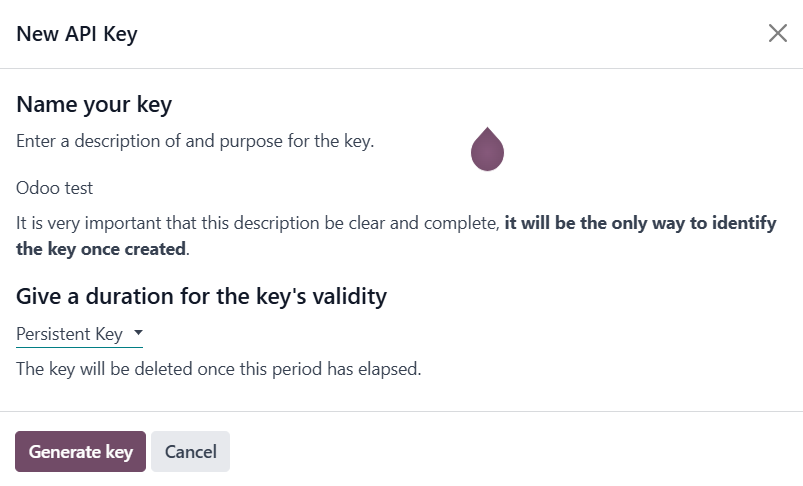
Step 3: Connect WordPress and Odoo
Return to your WordPress dashboard and navigate to the integration settings, usually found under Settings > Odoo. Here, you will paste the API key you generated in Odoo into the designated field. Additionally, provide the email address associated with your Odoo account and your database information.
Click Save to finalize the settings. A confirmation message, such as "Authentication Successful," will confirm that the connection between your WordPress site and Odoo has been successfully established.
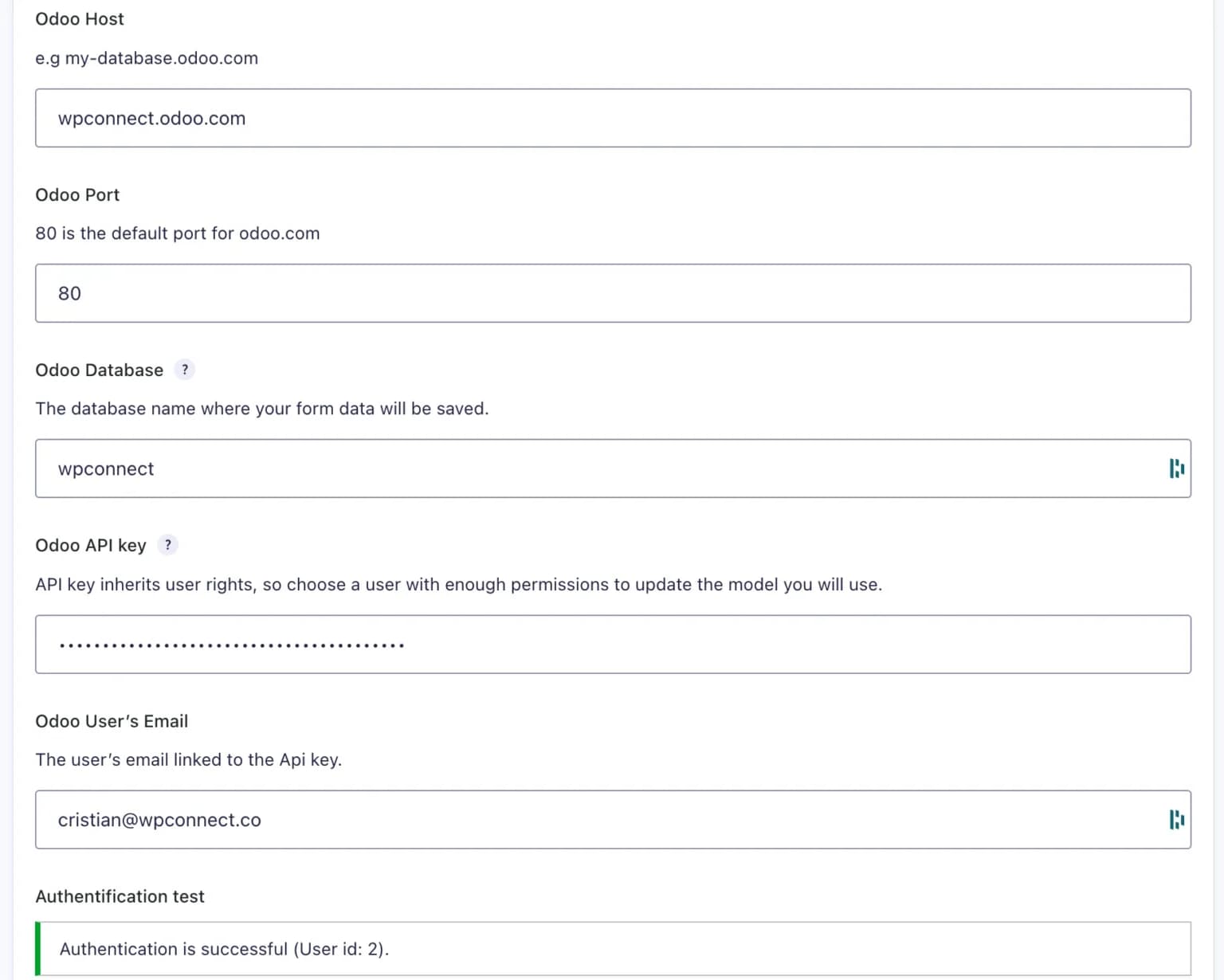
Step 4: Configure Field Mapping
Open the specific form that you wish to connect with Odoo. Within the form editor, go to its Settings and then locate the Odoo tab. Create a new feed within this section. You will then select the desired destination Odoo model (e.g., CRM Lead, Contact, Project Task).
The next crucial step involves mapping each field from your form to its corresponding field in Odoo. This ensures that data is transferred accurately to the correct locations within Odoo. Once the mapping is complete, save your settings to activate this configuration.
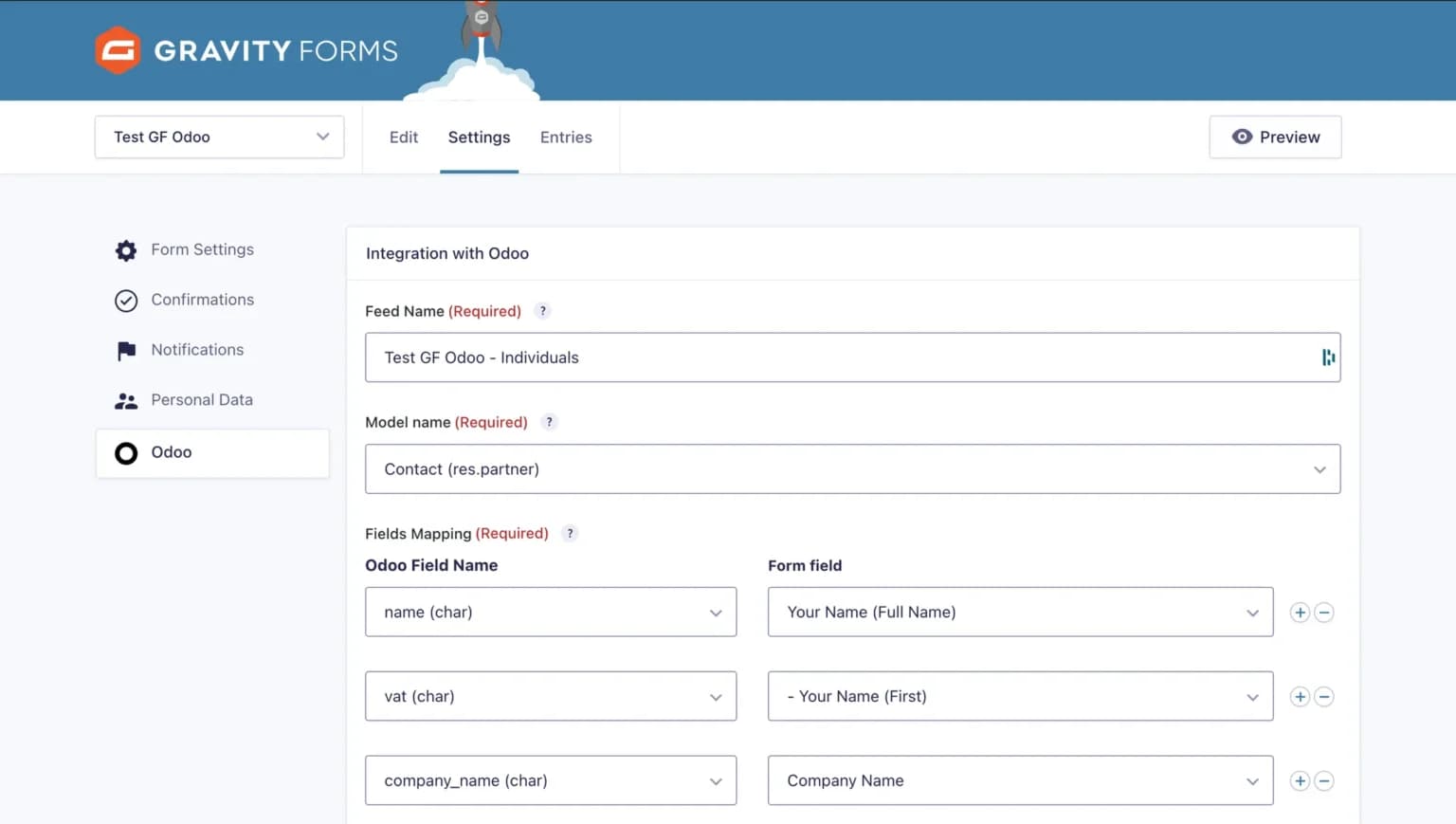
Step 5: Activation and Testing
Once your feed is configured and saved, activate it. It is highly recommended to perform a thorough test of the integration using dummy data. Submit a test entry through your form and then verify that the data appears correctly and as expected in Odoo.
You also have the flexibility to add conditional logic to your feed, allowing you to filter which submissions are synchronized with Odoo based on specific criteria. Once verified, your integration is now fully operational, ready to streamline your data flow!
FAQs About the Odoo Integration
Can I filter which form submissions are sent to Odoo?
Yes, the integration includes a robust conditional logic feature. This allows you to set precise rules and criteria, ensuring that only form submissions meeting specific conditions (such as request type, specific field values, or other parameters) are automatically sent to Odoo. This provides granular control over your data synchronization.
Do I need programming skills to configure the integration?
Absolutely not. This integration is designed as an entirely no-code solution, featuring an intuitive mapping interface that eliminates the need for any programming expertise. All configuration steps are easily managed through the WordPress interface, without requiring a single line of code. Comprehensive documentation is available to guide you through every step of the setup process.
How often is data synchronized between forms and Odoo?
Data synchronization between your forms and Odoo is instantaneous and occurs in real-time. As soon as a form is successfully submitted on your website, the collected data is immediately transferred to Odoo, ensuring that your business systems are always updated with the latest information without any delay.
Final Thoughts
The Odoo Add-On represents a significant advancement for achieving substantial gains in productivity and operational efficiency. By leveraging this solution, organizations can implement advanced workflows without any coding or technical complexities. This empowers teams to dedicate their focus to strategic missions, fostering greater responsiveness in managing customer requests and overall business operations.
In today's landscape, characterized by no-code solutions and artificial intelligence, automation is no longer an exclusive domain reserved for large enterprises. It offers immense potential for businesses of all sizes to create dynamic, customized workflows that perfectly align with and optimize their specific business processes.
