
 (1).svg)
 (1).png)


 (1).svg)
.svg)
Softaculous stands as a leading auto-installer, revolutionizing the way web applications and PHP classes are deployed. It is widely recognized as the most popular script installer within the web hosting industry, enabling users to launch sophisticated web platforms with unparalleled ease.
Understanding the Softaculous Application Installer
The Softaculous Application Installer is a robust, automated script installer seamlessly integrated into cPanel. Its primary function is to simplify the often-complex process of installing and configuring hundreds of web scripts and applications. This integration means that users no longer need to navigate manual installations, which typically involve creating databases, uploading files, and configuring settings by hand.
With Softaculous, the installation of widely-used platforms such as WordPress, Joomla, AbanteCart, PrestaShop, Drupal, and Open Real Estate, alongside over 350 other applications, can be accomplished swiftly and with minimal technical effort. This dramatically reduces the learning curve and time investment required to get a new website or application online.
Key Features and Benefits
Softaculous provides comprehensive management for the entire lifecycle of your applications. Beyond initial installation, it offers crucial features like automated backups, easy restoration options, and self-updating capabilities, ensuring your applications remain secure and up-to-date. Furthermore, users can benefit from script ratings, user reviews, and online demos available directly within the installer, aiding in informed decision-making. This holistic approach empowers users to deploy and maintain their web presence efficiently, requiring only a few clicks of a mouse.
For those interested in exploring the vast array of applications available, the Softaculous demo provides an excellent opportunity to review specifications, read user feedback, and experience the installation process firsthand before committing to a specific application.
Accessing Softaculous within cPanel
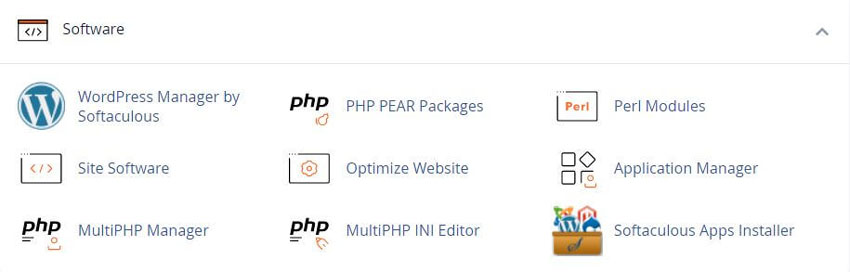
Locating the Softaculous Apps Installer is straightforward within your cPanel interface. You will find a dedicated link to Softaculous within the "Software" section of the cPanel Main Page. This section is designed to group together various tools related to application management and installation.
Additionally, for even quicker access, the cPanel front panel often features a dedicated section for the Softaculous Apps Installer. This prominent display highlights the most popular applications and allows for easy navigation through various application categories, putting the most sought-after tools at your fingertips.
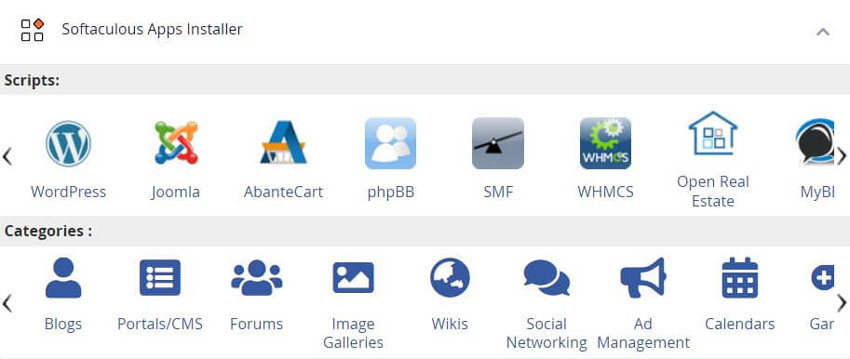
Upon clicking the Softaculous Apps Installer icon in the Software section, you will be redirected to the intuitive App Installer interface. This central dashboard serves as your gateway to installing, modifying, and managing all your web applications.
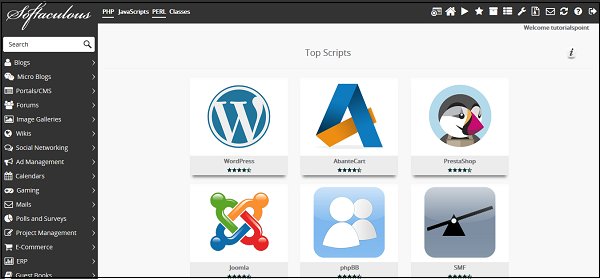
From this interface, you gain full control to install new applications, modify existing installations to suit your needs, and crucially, create and manage backups for all your installed applications. This comprehensive management console ensures that all aspects of your application's health and security are easily accessible.
Managing Applications with Softaculous
Installing a New Application
To install an application using the Softaculous Apps Installer, begin by browsing the categories listed on the left-hand side of the interface, or utilize the search box to quickly find a specific application. Once you have identified the desired application, simply click on its icon.
You will then be presented with an "Install" button. Clicking this button will guide you through a series of straightforward instructions to complete the installation process, integrating the application seamlessly into your website.
Creating Application Backups
Regular backups are crucial for website security and recovery. Softaculous Apps Installer simplifies this vital task, allowing you to easily create comprehensive backups of your applications for future restoration. To initiate a backup, navigate to the "All Installations" section within your Softaculous Apps Installer. This section can be accessed by clicking the dedicated icon in the top navigation bar, which displays a comprehensive list of all applications installed via Softaculous.
Within the "All Installations" list, locate the application you wish to back up and click on its corresponding backup icon. This action triggers an automatic backup process, capturing all application files, databases, and configuration settings. Should the need arise, you can effortlessly restore your application by accessing the "Backup and Restore" interface, also available from the top navigation menu.
Step-by-Step Installation Guide
The process of deploying a new application with Softaculous is designed for maximum simplicity. Follow these concise steps to get your desired application up and running:
- Log into your cPanel control panel using your credentials.
- Locate and click on the Softaculous icon, typically found in the "Software" section.
- Browse or search for the application you wish to install from the extensive library.
- Select the specific location (domain or directory) where you want the application to be installed.
- Choose your preferred administrator username and a strong password for the application.
- Click the "Install" button to complete the process. Your application will be ready in moments.
Softaculous boasts a vast collection of applications, encompassing over 30 categories. This includes diverse tools ranging from form builders and chat applications to genealogy software, financial management systems, and much more, ensuring a solution for nearly every web-based need.
