
 (1).svg)
 (1).png)


 (1).svg)
.svg)
When setting up new functionalities for your website, the installation of web applications is a fundamental step. The approach you take can vary based on your specific requirements and technical comfort level. This guide details two primary methods for deploying applications, allowing you to choose the one that best suits your project.
Choosing Your Application Installation Method
Depending on your needs and expertise, you can select from distinct installation methods, each offering different levels of control and ease of use.
Quick Installation
The quick installation method is designed for ease and speed, making it the most straightforward option for deploying an application. When opting for this approach, the system automatically handles a standard installation of the latest available version of your chosen application. It defaults to recommended settings, often utilizing your existing control panel access credentials as the application administrator's login. While streamlined, it's worth noting that some applications may still prompt for a few essential configurations, even during a quick setup, to ensure proper functionality.
Custom Installation
For users who require more control over their application deployment, the custom installation method offers extensive flexibility. This option enables you to meticulously define various settings, including administrator credentials, the exact installation directory on your server, and other crucial parameters. A key advantage of custom installation is the ability to manage automatic updates, allowing you to disable them if you prefer to manually control when and how your applications are upgraded. This can be particularly useful for maintaining compatibility with specific plugins or configurations that might be sensitive to updates.
Pre-Installation Considerations: PHP Settings
It is important to be aware that numerous web applications require a specific server environment to operate correctly. A common issue arises when the
safe_modePHP directive is active, as many applications are not compatible with this setting. To verify your server's configuration, navigate to the Websites & Domains section, then click on PHP settings, and locate thesafe_modedirective within the Common settings. Ifsafe_modeis enabled, it is highly recommended to disable it for optimal application performance. Should you encounter any difficulties in modifying these PHP settings, please reach out to your hosting provider for assistance.
Step-by-Step Application Installation Guide
Follow these detailed steps to successfully install an application on your hosting environment:
-
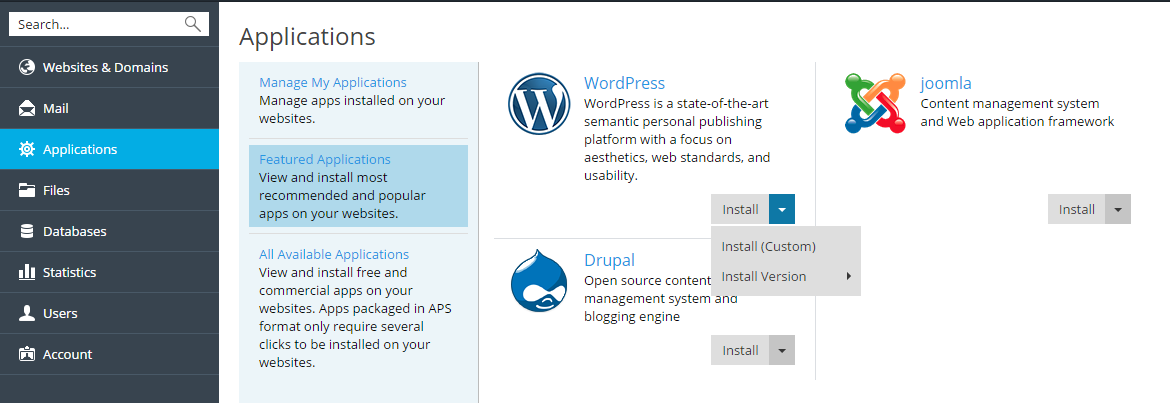
Begin by accessing the Applications interface within your control panel. Here, you will find a catalog of available applications. Browse or search to locate the specific application you wish to install.
-
Once you have identified the desired application, initiate the installation process. For a standard, default setup, click the Install button. If you require more granular control over the configuration, select Install (Custom) to proceed with a personalized installation.
-
Managing Automatic Updates
During the installation settings phase, you will typically find an option to control automatic updates. If you prefer to manually oversee when and how your application receives updates, which can be crucial for maintaining compatibility with specific plugins or custom code, ensure you deselect the option labeled "Automatically update this app when updates are available." This gives you full discretion over the update schedule, allowing for thorough testing before deployment.
-
Selecting Specific App Versions
There are instances where installing a particular version of an application is necessary. This might be due to compatibility requirements with existing extensions, themes, or custom integrations that are not yet compatible with the latest release. In such cases, before finalizing the installation, click on the application's name to reveal further options. Look for a feature like "Install version", which allows you to choose from a list of available historical versions. Select the desired version and then proceed with the installation.
By following these guidelines, you can effectively manage the installation of web applications, whether you opt for a rapid deployment or a more tailored setup. Understanding these methods empowers you to maintain a robust and stable online presence, ensuring your applications perform optimally according to your specific needs.
