
 (1).svg)
 (1).png)


 (1).svg)
.svg)
In today's globalized digital landscape, having a multilingual website is crucial for reaching a wider audience and expanding your online presence. This comprehensive guide will walk you through the essential steps to effectively translate your WordPress website, enabling you to connect with visitors in their native languages. We will explore a streamlined, five-step process to achieve a fully translated website.
1. Select Your Target Languages
The foundational step in localizing your website is to identify the languages you wish to offer. A versatile translation platform typically supports a broad spectrum of languages, often exceeding 65 options, allowing you to select as many as needed during the initial setup process. Carefully consider your target demographics and business objectives when making these selections.
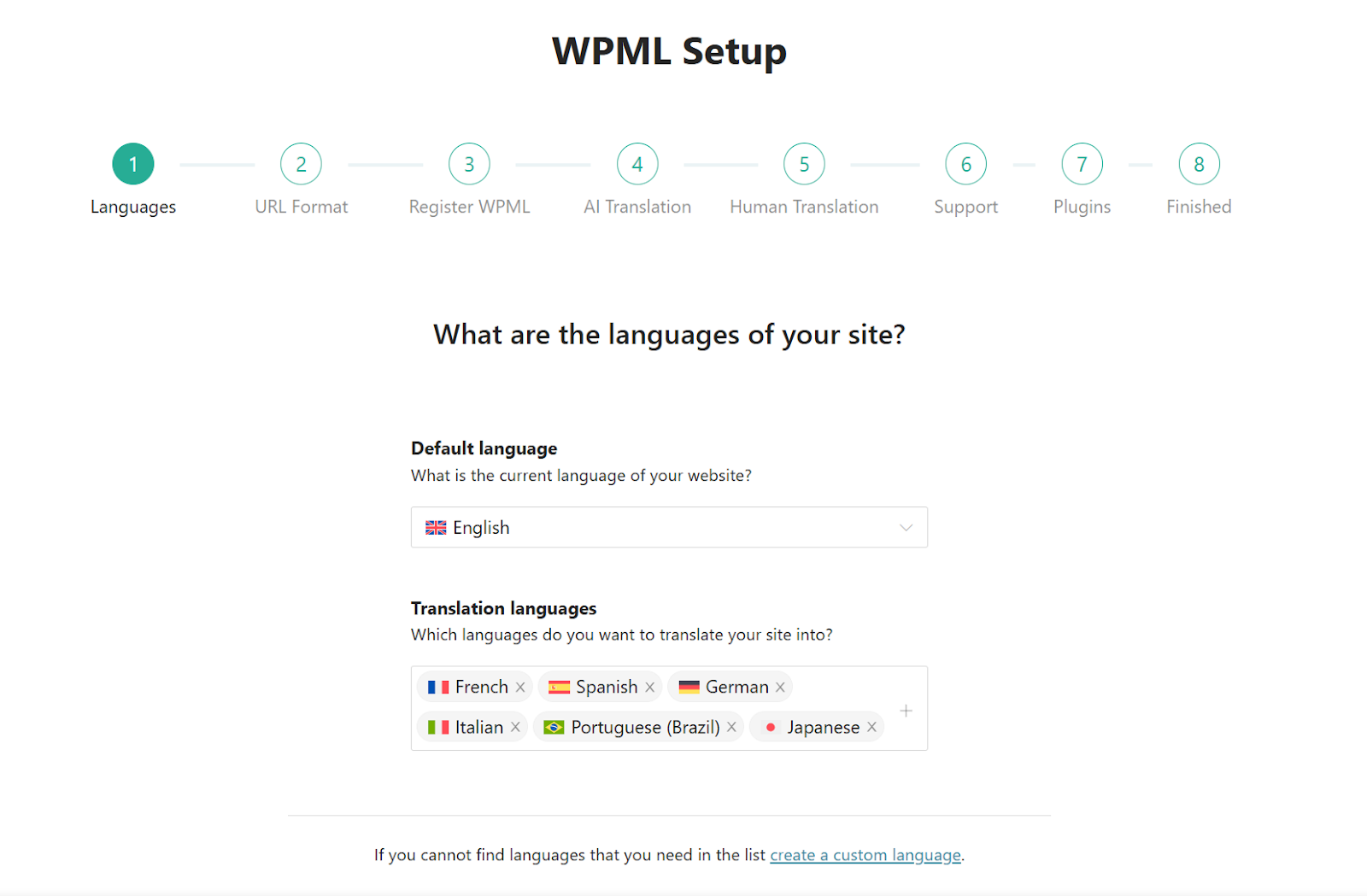
Choosing languages in the translation platform's setup wizard
Should your initial list of target languages not be exhaustive, there is no need for concern. Most systems are designed with flexibility in mind, allowing you to seamlessly add additional languages at any point after the initial configuration, ensuring your website can grow with your global aspirations.
2. Optimize Your AI Translation Settings
Leveraging artificial intelligence for website translation represents a cutting-edge and highly efficient approach. This method often surpasses traditional machine translation in terms of speed and can yield more natural-sounding results compared to purely manual processes. Modern AI translators are continually evolving to deliver superior linguistic accuracy and contextual relevance.
Many advanced translation solutions incorporate custom-built AI engines designed to generate translations that align with your specific terminology, stylistic preferences, and even desired level of formality. To achieve this remarkable degree of personalization, the integrated AI engine typically analyzes your entire website's content to gain comprehensive context, further enhanced by any specific guidelines or glossaries you provide during its setup.
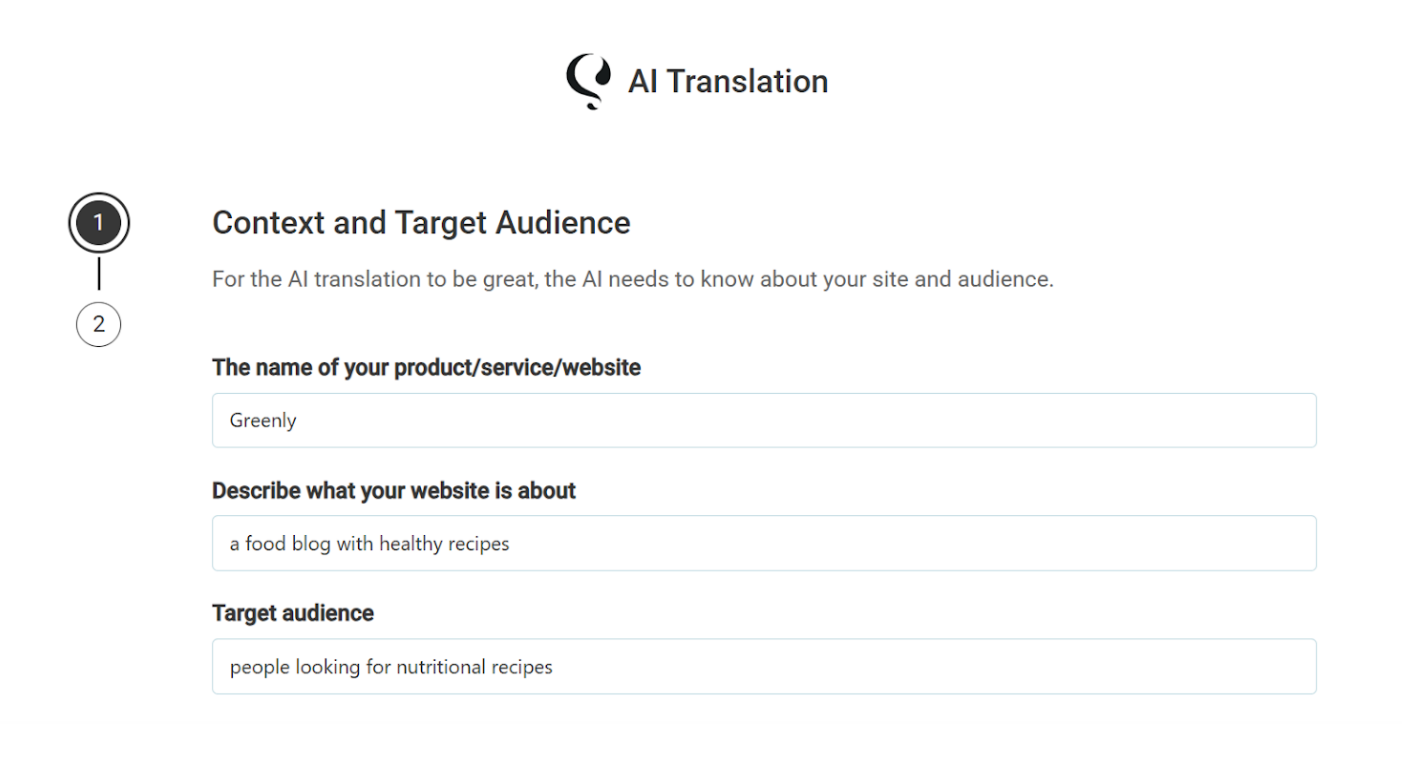
Sharing website context with the AI engine for enhanced accuracy
Beyond its inherent accuracy, employing an automated AI translation system often comes with several significant advantages:
- High-Quality Output: Expect translations that are precise and culturally appropriate, minimizing the need for extensive manual revisions.
- Cost-Effective Solutions: Automated translation services offer an economical alternative to traditional human translation, making large-scale projects more accessible.
- Content Ownership: All translated content generated by the system is stored securely on your website, remaining entirely under your control and ownership.
3. Efficiently Translate Your Website Content
A key aspect of effective website translation is the ability to manage all content from a centralized location. A comprehensive translation platform typically offers a dedicated interface, often referred to as a Translation Dashboard, from which you can oversee and initiate the translation of your entire website. This includes a wide array of content types such as pages, blog posts, custom post types, and even content generated by other plugins, like forms or product listings.
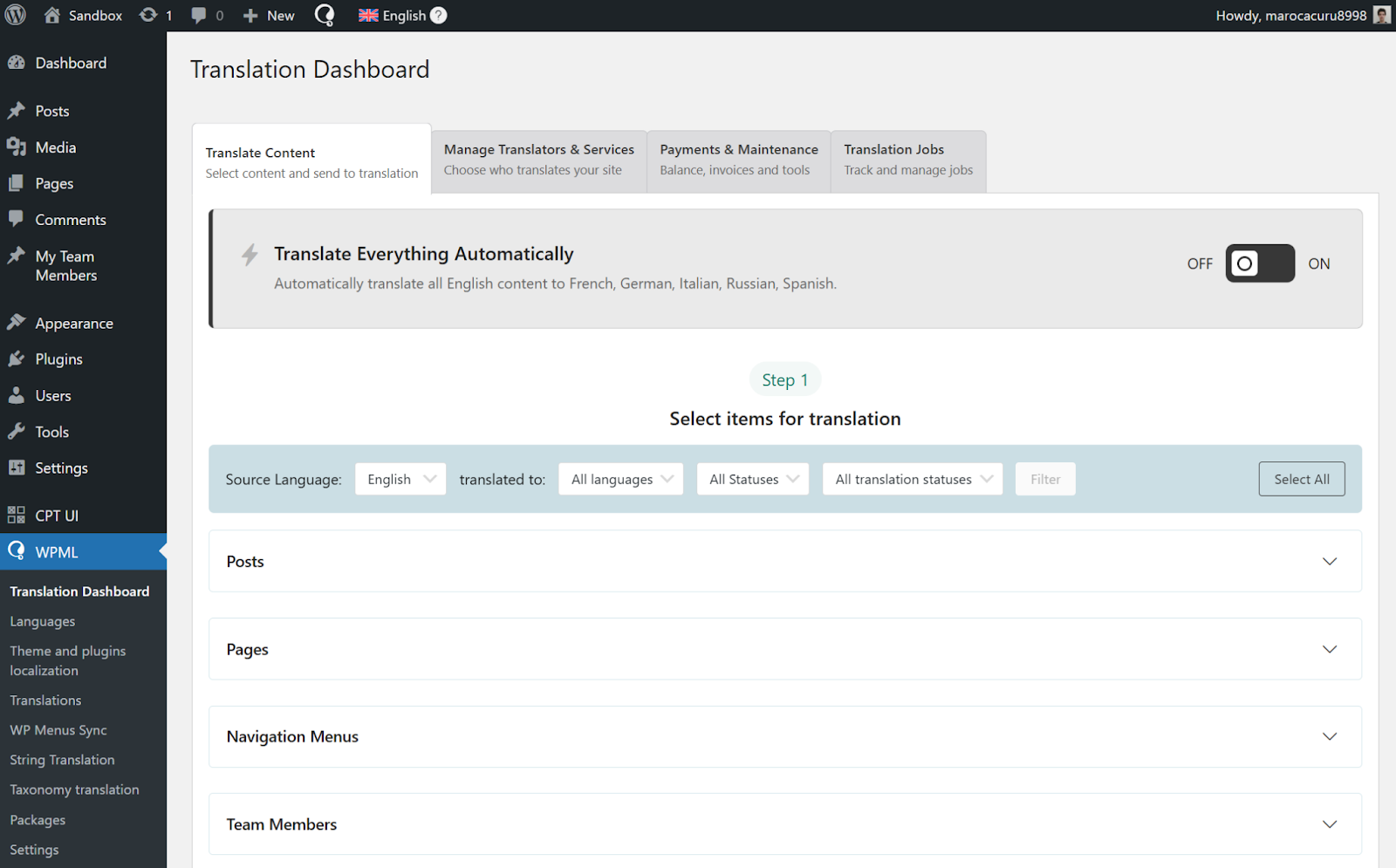
The platform's comprehensive Translation Dashboard
To begin translating your content, navigate to the system's administration panel, typically under a "Translation" or "Languages" section, and access the Translation Dashboard. Here, you can easily select the specific items—be it individual pages, posts, or other content elements—that you wish to translate into your chosen languages.
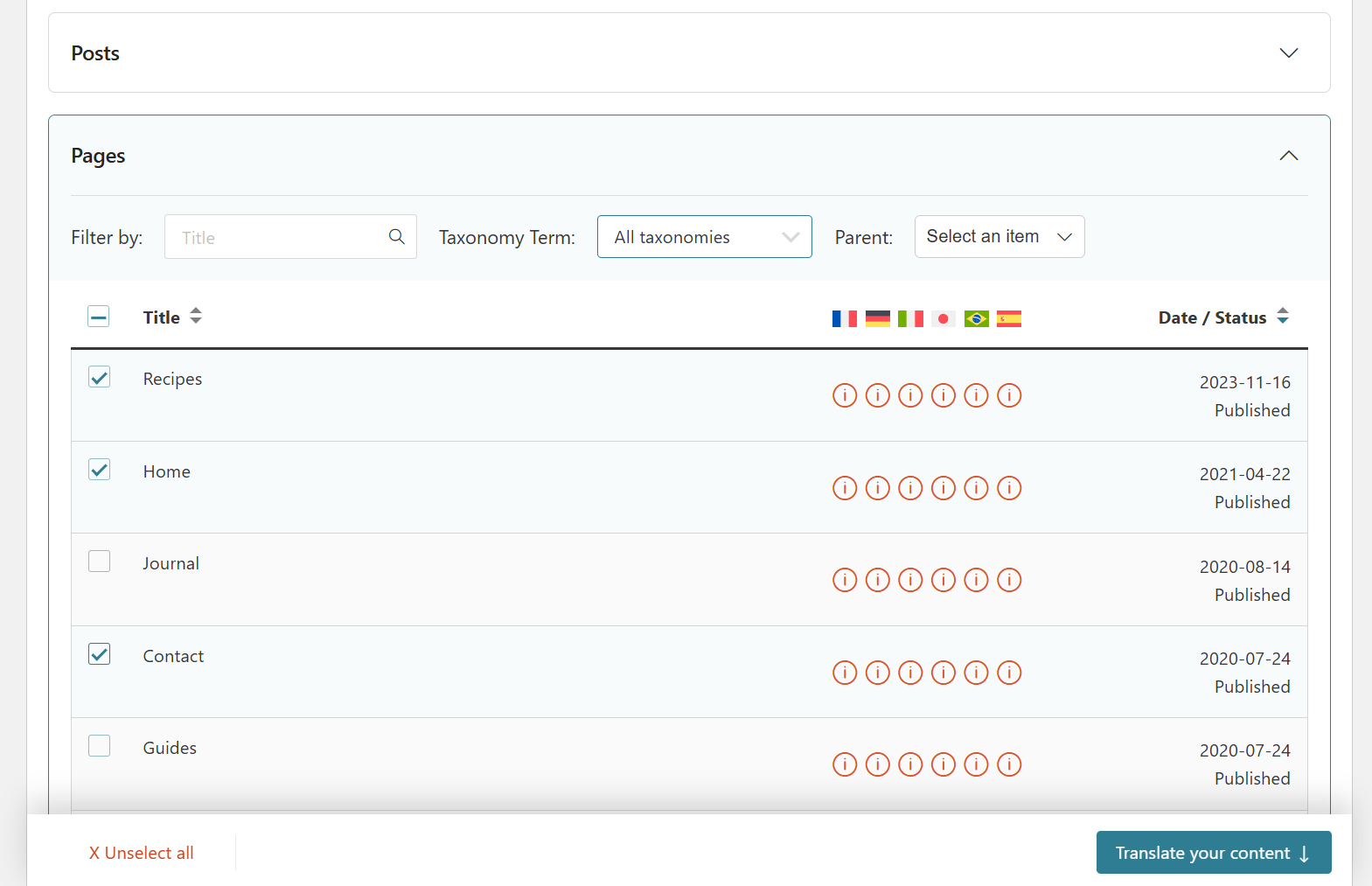
Selecting content for translation within the dashboard
Following your selection, you will choose your preferred translation method. To utilize the integrated AI engine, opt for Translate automatically and ensure that the AI engine is selected as your preferred translation service. This setup directs the system to process your content using its advanced artificial intelligence capabilities.
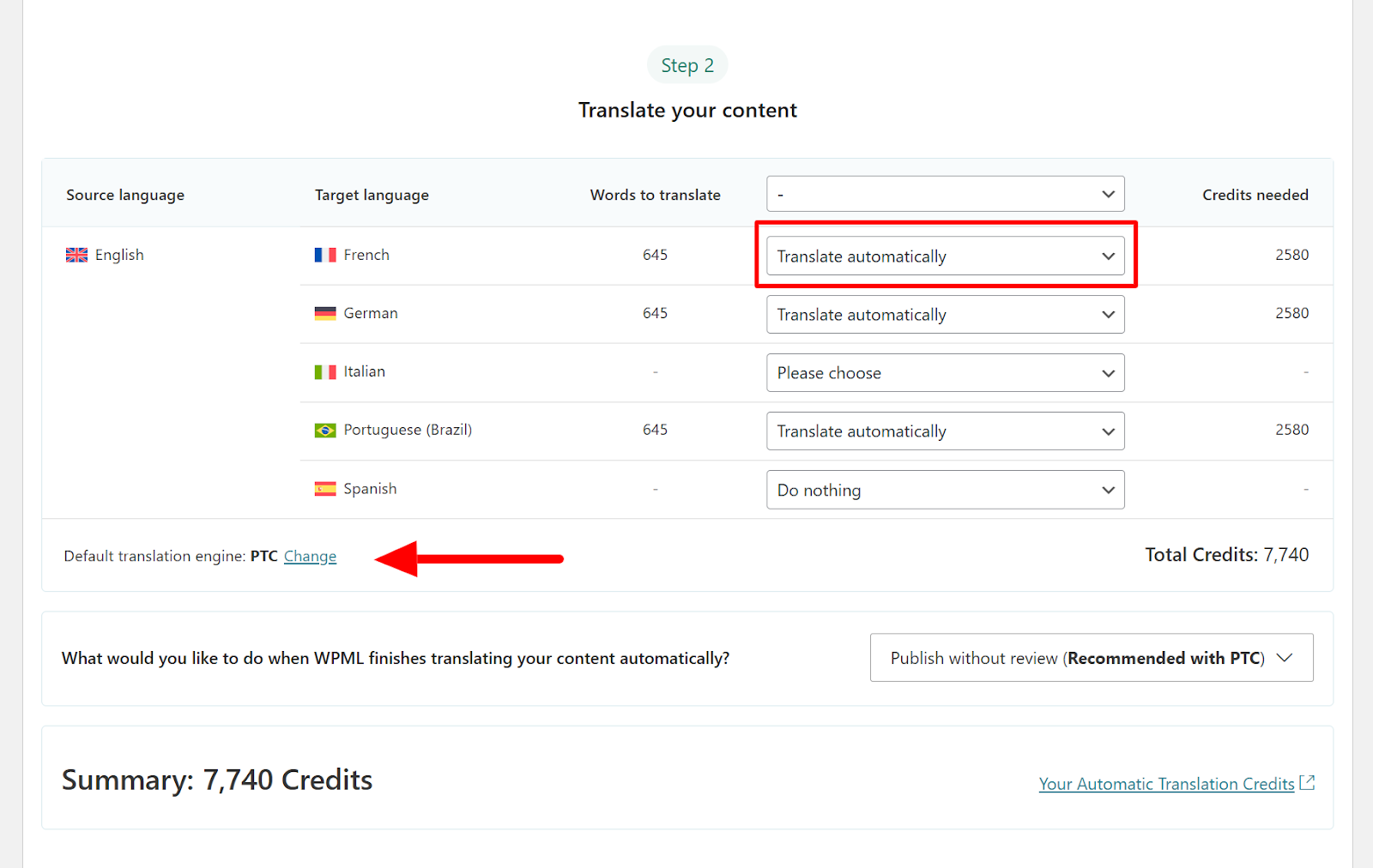
Selecting target languages and the desired translation method
Finally, you will have the option to determine whether you wish to review the automatically completed translations. Given the high quality of translations produced by advanced AI engines, this review process is often optional, allowing for a more hands-off approach if desired. Once your preferences are set, simply click Translate to initiate the process.
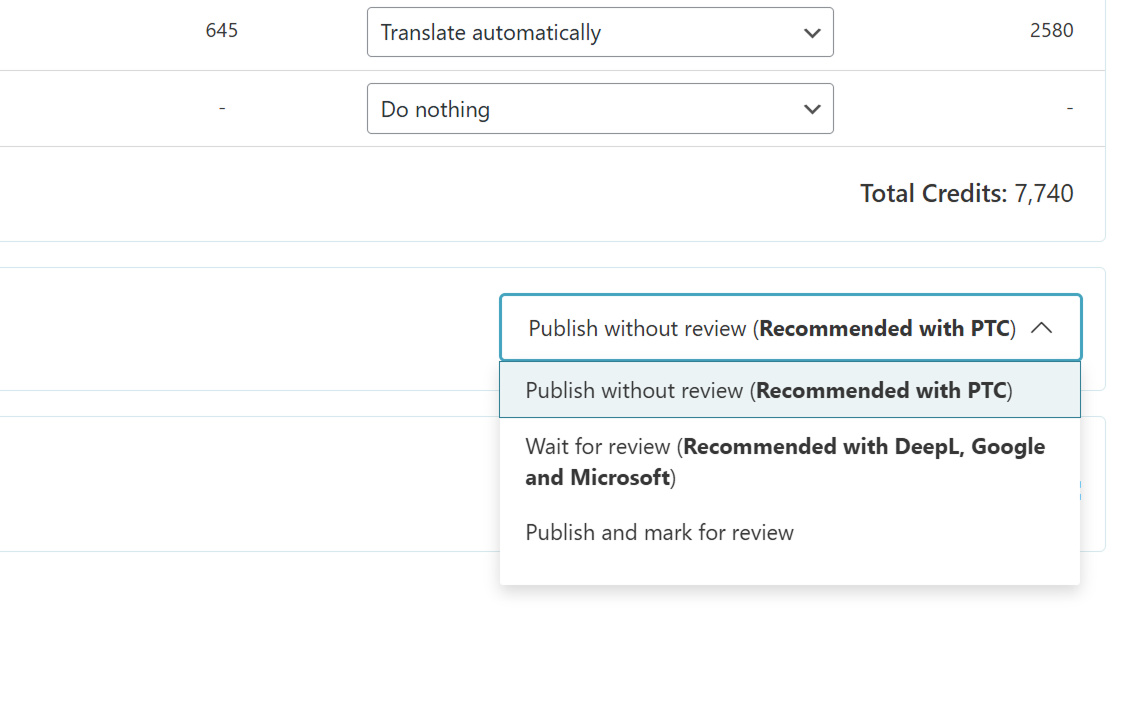
Choosing whether to review completed translations
Upon completion by the AI engine, your newly translated content will be seamlessly integrated into your website, becoming visible to visitors when they switch to the respective languages.
4. Automate Your Entire Website Translation Process
Translating an entire website, especially one with a substantial amount of content, can be a considerably time-consuming endeavor. To streamline this process and significantly reduce manual effort, many translation platforms offer an invaluable feature known as Translate Everything Automatically. This powerful mode encompasses two primary functions:
- Comprehensive Translation: It intelligently identifies and automatically translates every single page, post, and content item across your entire website into your selected languages.
- Dynamic Updates: Whenever you make edits or additions to your original language content, the system automatically detects these changes and retranslates the affected sections, ensuring your translated versions remain perpetually synchronized and up-to-date.
To activate this full automation, navigate to the platform's Translation Dashboard and locate the toggle switch, typically positioned at the top of the screen, designed to enable the "Translate Everything Automatically" feature.
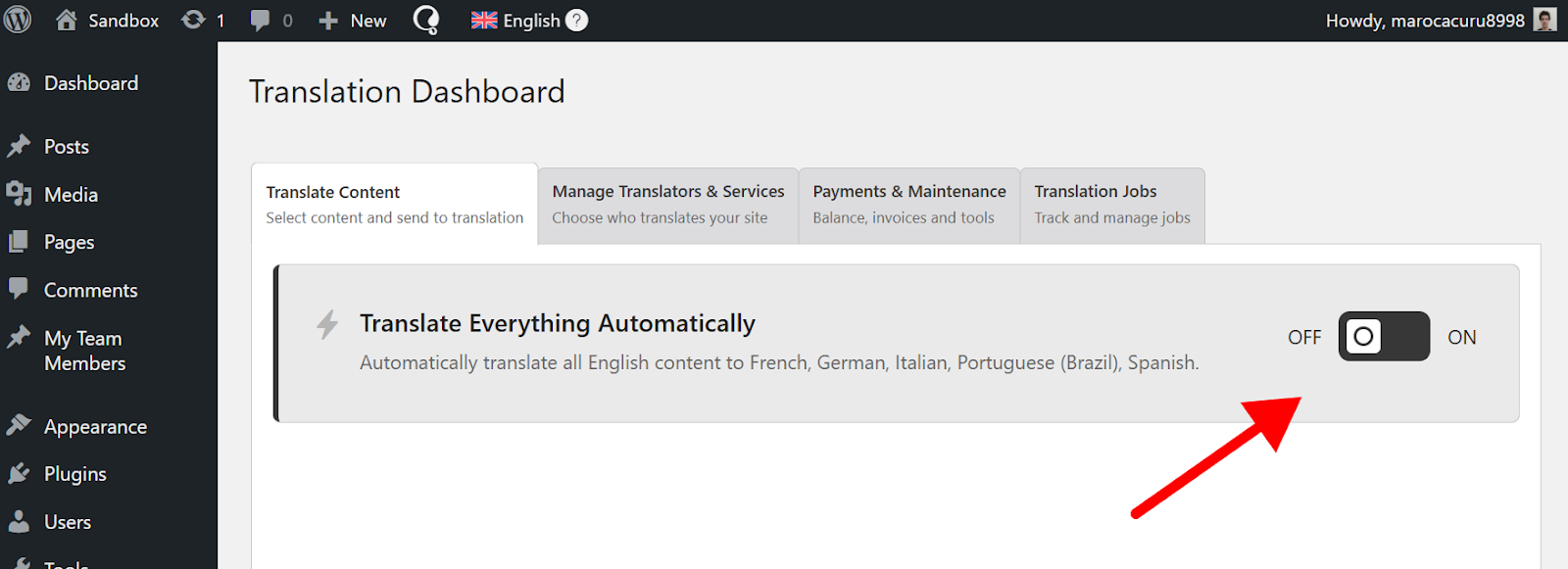
Enabling the "Translate Everything Automatically" feature
Activating this feature will typically trigger a pop-up window, prompting you to specify which content should be included in the automatic translation process. You can choose to translate all existing untranslated content immediately, or elect to only automatically translate new content published after this mode is enabled. This flexibility allows you to tailor the automation to your specific workflow and needs.
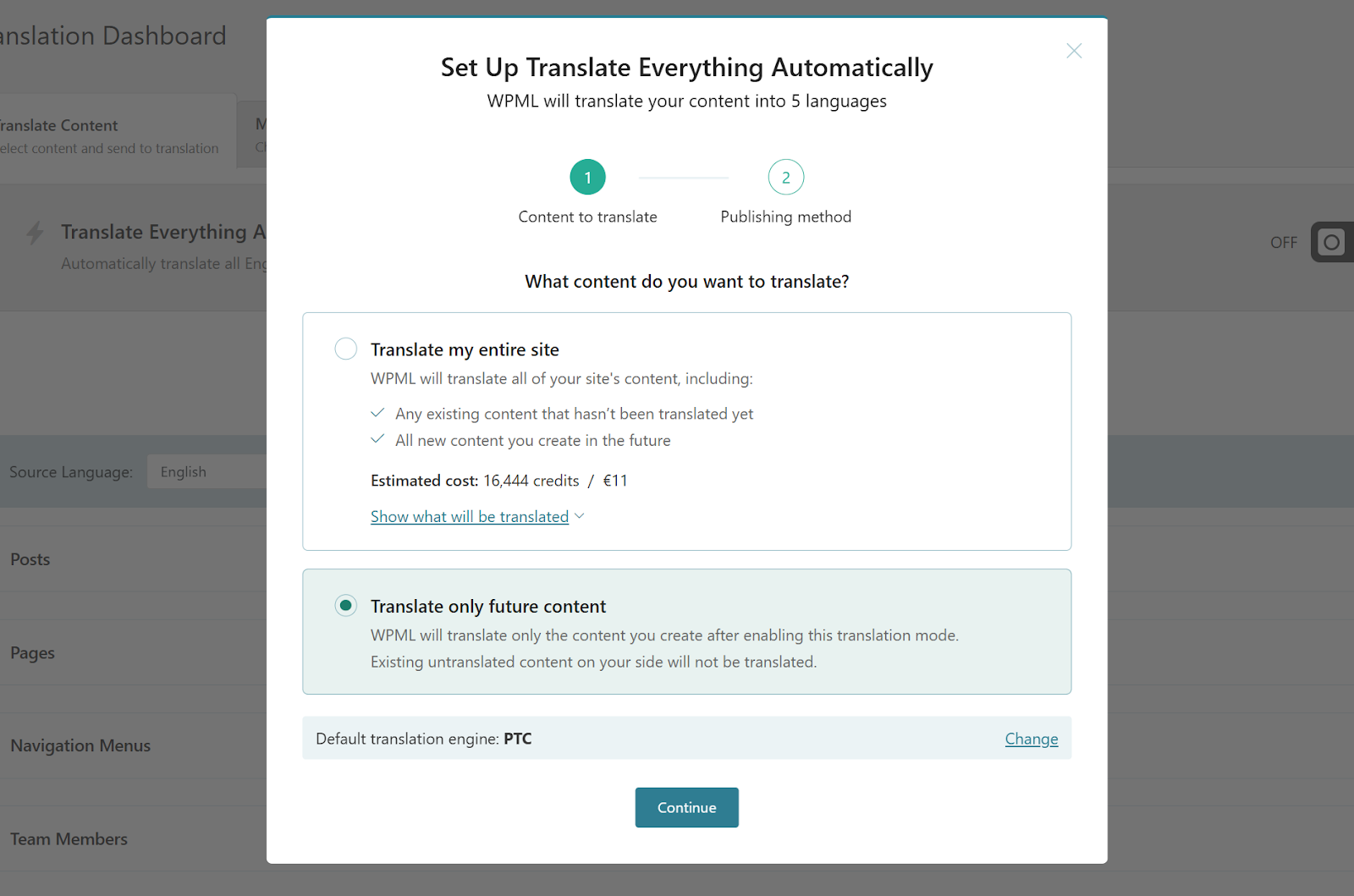
Configuring preferences for automatic content translation
Once your preferences are confirmed, the translation platform will commence the process of translating your content, providing a progress indicator at the top of the dashboard so you can monitor its advancement.
5. Implement a User-Friendly Language Switcher
Having successfully translated your website, the next crucial step is to empower your visitors to effortlessly select their preferred language. While some platforms offer automatic redirection based on browser language settings, it is generally recommended to provide a visible and intuitive language switcher. This allows users to manually choose their desired language, enhancing their control and overall user experience.
By default, many translation solutions will automatically display a basic language switcher, often positioned in the footer section of your website, whenever a page has available translations. This provides a discreet yet accessible option for visitors.
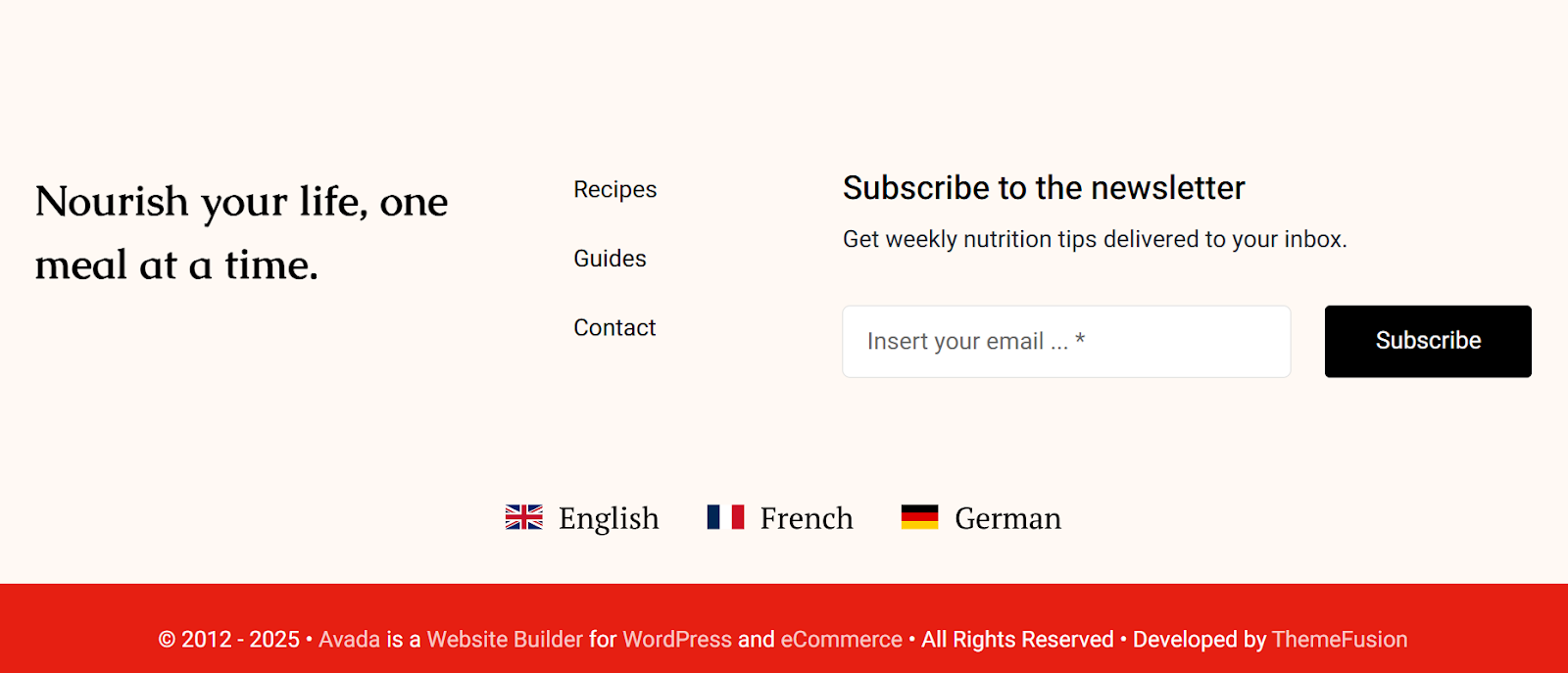
A language switcher typically found in the footer area
However, for greater visibility and integration, you have the flexibility to place a language switcher in other prominent areas of your site. Common locations include within your main navigation menus, sidebar widgets, or even embedded directly within a page's body content, depending on your site's design and user flow.

Integrating a language switcher into navigation menus
To configure and add a language switcher, navigate to the language settings section within your translation platform's administration panel, typically labeled "Languages." Scroll down to the dedicated language switcher settings. From this interface, you can effortlessly add switchers to various areas of your site, including menus, widgets, and even by generating shortcodes for manual placement within content.
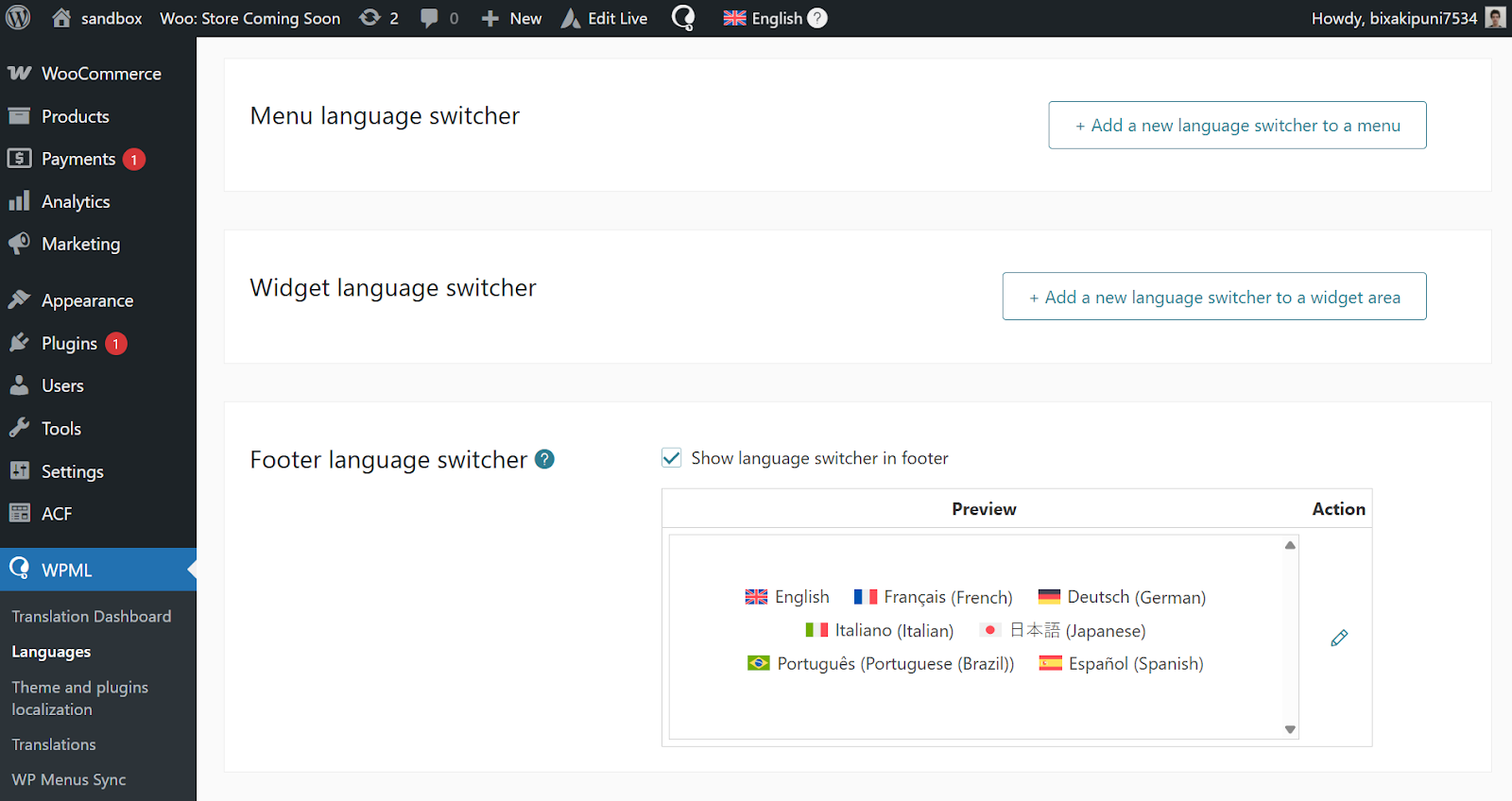
Comprehensive language switcher settings panel
Once you've selected a placement, you can customize its appearance to seamlessly integrate with your website's design. Simply click the button corresponding to your desired location and explore the available customization options.
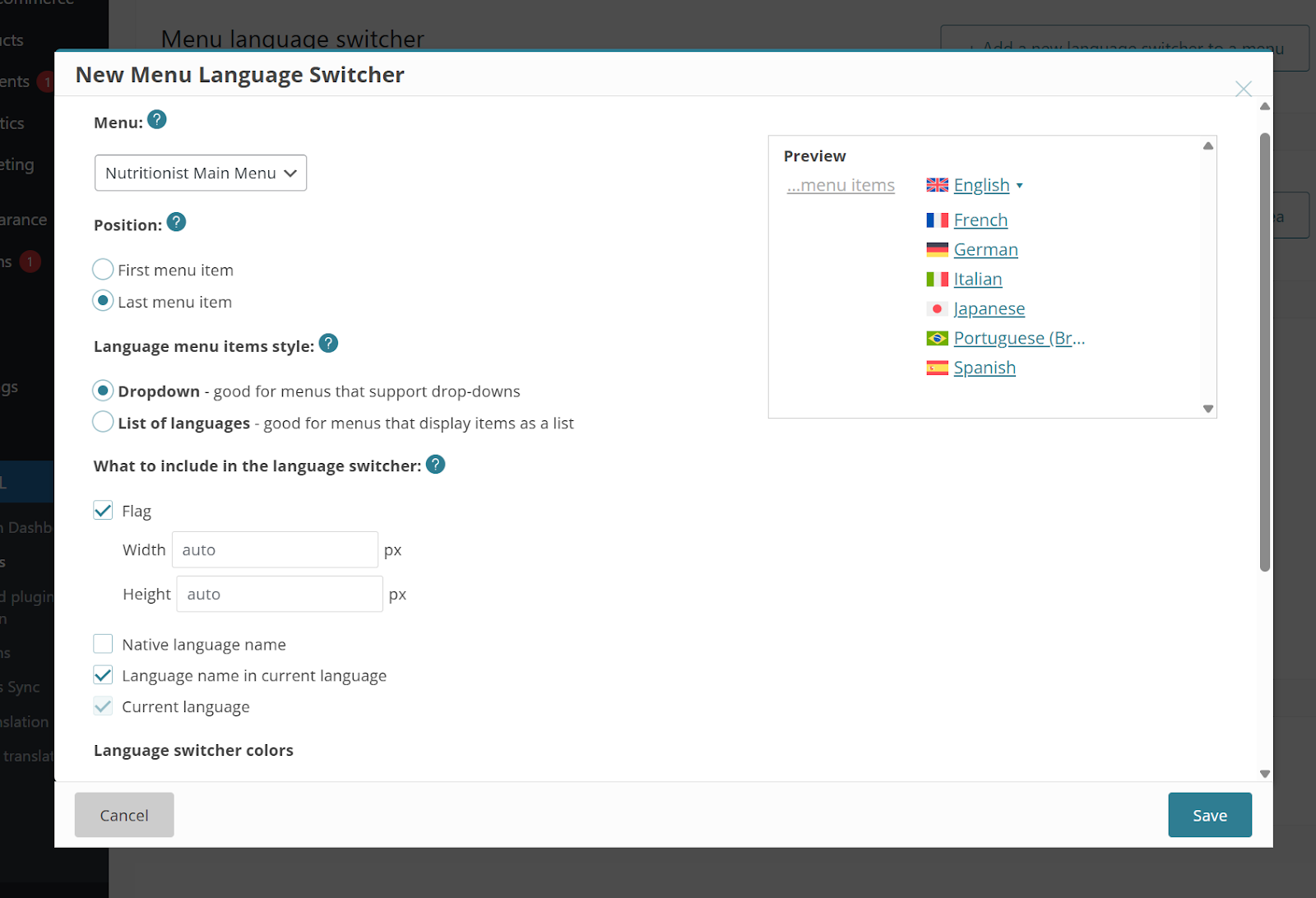
Customization options for the language switcher's appearance
Most translation solutions provide a range of customization choices for your language switcher, allowing you to fine-tune its look and feel:
- Display Format: Choose between a compact dropdown menu or a more expansive horizontal list of languages.
- Color Scheme: Set a background color that complements your website's palette.
- Flag Visibility: Opt to show or hide country flags alongside language names.
- Native Language Names: Display languages using their native names (e.g., "Deutsch" for German) for a more authentic user experience.
Beyond these standard customization settings, for those with a flair for design, you can often apply your own custom CSS rules to create a truly unique and branded language switcher that perfectly matches your site's aesthetic. This allows for limitless creative possibilities.

An example of a language-only menu switcher
Further extensive documentation and guides are typically available within the platform's resources for detailed instructions on advanced language switcher configurations and custom styling.
Explore Alternative Translation Methods
While utilizing a dedicated AI engine for translation is highly efficient, various other translation engines and methods are available, each offering distinct qualities and features to suit different needs and preferences.
| Translation Engine | Quality | Key Feature |
|---|---|---|
| Dedicated AI Engine | Exceptional | AI-powered, context-aware translations |
| Advanced Machine Translation Engine A | Very Good | Ability to control language formality |
| Widely Used Machine Translation Engine B | Good | Broadest availability of languages |
| General Purpose Machine Translation Engine C | Good | Often the most cost-effective option |
To switch to a different translation engine, you can typically find a "Change" option or link within the translation interface, often located near the selection for automatic translation methods when you are preparing content for translation.
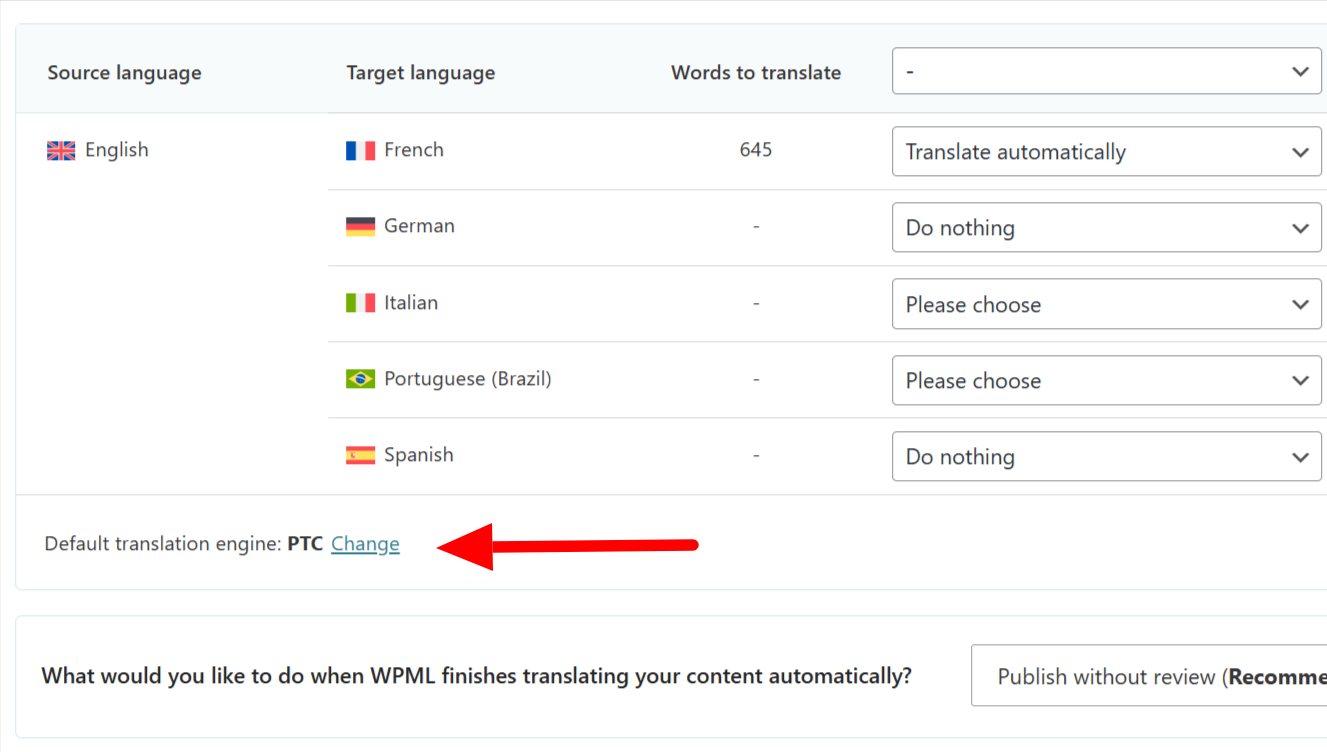
Option to change translation engines within the interface
For those who prefer a more hands-on approach, the platform also provides options for manual translation. However, given that this method can be highly time-consuming for extensive websites, a hybrid approach is often recommended. This involves using automatic translation to generate an initial draft, which can then be refined and perfected through a subsequent manual review process by a human translator or editor. This blend leverages the speed of AI with the nuanced quality of human oversight.
Optimizing for Multilingual SEO: Essential Strategies
Beyond simply translating your website, optimizing it for multilingual search engine optimization (SEO) is paramount. Strategic multilingual SEO ensures your translated content ranks effectively in search results for various languages and regions, thereby attracting a larger international audience and significantly boosting global traffic to your site.
Below are a few fundamental optimization strategies to integrate into your multilingual website plan. For a comprehensive overview, consult advanced guides on setting up multilingual SEO for your online presence.
Use Language Directories for URLs
Implementing language directories within your URL structure is a straightforward and highly effective method for both users and search engines. This approach helps search engines easily identify and understand the specific language of each page, contributing to better indexing and ranking. For instance, an "About" page translated into Spanish might appear as:
example.com/about/(Original language)example.com/es/sobre/(Spanish version in a language directory)
Implementation Guidance
When configuring your translation platform, you typically have the flexibility to choose from various URL formats. These often include language directories, but may also extend to using subdomains (e.g., es.example.com) or even distinct domains for each language (e.g., example.es).
Implement Hreflang Tags
Hreflang tags are critical technical SEO elements that inform search engines about the language and geographical targeting of a webpage. Properly implemented hreflang tags help search engines present the correct language version of your content to users based on their language preferences and location. Every page should ideally include an hreflang tag that points to its translated counterparts, with each translation, in turn, linking back to the original content, creating a complete network of language associations.
Implementation Guidance
A sophisticated translation platform will automatically generate and manage hreflang tags for you. This means you do not need to manually create or update these complex tags. As you add new translations, modify existing pages, or even restructure your website, the system intelligently updates your hreflang tags in the background, ensuring accuracy and compliance with search engine guidelines.
Translate URL Slugs
Translating URL slugs—the part of the URL that describes the page's content—is an important practice for both SEO and user experience. Translated slugs provide clearer context to search engines about the content in each language and make URLs more readable and user-friendly for international visitors. Consider this example:
example.com/blog/best-summer-destinations/(Original slug)example.com/blog/es/mejores-destinos-de-verano/(Translated Spanish slug)
Implementation Guidance
By default, most translation systems are configured to automatically create a translated URL slug when you translate corresponding content. This streamlines the process. However, if you require more granular control, you often have the option to manually specify and customize your own translated URL slugs, allowing for precise optimization.
