
 (1).svg)
 (1).png)


 (1).svg)
.svg)
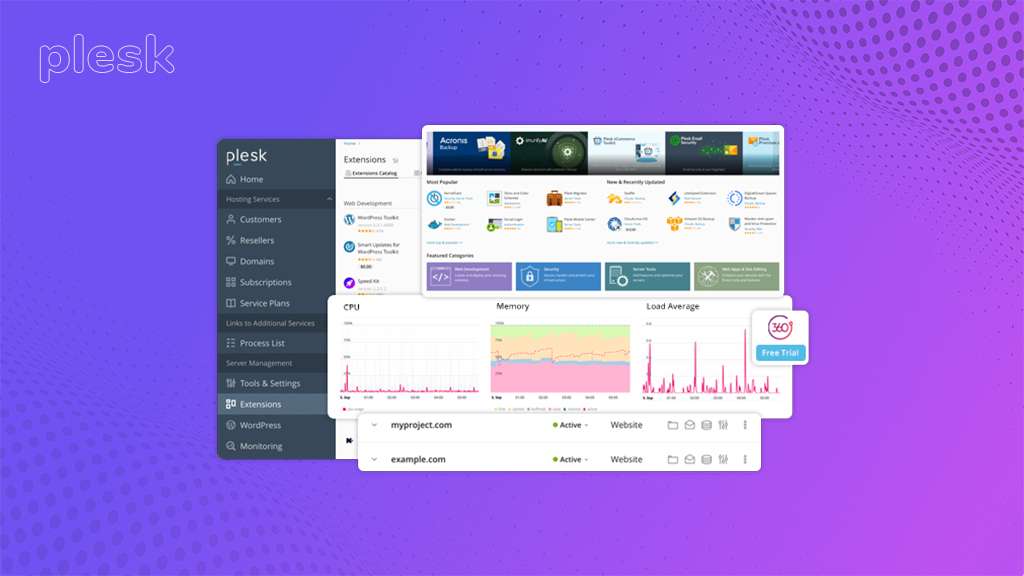
The landscape of web hosting can often appear complex, particularly for individuals or organizations tasked with managing multiple websites or providing hosting solutions. In this intricate environment, web hosting control panels emerge as essential tools, offering simplified management and streamlined operations. These intuitive interfaces serve as centralized platforms, simplifying tasks and enhancing efficiency across various aspects of your online presence. Among the array of prominent control panels available, the Plesk Control Panel is widely recognized for its powerful features and user-friendly design.
This in-depth guide aims to provide a thorough exploration of Plesk, delving into its core functionalities, key features, recommended best practices, and demonstrating how it empowers a diverse range of users, including web developers, website owners, and hosting service providers.
Introducing the Plesk Control Panel
The Plesk Control Panel is a robust web hosting control panel that acts as your central command center. It empowers users to efficiently manage a single website or a multitude of online properties, including domains, email accounts, databases, and server resources. Whether you are a web developer overseeing various client projects or a hosting provider offering scalable hosting solutions, Plesk delivers a unified and intuitive platform for seamless administration.
Who Benefits from Plesk? A Diverse User Base
Plesk is designed to serve a wide array of users, each possessing distinct requirements:
Web Hosting Providers
For hosting providers, Plesk significantly streamlines server management. It enables easy administration of customer accounts, efficient allocation of resources, and the seamless delivery of value-added services to their client base.
Web Developers
Web developers find Plesk an invaluable tool for effectively managing their personal websites and client projects. Its intuitive interface simplifies crucial tasks such as domain and subdomain management, secure file uploads, and efficient database creation, enhancing overall productivity.
Website Owners
Both businesses and individual website owners managing multiple online properties can leverage Plesk for comprehensive, centralized control over their entire web presence, ensuring consistency and ease of management.
Plesk Editions: Finding the Perfect Fit
Plesk is available in a variety of editions, each meticulously designed to cater to specific user requirements. Among these, some popular versions include:
Plesk Web Admin
This edition is perfectly suited for users who need to manage a single server that hosts multiple domains, offering a focused and efficient administrative experience.
Plesk Web Host Edition
Specifically developed for web hosting providers, this edition is optimized for offering comprehensive shared hosting services, providing all the necessary tools for client management and resource allocation.
Plesk Onyx
As the flagship edition, Plesk Onyx delivers an extensive suite of advanced features, making it ideal for managing high-traffic websites and navigating complex server environments with enhanced control and capabilities.
Plesk’s Premium Features
Plesk offers a comprehensive array of features designed to empower users in efficiently managing their web hosting requirements. Let’s explore some of its key functionalities:
Website Management
Domain & Subdomain Management
Users can effortlessly create, manage, and configure domains and subdomains, ensuring complete control over their website structures.
File Management
The platform provides a built-in file manager for seamless uploading, editing, and organizing of website files. For extended flexibility, Plesk also integrates with popular FTP clients, catering to varied user preferences.
Website Builder Integration
Plesk features robust integration with leading website builders, such as WordPress Toolkit and Joomla Installer. This significantly simplifies the process of website creation, deployment, and ongoing management, making it accessible even for those with limited technical expertise.
Customer Management for Hosting Providers
User Accounts & Access Control
Plesk enables the creation of user accounts for clients with customizable access levels, allowing them to independently manage their domains and web applications within defined parameters.
Customer Billing & Resource Allocation
Hosting providers can effectively set up billing plans, precisely allocate resources such as disk space and bandwidth, and meticulously monitor resource usage for each customer account, ensuring fair and efficient service delivery.
Security Features
Firewalls & Intrusion Detection
Plesk incorporates robust built-in firewalls and advanced intrusion detection systems, designed to vigilantly safeguard your server infrastructure and hosted websites from a wide range of malicious attacks and unauthorized access attempts.
SSL/TLS Certificate Management
The platform facilitates the easy installation, comprehensive management, and timely renewal of SSL/TLS certificates. This critical feature ensures that your websites are secured with strong encryption, providing a trusted and protected environment for data exchange, much like a secure digital padlock.
Malware Scanning & Protection
Plesk offers dedicated tools to meticulously scan websites and servers for malware and other vulnerabilities. This proactive approach helps in preventing security breaches and maintaining the integrity of your online assets, making regular security checks an essential practice for a healthy website.
Email Management
Email Accounts
Users can effortlessly create and manage professional email accounts associated with their website or domain, ensuring seamless communication.
Spam & Virus Filtering
Plesk effectively filters out unsolicited spam and potentially harmful emails, helping to maintain a clean and secure inbox for all users.
Webmail Access
The control panel provides convenient webmail access, allowing clients and website owners to manage their emails directly through a user-friendly web interface, offering flexibility and accessibility.
Database Management
Database Creation & Management
Plesk simplifies the creation and management of MySQL and other essential database types that power various web applications, providing a centralized hub for all database operations.
User Access Control
Users can define precise access levels for databases, which is crucial for ensuring data security and preventing unauthorized modifications, thereby maintaining the integrity of sensitive information.
Applications Management
One-Click Installation
The Plesk control panel streamlines the deployment of popular web applications such as WordPress, Joomla, and Drupal through its efficient built-in application installer, making setup quick and straightforward.
Updates & Security Management
Users can manage application updates from a central location, ensuring that all applications remain secure, up-to-date, and function optimally, minimizing risks associated with outdated software.
Server Management Tools
Resource Monitoring
Plesk allows for continuous monitoring of vital server resources, including CPU usage, disk space, and bandwidth consumption. This ensures optimal performance and helps in identifying potential bottlenecks proactively.
Backup & Restore
The Plesk control panel provides comprehensive backup and restore functionalities, which are crucial for safeguarding your website data and server configurations. Scheduling regular backups is highly recommended to significantly minimize the risks of data loss.
Additional Features to Enhance Your Experience
Marketing Tools
Certain Plesk editions come equipped with valuable marketing tools designed to help promote websites effectively. These often include integrated SEO (Search Engine Optimization) tools, website analytics integration for insightful data, and robust email marketing features.
Development Tools
Plesk offers a suite of features specifically tailored for developers, such as seamless version control integration with Git or Subversion, powerful code editors, and essential debugging tools to enhance the development workflow.
Scalability
One of Plesk's significant advantages is its inherent scalability, allowing it to adapt effortlessly to growing web hosting needs. As your requirements expand, you can seamlessly upgrade to more powerful Plesk editions or implement multi-server setups to achieve enhanced performance and capacity.
Best Practices to Optimize Your Plesk Experience
While Plesk’s user-friendly interface makes navigation intuitive, implementing a set of best practices can further optimize your experience, ensuring a secure, efficient, and high-performing web hosting environment. Here are some key considerations:
Stay Updated for Security and Performance
Just like any sophisticated software, Plesk regularly releases updates that include new features, critical security patches, and performance enhancements. Keeping Plesk updated is paramount for several reasons:
Enhanced Security
- Strong Passwords & Two-Factor Authentication (2FA): Always utilize robust, unique passwords for all Plesk accounts and enable two-factor authentication (2FA) to add an essential extra layer of security, acting as a double lock on your digital access.
- Regular Updates: Ensure that Plesk, all web applications, and server software are consistently updated with the latest security patches. This proactive measure promptly addresses vulnerabilities, effectively shielding your server from potential attacks.
- Vulnerability Scans: Regularly scan your server and hosted websites for malware and vulnerabilities. Utilize Plesk’s integrated tools or reputable third-party security scanners. These routine checkups are vital for maintaining a secure and healthy website environment.
Improved Performance
Updates frequently include optimizations to Plesk’s underlying code, leading to faster loading times for websites and a smoother, more responsive user experience. This is akin to fine-tuning an engine for superior operational performance.
Access to New Features
Keeping Plesk updated unlocks access to the latest functionalities and features within the platform, enabling you to explore innovative ways to manage your websites. These updates act as continuous additions to your toolkit, expanding your capabilities and efficiency.
Automate Repetitive Tasks with Plesk
The Plesk control panel provides powerful automation features that can significantly reduce manual effort and save valuable time. Here’s how automation can streamline your workflow:
Scheduled Updates and Backups
Automate critical tasks such as software updates, comprehensive data backups, and other essential maintenance. This ensures your website remains secure with the most recent updates and that you have readily available backups in the event of unforeseen circumstances. Think of this as setting automated reminders for crucial maintenance, with Plesk handling the execution.
Run Custom Scripts and Commands
Plesk allows you to create and execute custom scripts or commands to automate specific tasks, further refining your workflow. For instance, you could devise a script that automatically installs a new WordPress plugin whenever a new website is added.
Personalize Your Plesk Dashboard for Efficiency
Plesk’s user-friendly interface offers extensive customization options, empowering users to tailor it precisely to their specific operational needs. Here’s how to personalize your Plesk dashboard for maximum efficiency:
Access Customization Options
After logging into Plesk, navigate to the “Tools & Settings” section, and then proceed to “Plesk Appearance” to access the customization panel.
Enhance Workflow
Customize various elements, including the default language, the layout of the user interface, and even the arrangement of buttons. This personalization creates a more efficient workflow, making it easier to quickly locate and utilize necessary features.
Basic Customization Options
You have the flexibility to change the default Plesk logo, adjust the title, and modify the color scheme. These basic customizations allow you to personalize the overall visual identity and feel of your Plesk dashboard.
Advanced Customization
For advanced users with a good understanding of stylesheets, Plesk offers deeper customization possibilities, allowing for modifications to fonts, backgrounds, and other intricate visual elements, providing granular control over the interface.
Leverage Plesk’s Community and Resources
The extensive Plesk community and official resources are invaluable assets for continuous learning, effective troubleshooting, and staying informed. Here’s how to effectively utilize these resources:
The Plesk forum serves as a rich source of information and diverse discussion topics. Here, you can discover solutions to common issues, learn best practices for various operating systems and applications like WordPress toolkits and extensions, and connect with a global network of fellow Plesk users, fostering knowledge exchange.
Official Documentation
Plesk provides comprehensive and meticulously detailed documentation that thoroughly explains how to utilize the control panel effectively. This documentation acts as an exhaustive guidebook, helping users navigate Plesk’s features and functionalities with confidence.
Backups
Regular Backups
It is crucial to implement a comprehensive backup strategy. Regularly back up your websites, databases, and server configurations to a secure, off-site location. Consistent backups serve as a vital safety net, providing protection in case any unforeseen issues arise.
Disaster Recovery Plan
Develop a robust disaster recovery plan that meticulously outlines the steps required to restore your web hosting environment in the event of a major outage or data loss. A well-defined disaster recovery plan is akin to conducting a fire drill for your website – it ensures you are thoroughly prepared for unexpected challenges.
The Plesk Advantage: Why Choose This Powerful Control Panel?
Plesk distinguishes itself as an exceptionally powerful and versatile web hosting control panel, offering a wide array of features that cater to the diverse needs of various users. Whether you are a web developer managing multiple client sites, a hosting provider delivering scalable solutions, or a business owner overseeing your company's online presence, Plesk empowers you with centralized control and significantly simplifies complex tasks.
Here’s a concise overview of the key advantages Plesk brings to its users:
Simplified Management
Plesk offers an intuitive, user-friendly interface for managing every aspect of your web hosting environment, encompassing domains, email services, databases, and various applications, all from a single dashboard.
Enhanced Security
With robust built-in security features, including advanced firewalls, sophisticated intrusion detection systems, and comprehensive SSL/TLS management, Plesk diligently safeguards your server and all hosted websites from evolving cyber threats.
Streamlined Workflows
Plesk significantly automates numerous tasks, such as application installation and regular updates. This automation frees up your valuable time, allowing you to concentrate on core business activities and strategic initiatives.
Scalability
Plesk is designed to adapt seamlessly to your evolving needs. As your web hosting requirements grow, you can effortlessly upgrade to more powerful editions or implement multi-server setups to enhance performance and accommodate increased demand.
Exploring Advanced Plesk Features
While this guide has provided a comprehensive overview of Plesk’s core functionalities and essential best practices, it is worth noting that Plesk also offers an extensive array of advanced features designed to meet specialized user needs. Here are some areas warranting further exploration:
Power User Features
Plesk caters to experienced users with sophisticated functionalities, including:
Command-Line Scripting
Automate complex tasks and refine server configurations with precision using advanced scripting languages, granting granular control over your environment.
Development Tool Integration
Integrate Plesk seamlessly with leading development tools like Git or Subversion, creating streamlined development workflows that enhance collaboration and efficiency.
Advanced Security Configurations
Fine-tune intricate security settings to meet highly specific security requirements, ensuring a robust and tailored protective posture for your digital assets. These advanced features function as specialized tools in your arsenal, enabling you to execute more complex tasks and extensively customize your Plesk experience.
Customization Options
Plesk indeed provides a substantial level of customization, empowering users to tailor the interface and functionalities to perfectly align with their unique workflow requirements. This can encompass:
Customizing the Control Panel Interface
Users can rearrange menus, selectively hide unused features, and create personalized custom shortcuts for frequently accessed functionalities, optimizing navigation and speed.
Developing Extensions
For those with advanced technical skills, Plesk offers the capability to develop custom extensions, allowing for the further expansion and bespoke adaptation of Plesk’s core functionality to suit unique operational demands.
These extensive customization options are akin to designing your own workspace – you can personalize it to maximize efficiency and create a comfortable, productive environment tailored specifically for you.
Integration with Third-Party Tools
Explore the significant potential of integrating Plesk with various third-party tools to unlock enhanced functionality and streamline operations. This integration could include:
Marketing Automation Platforms
Automate email marketing campaigns and efficiently track website analytics directly within the Plesk environment, providing a consolidated view of your marketing efforts.
Customer Relationship Management (CRM) Software
Integrate Plesk with your CRM system to seamlessly manage client interactions and website hosting services, fostering improved customer relationships and operational efficiency.
Security Monitoring Solutions
Gain real-time insights into potential security threats and receive immediate alerts for any vulnerabilities detected, ensuring proactive protection for your websites and server infrastructure.
By effectively integrating Plesk with these diverse tools, you can establish a powerful, centralized hub for managing all facets of your web hosting environment with unparalleled efficiency and comprehensive oversight.
The Future of Plesk: Continuous Evolution and Innovation
Plesk consistently maintains its position as a leading force in the web hosting control panel market, characterized by ongoing innovation and the continuous introduction of new features. Here are some exciting trends that indicate its future trajectory:
Enhanced Security Features
Anticipate the development of even more robust security features, including advanced intrusion detection systems, sophisticated malware scanning capabilities, and seamless integration with Security Information and Event Management (SIEM) solutions, ensuring a future-proof security posture.
Improved Automation
Plesk is poised to continue expanding its automation capabilities, encompassing tasks such as server optimization, proactive software updates, and comprehensive website backups. This continuous advancement will liberate users, allowing them to dedicate valuable time to more strategic initiatives.
Cloud Integration
Given the escalating popularity of cloud hosting, expect Plesk to offer increasingly seamless integration with various cloud platforms. This will facilitate easier deployment, more efficient management of cloud-based websites, and streamlined application hosting, adapting to modern infrastructure demands.
Conclusion
In conclusion, Plesk presents an exceptionally powerful and remarkably user-friendly solution for comprehensively managing your web hosting environment. Whether you are a seasoned web professional with years of experience or just embarking on your web hosting journey, Plesk empowers you with centralized control, a rich suite of robust features, and the inherent ability to scale effortlessly as your needs evolve. By thoroughly understanding its core functionalities, diligently implementing recommended best practices, and actively exploring its advanced features, you can unlock the full potential of Plesk and significantly streamline your entire web hosting experience.
